Gravity Pads
⚪ Last updated 2023⚠️ Install Order · 2 steps
Install in this order, then this mod last — most mods fail to load without their framework and dependencies in place.
🖼️ Gallery (9 images)
🔍 Analysis
- 👍 0.7% endorsement rate
- 🏆 #17 of 33 game-mechanics mods in this game by downloads
📋 About This Mod
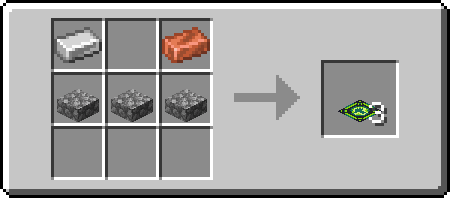
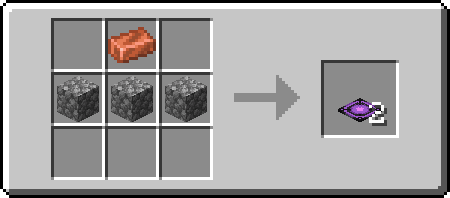
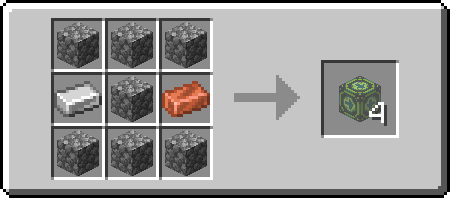
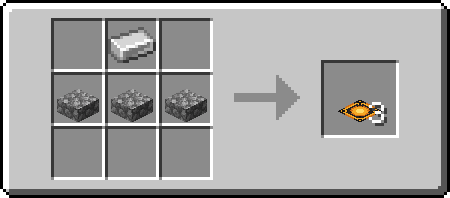
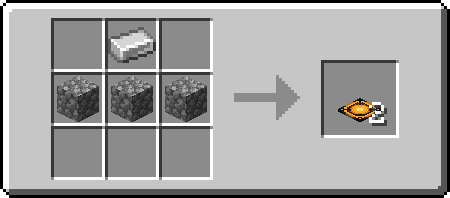
# Gravity Pads Just a simple Gravity Pad mod. ## Explanation Pushing Gravity Pads (Orange) sets your gravity to the direction it's facing, while Pulling Gravity Pads (Purple) sets your gravity to the direction its facing away from (Think of it as pulling). Directional Gravity Pad/Block allow you to choose the direction that the gravity will go by targeting the edge of a block when placing. Targeting center of the block will place a "towards" directional pad/block (signified by the + sign, the gravity direction is towards to player). Sneak placing will invert the direction you are placing. Placing targeting the center of the block while sneaking will result in an "away" directional pad/block (signified by a ◼ square, the gravity direction is away from the player). You can also rotate it using a wrench (configurable) using the side you right click as rotation axis. The mod also comes with anti-softlock. It triggers when you are 64 blocks above the block height limit (configurable) and will reverse your gravity back to normal (configurable). ## Recipes ### Pulling !(https://cdn.modrinth.com/data/uhDTMUeX/images/85d0e3b7861ec6a214df241736ba870c40262e9d.png) !(https://cdn.modrinth.com/data/uhDTMUeX/images/5dfbb149ee3f108fc35b3385f1a523d611095f0c.png) ### Pushing !(https://cdn.modrinth.com/data/uhDTMUeX/images/73f4188c54daef95d3339f2256aac2c3ef53da6c.png) !(https://cdn.modrinth.com/data/uhDTMUeX/images/285dc1387592d391fa12c24de54c1ed9b33f44e9.png) ### Directional !(https://cdn.modrinth.com/data/uhDTMUeX/images/569de81013eae78aeee2d123ffe5692ae96b46bd.png) !(https://cdn.modrinth.com/data/uhDTMUeX/images/569de81013eae78aeee2d123ffe5692ae96b46bd.png) !(https://cdn.modrinth.com/data/uhDTMUeX/images/87eddb56cfb2ebdf38f65ad0191267b3e63b02c5.png)
# Gravity Pads Just a simple Gravity Pad mod.
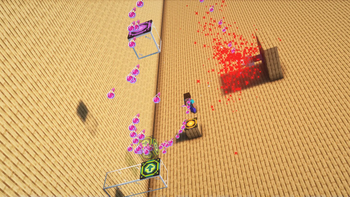
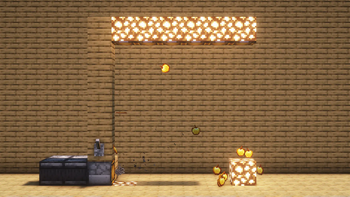
## Explanation Pushing Gravity Pads (Orange) sets your gravity to the direction it's facing, while Pulling Gravity Pads (Purple) sets your gravity to the direction its facing away from (Think of it as pulling).
Directional Gravity Pad/Block allow you to choose the direction that the gravity will go by targeting the edge of a block when placing. Targeting center of the block will place a "towards" directional pad/block (signified by the + sign, the gravity direction is towards to player). Sneak placing will invert the direction you are placing. Placing targeting the center of the block while sneaking will result in an "away" directional pad/block (signified by a ◼ square, the gravity direction is away from the player). You can also rotate it using a wrench (configurable) using the side you right click as rotation axis.
The mod also comes with anti-softlock. It triggers when you are 64 blocks above the block height limit (configurable) and will reverse your gravity back to normal (configurable).
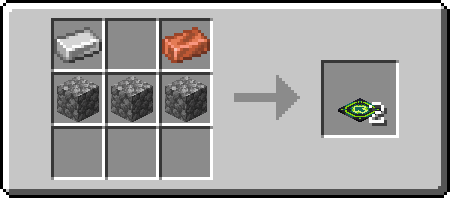
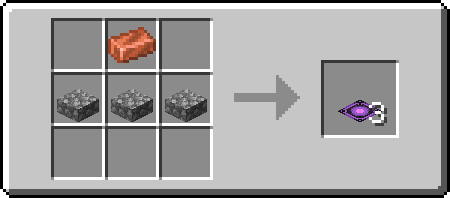
## Recipes ### Pulling !(https://cdn.modrinth.com/data/uhDTMUeX/images/85d0e3b7861ec6a214df241736ba870c40262e9d.png) !(https://cdn.modrinth.com/data/uhDTMUeX/images/5dfbb149ee3f108fc35b3385f1a523d611095f0c.png) ### Pushing !(https://cdn.modrinth.com/data/uhDTMUeX/images/73f4188c54daef95d3339f2256aac2c3ef53da6c.png) !(https://cdn.modrinth.com/data/uhDTMUeX/images/285dc1387592d391fa12c24de54c1ed9b33f44e9.png) ### Directional !(https://cdn.modrinth.com/data/uhDTMUeX/images/569de81013eae78aeee2d123ffe5692ae96b46bd.png) !(https://cdn.modrinth.com/data/uhDTMUeX/images/569de81013eae78aeee2d123ffe5692ae96b46bd.png) !(https://cdn.modrinth.com/data/uhDTMUeX/images/87eddb56cfb2ebdf38f65ad0191267b3e63b02c5.png)
📊 Mod Details
- Game
- Minecraft Mods
- Author
- Aikoyori
- Version
- 1.3.0+1.20.1
- Downloads
- 1,817
- Endorsements
- 13
- Category
- game-mechanics
- Created
- 6/25/2023
- Updated
- 9/24/2023
- Game Versions
- 1.20.1
- Tags
- game-mechanics
🔧 How to Install Minecraft Mods Mods
Download from Modrinth. Use Prism Launcher or drop into your mods folder.
📖 Full step-by-step install guide for Minecraft Mods →
Visit the official mod page for specific installation instructions for this mod.
🎮 Need cheat codes or console commands? Check ur gaming wiki for Minecraft Mods commands, item IDs, and more.
❓ Frequently Asked Questions
Which Minecraft Mods versions does Gravity Pads support?
The author lists 1.20.1. Other versions may work but are untested by the author.
What is the latest version of Gravity Pads?
Version 1.3.0+1.20.1, published 2023-09-24 with 1,817 downloads recorded at the source.
Keep browsing — more Minecraft Mods mods await