Glyphix
⚪ Last updated 2022⚠️ Install Order · 2 steps
Install in this order, then this mod last — most mods fail to load without their framework and dependencies in place.
🖼️ Gallery (1 images)
🔍 Analysis
- 👍 1.4% endorsement rate — high engagement, a strong quality signal
- 🏆 #720 of 892 fabric mods in this game by downloads
📋 About This Mod
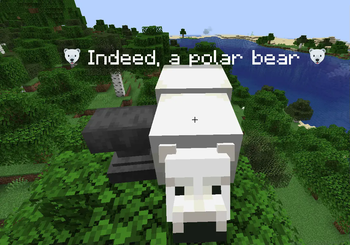
# Glyphix A mod to improve font support for Minecraft. ## Features - **100% client side**. Anyone who has this mod will see emojis as properly rendered. - Full (https://twemoji.twitter.com/) support by default - Proper width calculations. Because emojis are multiple characters, Minecraft has a hard time dealing with width, but - Different emoji atlases - Fast. This mod does not improve vanilla speed, but even with more features it does not slow down. If I can think of a way to speed up vanilla that will definitely get added to this mod. This mod is still in **beta** because overhauling Minecraft's font is super finicky. If there are any bugs, please report them to the (https://github.com/DarkKronicle/Glyphix/issues). ## How to use emojis Just copy and paste the raw emoji. In (https://unicode.org/emoji/charts/full-emoji-list.html) it's the `browser` column. Anything in the `twitter` column should work by default. ## Planned Features - Ligature support from `.ttf` fonts. Emojis are essentially just ligatures so it probably won't be too hard to add more support. - Use an actual bold font when rendering bold. Currently Minecraft just renders text twice when it is supposed to be bold, I want to add support for a specified bold font. - Use an actual italic font when rendering italic. Currently minecraft just slices text. - Fix some weird `.ttf` bugs. There are some inaccuracies with spacing and `.ttf` font. Another goal of the project is to make it render correctly. - Text box weirdness with emojis. Textboxes uses string length and not glyph length for some calculations which can make rendering weird. Fixing these will require a bit of work, but should improve usability. - Chat hooks to automatically convert strings like `:grinning_face:` -> 😀 for incoming and outgoing messages. - Other built in emoji fonts ## Changing Emoji Atlas There is a script `./scripts/emoji_atlas.py` that will convert a directory of emojis into an atlas with JSON file specifying locations. The emojis name has to be `<unicode>.png` with multi-character emojis as `<unicode>-<unicode>.png` and so on. It shouldn't be too hard to modify the python script to change the names if there is a different naming scheme for whatever emojis you choose. The script will generate 2 files. `emoji_atlas.png` and `emoji_positions.png`. Put these into a resourcepack under `assets/glyphix/emoji/`. Reload texturepacks and the new emojis should render correctly. Currently, emojis have to be **square** for them to render correctly.
A mod to improve font support for Minecraft.
## Features
- 100% client side. Anyone who has this mod will see emojis as properly rendered.
- Full (https://twemoji.twitter.com/) support by default
- Proper width calculations. Because emojis are multiple characters, Minecraft has a hard time dealing with width, but
- Different emoji atlases
- Fast. This mod does not improve vanilla speed, but even with more features it does not slow down. If I can think of a way to speed up vanilla that will definitely get added to this mod.
This mod is still in beta because overhauling Minecraft's font is super finicky. If there are any bugs, please report them to the (https://github.com/DarkKronicle/Glyphix/issues).
## How to use emojis
Just copy and paste the raw emoji. In (https://unicode.org/emoji/charts/full-emoji-list.html) it's the `browser` column. Anything in the `twitter` column should work by default.
## Planned Features
- Ligature support from `.ttf` fonts. Emojis are essentially just ligatures so it probably won't be too hard to add more support.
- Use an actual bold font when rendering bold. Currently Minecraft just renders text twice when it is supposed to be bold, I want to add support for a specified bold font.
- Use an actual italic font when rendering italic. Currently minecraft just slices text.
- Fix some weird `.ttf` bugs. There are some inaccuracies with spacing and `.ttf` font. Another goal of the project is to make it render correctly.
- Text box weirdness with emojis. Textboxes uses string length and not glyph length for some calculations which can make rendering weird. Fixing these will require a bit of work, but should improve usability.
- Chat hooks to automatically convert strings like `:grinning_face:` -> 😀 for incoming and outgoing messages.
- Other built in emoji fonts
## Changing Emoji Atlas
There is a script `./scripts/emoji_atlas.py` that will convert a directory of emojis into an atlas with JSON file specifying locations. The emojis name has to be `
The script will generate 2 files. `emoji_atlas.png` and `emoji_positions.png`. Put these into a resourcepack under `assets/glyphix/emoji/`. Reload texturepacks and the new emojis should render correctly.
Currently, emojis have to be square for them to render correctly.
📊 Mod Details
- Game
- Minecraft Mods
- Author
- DarkKronicle
- Version
- 0.1.0-1.19
- Downloads
- 1,290
- Endorsements
- 18
- Category
- fabric
- Created
- 12/13/2022
- Updated
- 12/13/2022
- Game Versions
- 1.19.2
- Tags
- social, utility
🔧 How to Install Minecraft Mods Mods
Download from Modrinth. Use Prism Launcher or drop into your mods folder.
📖 Full step-by-step install guide for Minecraft Mods →
Visit the official mod page for specific installation instructions for this mod.
🎮 Need cheat codes or console commands? Check ur gaming wiki for Minecraft Mods commands, item IDs, and more.
❓ Frequently Asked Questions
Which Minecraft Mods versions does Glyphix support?
The author lists 1.19.2. Other versions may work but are untested by the author.
What is the latest version of Glyphix?
Version 0.1.0-1.19, published 2022-12-13 with 1,290 downloads recorded at the source.
Keep browsing — more Minecraft Mods mods await