Glowing Tools
⚪ Last updated 2024⚠️ Install Order · 2 steps
Install in this order, then this mod last — most mods fail to load without their framework and dependencies in place.
🖼️ Gallery (12 images)








🔍 Analysis
- 👍 0.1% endorsement rate
- 🏆 #249 of 263 equipment mods in this game by downloads
📋 About This Mod
# Glowing Tools Adds glowing tools so you don't have to unequip your shield or use a fullbright mod to see while you're busy mining in caves! Works with shaders (tested with BSL and Complementary on Iris)! **Requires LambDynamicLights / DynamicLights Reforged!** ## Instructions 1. Acquire any compatible tool (any vanilla tool) 2. Craft a torch 3. Combine the torch with the tool in the crafting grid to get a glowing tool (Bug: resets item data!) 4. Glowing diamond tools can be upgraded to glowing netherite tools in the smithing table 5. Durability, enchantments etc. work exactly as on their vanilla counterpart 6. Hold the item to lighten up your environment 7. Place a torch from your inventory by sneaking and right-clicking on a block 8. Pick up a torch by sneak right-clicking on a torch using any tool (vanilla tools get turned into glowing tools) ## Known Issues - Durability, custom names and enchantments get reset on craft - Custom names get reset when placing torches or picking them up - Legacy items look like normal tools because of the durability bar. (Won't fix) - Torches only placeable on solid blocks (expected behavior for now) ## Translations Currently translated: - English (US) - Lolcat - Chinese (contributed by @oritong) Help with translations would be very appreciated! ## Requirements ### Fabric - Fabric Loader and API - LambDynamicLights ### Forge - Forge - DynamicLights Reforged ## Gallery !(https://raw.githubusercontent.com/iMiluum/glowing-tools-fabric/main/img/glowing_axes.png) !(https://raw.githubusercontent.com/iMiluum/glowing-tools-fabric/main/img/glowing_pickaxes.png) !(https://raw.githubusercontent.com/iMiluum/glowing-tools-fabric/main/img/glowing_hoes.png) !(https://raw.githubusercontent.com/iMiluum/glowing-tools-fabric/main/img/glowing_shovels.png) !(https://raw.githubusercontent.com/iMiluum/glowing-tools-fabric/main/img/glowing_swords.png) ## Legacy Textures There is a legacy resource pack included, if you prefer a rather subtle texture instead of a torch on the tool. !(https://raw.githubusercontent.com/iMiluum/glowing-tools-fabric/main/img/glowing_axes_legacy.png) !(https://raw.githubusercontent.com/iMiluum/glowing-tools-fabric/main/img/glowing_pickaxes_legacy.png) !(https://raw.githubusercontent.com/iMiluum/glowing-tools-fabric/main/img/glowing_hoes_legacy.png)
# Glowing Tools
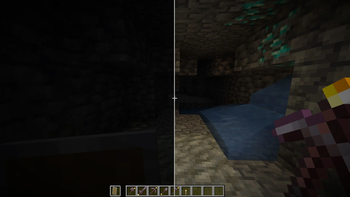
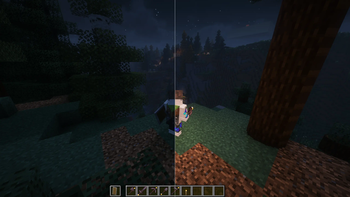
Adds glowing tools so you don't have to unequip your shield or use a fullbright mod to see while you're busy mining in caves! Works with shaders (tested with BSL and Complementary on Iris)!
Requires LambDynamicLights / DynamicLights Reforged!
## Instructions
1. Acquire any compatible tool (any vanilla tool) 2. Craft a torch 3. Combine the torch with the tool in the crafting grid to get a glowing tool (Bug: resets item data!) 4. Glowing diamond tools can be upgraded to glowing netherite tools in the smithing table 5. Durability, enchantments etc. work exactly as on their vanilla counterpart 6. Hold the item to lighten up your environment 7. Place a torch from your inventory by sneaking and right-clicking on a block 8. Pick up a torch by sneak right-clicking on a torch using any tool (vanilla tools get turned into glowing tools)
## Known Issues
- Durability, custom names and enchantments get reset on craft
- Custom names get reset when placing torches or picking them up
- Legacy items look like normal tools because of the durability bar. (Won't fix)
- Torches only placeable on solid blocks (expected behavior for now)
## Translations
Currently translated:
- English (US)
- Lolcat
- Chinese (contributed by @oritong)
Help with translations would be very appreciated!
## Requirements
- Fabric Loader and API
- LambDynamicLights
- Forge
- DynamicLights Reforged
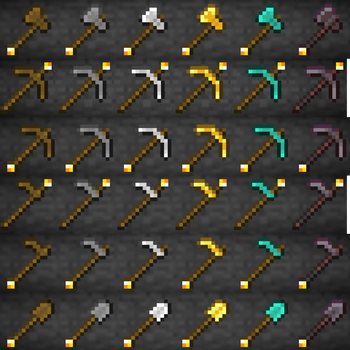
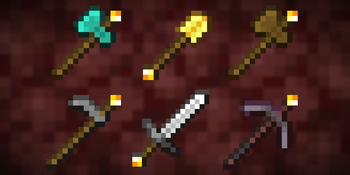
## Gallery !(https://raw.githubusercontent.com/iMiluum/glowing-tools-fabric/main/img/glowing_axes.png) !(https://raw.githubusercontent.com/iMiluum/glowing-tools-fabric/main/img/glowing_pickaxes.png) !(https://raw.githubusercontent.com/iMiluum/glowing-tools-fabric/main/img/glowing_hoes.png) !(https://raw.githubusercontent.com/iMiluum/glowing-tools-fabric/main/img/glowing_shovels.png) !(https://raw.githubusercontent.com/iMiluum/glowing-tools-fabric/main/img/glowing_swords.png)
## Legacy Textures
There is a legacy resource pack included, if you prefer a rather subtle texture instead of a torch on the tool.
!(https://raw.githubusercontent.com/iMiluum/glowing-tools-fabric/main/img/glowing_axes_legacy.png) !(https://raw.githubusercontent.com/iMiluum/glowing-tools-fabric/main/img/glowing_pickaxes_legacy.png) !(https://raw.githubusercontent.com/iMiluum/glowing-tools-fabric/main/img/glowing_hoes_legacy.png)
📊 Mod Details
- Game
- Minecraft Mods
- Author
- miluum
- Version
- 1.4.2+1.20.4
- Downloads
- 36,263
- Endorsements
- 45
- Category
- equipment
- Created
- 11/16/2023
- Updated
- 8/12/2024
- Game Versions
- 1.20.4
- Tags
- equipment
🔧 How to Install Minecraft Mods Mods
Download from Modrinth. Use Prism Launcher or drop into your mods folder.
📖 Full step-by-step install guide for Minecraft Mods →
Visit the official mod page for specific installation instructions for this mod.
🎮 Need cheat codes or console commands? Check ur gaming wiki for Minecraft Mods commands, item IDs, and more.
❓ Frequently Asked Questions
Which Minecraft Mods versions does Glowing Tools support?
The author lists 1.20.4. Other versions may work but are untested by the author.
What is the latest version of Glowing Tools?
Version 1.4.2+1.20.4, published 2024-08-12 with 36,263 downloads recorded at the source.
Keep browsing — more Minecraft Mods mods await