GlowfulWorld
⚪ Last updated 2022⚠️ Install Order · 2 steps
Install in this order, then this mod last — most mods fail to load without their framework and dependencies in place.
🖼️ Gallery (3 images)
🔍 Analysis
- 👍 0.6% endorsement rate
- 🏆 #510 of 574 adventure mods in this game by downloads
📋 About This Mod
# Glowful world Well, the world these days is a bit black and white, isn't it? Why not make it glow a bit more?! This mod helps you with that, it makes (almost) every entity have a unique color for the glowing effect, the one from spectral arrows. (also, don't you have the feeling that shulkers should make you glow too for some reason?) ### The potion It also adds a new potion, the **Glowing Potion**. You can craft it like any other potion, the ingridient is the **Glow Berry**. It also has all of the other version of potions, and craftable in the same way, so to have the splash potion you use gunpowder, to have the longer one redstone ecc... !(https://user-images.githubusercontent.com/29462910/162566746-adba123e-6c20-4251-a2ae-e41f4176502f.png) (If this feature is enabled the mod will need to be on the client too) ### The config file You can also set a few things in the config file, located in `config/glowful_world`. In the file `glowful_world_config.properties` you can choose to enable or disable some features, like the Glowing Potion, and the shulkers setting you glowing. Instead, in the `glowful_world_entities_color.json` file, you can set/change the color of entities. If you want to change the color of an entity already present in the config, (look (https://gist.github.com/Emafire003/a9c8399009e9eff354eb2a31254990a2) for the list, updated to 9/04/2022), search for it and change the hex value associeted with it. For example, let's say we want to change the color of the cat to "ff00ff". You would need to search in the file (suggestion: use ctrl+f and type the word "cat") and edit the line as it follows: ```json {"minecraft:something":"#color"} {"minecraft:cat":"#9ef3e7"} {"minecraft:something":"#color"} ``` New: ```json {"minecraft:something":"#color"} {"minecraft:cat":"ff00ff"} {"minecraft:something":"#color"} ``` **WARNING: DO NOT PUT MORE THAT ONE THING ONE ONE LINE! ONLY ONE OBJECT PER LINE IS SUPPORTED.** If you would like to have a new entity added to the list, for example `"minecraft:chest_minecart"` (yes apparently minecarts glow too if summond with the {Glowing:1} tag), you simply need to add a new line with a new object like the ones before it, so: ```json {"minecraft:something":"#color"} {"minecraft:chest_minecart":"#9ef3e7"} ``` **WARNING: DO NOT PUT MORE THAT ONE THING ONE ONE LINE! ONLY ONE OBJECT PER LINE IS SUPPORTED.** To update the configs in-game, simply use the command `/updategwconfigs` !() ### Some images Here, have some images to show you better (skip to the !(https://github.com/Emafire003/GlowfulWorld/#Installation) and !(https://github.com/Emafire003/GlowfulWorld/#coming-features)): !(https://user-images.githubusercontent.com/29462910/161439079-34e7bfe9-4817-45e2-8e5d-f32020eb901c.jpg) !(https://user-images.githubusercontent.com/29462910/161439198-ada9df50-dcac-4f41-b9c5-6820dd92e063.jpg) !(https://user-images.githubusercontent.com/29462910/161439203-97c880b2-6436-4db3-82fa-c540306c3d89.jpg) !(https://user-images.githubusercontent.com/29462910/161439205-6987e76a-653f-4655-8da9-3a9964b8e3c7.jpg) !(https://user-images.githubusercontent.com/29462910/161439206-dbcf902e-389e-4706-887f-a9a23f652177.jpg) !(https://user-images.githubusercontent.com/29462910/161439207-73d7a236-10fa-452f-be8d-c3043f78731b.jpg) !(https://user-images.githubusercontent.com/29462910/161439208-0e73504a-8ae2-4853-8f4a-e5c8c159d41f.jpg) !(https://user-images.githubusercontent.com/29462910/161439209-24cca450-ed63-4f7e-816c-a561c1002ef6.jpg) !(https://user-images.githubusercontent.com/29462910/161439214-fbd672cc-d946-4cb8-98f4-ab5dcf712c3c.jpg) !(https://user-images.githubusercontent.com/29462910/161439216-71f8f4d3-c3bf-47e0-b0c0-a05dd357228c.jpg) !(https://user-images.githubusercontent.com/29462910/161439217-74410e5d-8988-4535-b53b-00dd34002dff.jpg) !(https://user-images.githubusercontent.com/29462910/161439219-146f0a8c-69ac-46bf-9f5c-013fc8766012.jpg) !(https://user-images.githubusercontent.com/29462910/161439220-fdd662bb-1a4b-4438-8970-1be5d0d63573.jpg) !(https://user-images.githubusercontent.com/29462910/161439223-8f702901-0bea-4eb0-9b7f-106899c630b6.jpg) !(https://user-images.githubusercontent.com/29462910/161439226-155f5848-f28f-46c6-9a00-e59aae9609bc.jpg) !(https://user-images.githubusercontent.com/29462910/161439227-478d75cd-f411-43b0-8566-f9ec1b68e21a.jpg) !(https://user-images.githubusercontent.com/29462910/161439229-5d96e1b6-7ad9-4fdf-96bc-4dc0688d632f.jpg) !(https://user-images.githubusercontent.com/29462910/161439230-2edb6616-3b00-44e8-a0de-643601abf48e.jpg) !(https://user-images.githubusercontent.com/29462910/161439233-538cedcb-7322-4102-871f-03d61abdfa1f.jpg) !(https://user-images.githubusercontent.com/29462910/16
# Glowful world Well, the world these days is a bit black and white, isn't it? Why not make it glow a bit more?!
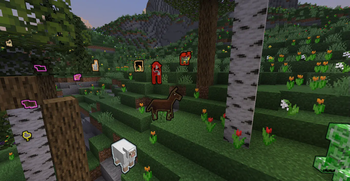
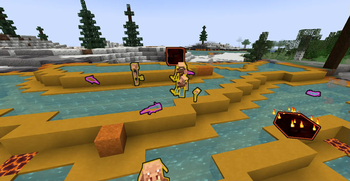
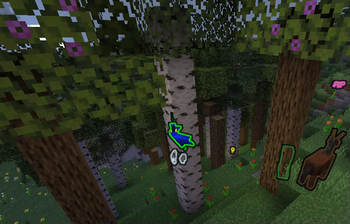
This mod helps you with that, it makes (almost) every entity have a unique color for the glowing effect, the one from spectral arrows. (also, don't you have the feeling that shulkers should make you glow too for some reason?)
### The potion It also adds a new potion, the Glowing Potion. You can craft it like any other potion, the ingridient is the Glow Berry. It also has all of the other version of potions, and craftable in the same way, so to have the splash potion you use gunpowder, to have the longer one redstone ecc...
!(https://user-images.githubusercontent.com/29462910/162566746-adba123e-6c20-4251-a2ae-e41f4176502f.png) (If this feature is enabled the mod will need to be on the client too)
### The config file You can also set a few things in the config file, located in `config/glowful_world`. In the file `glowful_world_config.properties` you can choose to enable or disable some features, like the Glowing Potion, and the shulkers setting you glowing.
Instead, in the `glowful_world_entities_color.json` file, you can set/change the color of entities. If you want to change the color of an entity already present in the config, (look (https://gist.github.com/Emafire003/a9c8399009e9eff354eb2a31254990a2) for the list, updated to 9/04/2022), search for it and change the hex value associeted with it.
For example, let's say we want to change the color of the cat to "ff00ff". You would need to search in the file (suggestion: use ctrl+f and type the word "cat") and edit the line as it follows: ```json {"minecraft:something":"#color"} {"minecraft:cat":"#9ef3e7"} {"minecraft:something":"#color"} ```
New: ```json {"minecraft:something":"#color"} {"minecraft:cat":"ff00ff"} {"minecraft:something":"#color"} ```
WARNING: DO NOT PUT MORE THAT ONE THING ONE ONE LINE! ONLY ONE OBJECT PER LINE IS SUPPORTED.
If you would like to have a new entity added to the list, for example `"minecraft:chest_minecart"` (yes apparently minecarts glow too if summond with the {Glowing:1} tag), you simply need to add a new line with a new object like the ones before it, so:
```json {"minecraft:something":"#color"} {"minecraft:chest_minecart":"#9ef3e7"} ```
WARNING: DO NOT PUT MORE THAT ONE THING ONE ONE LINE! ONLY ONE OBJECT PER LINE IS SUPPORTED.
To update the configs in-game, simply use the command `/updategwconfigs`
### Some images
Here, have some images to show you better (skip to the !(https://github.com/Emafire003/GlowfulWorld/#Installation) and !(https://github.com/Emafire003/GlowfulWorld/#coming-features)):
!(https://user-images.githubusercontent.com/29462910/161439079-34e7bfe9-4817-45e2-8e5d-f32020eb901c.jpg) !(https://user-images.githubusercontent.com/29462910/161439198-ada9df50-dcac-4f41-b9c5-6820dd92e063.jpg) !(https://user-images.githubusercontent.com/29462910/161439203-97c880b2-6436-4db3-82fa-c540306c3d89.jpg) !(https://user-images.githubusercontent.com/29462910/161439205-6987e76a-653f-4655-8da9-3a9964b8e3c7.jpg) !(https://user-images.githubusercontent.com/29462910/161439206-dbcf902e-389e-4706-887f-a9a23f652177.jpg) !(https://user-images.githubusercontent.com/29462910/161439207-73d7a236-10fa-452f-be8d-c3043f78731b.jpg) !(https://user-images.githubusercontent.com/29462910/161439208-0e73504a-8ae2-4853-8f4a-e5c8c159d41f.jpg) !(https://user-images.githubusercontent.com/29462910/161439209-24cca450-ed63-4f7e-816c-a561c1002ef6.jpg) !(https://user-images.githubusercontent.com/29462910/161439214-fbd672cc-d946-4cb8-98f4-ab5dcf712c3c.jpg) !(https://user-images.githubusercontent.com/29462910/161439216-71f8f4d3-c3bf-47e0-b0c0-a05dd357228c.jpg) !(https://user-images.githubusercontent.com/29462910/161439217-74410e5d-8988-4535-b53b-00dd34002dff.jpg) !(https://user-images.githubusercontent.com/29462910/161439219-146f0a8c-69ac-46bf-9f5c-013fc8766012.jpg) !(https://user-images.githubusercontent.com/29462910/161439220-fdd662bb-1a4b-4438-8970-1be5d0d63573.jpg) !(https://user-images.githubusercontent.com/29462910/161439223-8f702901-0bea-4eb0-9b7f-106899c630b6.jpg) !(https://user-images.githubusercontent.com/29462910/161439226-155f5848-f28f-46c6-9a00-e59aae9609bc.jpg) !(https://user-images.githubusercontent.com/29462910/161439227-478d75cd-f411-43b0-8566-f9ec1b68e21a.jpg) !(https://user-images.githubusercontent.com/29462910/161439229-5d96e1b6-7ad9-4fdf-96bc-4dc0688d632f.jpg) !(https://user-images.githubusercontent.com/29462910/161439230-2edb6616-3b00-44e8-a0de-643601abf48e.jpg) !(https://user-images.githubusercontent.com/29462910/161439233-538cedcb-7322-4102-871f-03d61abdfa1f.jpg) !(https://user-images.githubusercontent.com/29462910/16
📊 Mod Details
- Game
- Minecraft Mods
- Author
- Emafire003
- Version
- 1.1.0
- Downloads
- 1,252
- Endorsements
- 7
- Category
- adventure
- Created
- 4/2/2022
- Updated
- 6/9/2022
- Game Versions
- 1.19
- Tags
- adventure, decoration
🔧 How to Install Minecraft Mods Mods
Download from Modrinth. Use Prism Launcher or drop into your mods folder.
📖 Full step-by-step install guide for Minecraft Mods →
Visit the official mod page for specific installation instructions for this mod.
🎮 Need cheat codes or console commands? Check ur gaming wiki for Minecraft Mods commands, item IDs, and more.
❓ Frequently Asked Questions
Which Minecraft Mods versions does GlowfulWorld support?
The author lists 1.19. Other versions may work but are untested by the author.
What is the latest version of GlowfulWorld?
Version 1.1.0, published 2022-06-09 with 1,252 downloads recorded at the source.
Keep browsing — more Minecraft Mods mods await