Glamour Table
🟡 Updated this year⚠️ Install Order · 2 steps
Install in this order, then this mod last — most mods fail to load without their framework and dependencies in place.
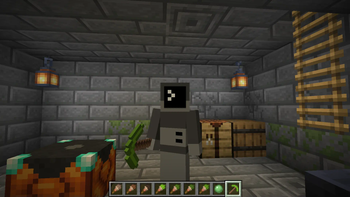
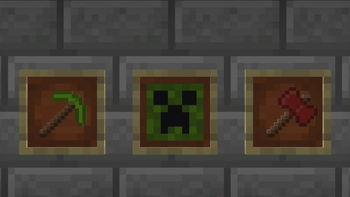
🖼️ Gallery (10 images)
🔍 Analysis
- 👍 1.5% endorsement rate — high engagement, a strong quality signal
- 🏆 #36 of 253 datapack mods in this game by downloads
📋 About This Mod
### Resource Pack Info This datapack requires the included resource pack to function! The resource pack is included as `GlamourRP.zip` in the root directory of the datapack. You can also download the resource pack on its own from the page for the specific version here on Modrinth. Regardless of how you download it, make sure it's added to your Minecraft `resources` directory and enabled in game! # Introduction This datapack adds a two new utility blocks to Minecraft - the Painting Table and the Glamour Table. The painting table can be used to create 1x1 custom paintings that can be hung in item frames. The glamour table can be used to change the appearance of tools. Both tables use paintbrushes to edit textures entirely in game. ## Recipes The painting table can be crafted using planks, a bowl, and a brush: !(https://cdn.modrinth.com/data/cached_images/89c3a9530d370b0088ba455a172cde5751d852a8.png) To use a painting table, you'll need to create canvases using sticks and a carpet. The color of carpet used will determine the base color of the canvas: !(https://cdn.modrinth.com/data/cached_images/35412102562cdf234735dd9b1499c20bef7443ad.png) The glamour table can be crafted using glowstone, a creaking heart, diamonds, and any carpet: !(https://cdn.modrinth.com/data/cached_images/7b3c5a40b959bb45870668efeee054db8e5c3818.png) To use the glamour table, you'll need to prepare your tools in a smithing table. Add an eye of ender and a piece of glowstone, and your tool's texture will be updated to an outline. !(https://cdn.modrinth.com/data/cached_images/a93140f0f3a3acefb7b8f62e5952eb8c4e9c487f.png) To create paint brushes, add dye to brushes in a crafting table. The final color of the paint brush is determined using the same formula as dyed armor: !(https://cdn.modrinth.com/data/cached_images/28a524a0ba89bb5d83ad615c5eb5df55e3c3297e.png) ## Editing Textures Right click the glamour or paint table with the item you'd like to edit to place it. Paint tables can only edit canvases, and glamour tables can only edit items. To edit the item's texture, you can either use dyes directly, or use a paintbrush. Just right click the pixel you want to edit with the dye or brush! You can also right click with a slime ball to remove a pixel. !(https://cdn.modrinth.com/data/cached_images/9a2f7070f5371dd58ec0bece608731c1be53756d.png) !(https://cdn.modrinth.com/data/cached_images/59784fcd307e6d83999a397440a213650d5f3ede.png) Once you're satisfied with the updated texture, just right click with an empty hand to retrieve your tool! !(https://cdn.modrinth.com/data/cached_images/9358f9a42dda070a9639fec515f3697d0265f39e.png) If you want to remove the texture from a tool, place it on the glamour table and right click with a wet sponge. The custom texture will be removed from your item. Items that can have glamours applied include: - All pickaxes, axes, shovels, hoes, and swords. - Maces ## Texture Helper Tool With some help from (https://github.com/ArubikU), I've put together a webapp to help create items compatible with this resource pack. This tool can either generate a give command for an item with exact RGB values for each pixel, or reduce the colors in the texture to those obtainable by dyes and generate a paint-by-number template to create the texture in survival. The tool can be accessed here: (https://dqwertyc.github.io/glamour-table/) !(https://cdn.modrinth.com/data/cached_images/5700baf52f86afadc0f6238cbf74b64f5966b04a.png)
### Resource Pack Info This datapack requires the included resource pack to function! The resource pack is included as `GlamourRP.zip` in the root directory of the datapack. You can also download the resource pack on its own from the page for the specific version here on Modrinth. Regardless of how you download it, make sure it's added to your Minecraft `resources` directory and enabled in game!
# Introduction This datapack adds a two new utility blocks to Minecraft - the Painting Table and the Glamour Table. The painting table can be used to create 1x1 custom paintings that can be hung in item frames. The glamour table can be used to change the appearance of tools. Both tables use paintbrushes to edit textures entirely in game.
## Recipes The painting table can be crafted using planks, a bowl, and a brush: !(https://cdn.modrinth.com/data/cached_images/89c3a9530d370b0088ba455a172cde5751d852a8.png)
To use a painting table, you'll need to create canvases using sticks and a carpet. The color of carpet used will determine the base color of the canvas: !(https://cdn.modrinth.com/data/cached_images/35412102562cdf234735dd9b1499c20bef7443ad.png)
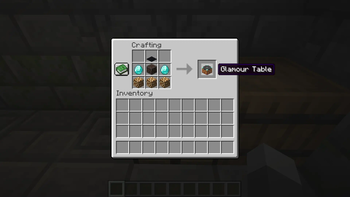
The glamour table can be crafted using glowstone, a creaking heart, diamonds, and any carpet: !(https://cdn.modrinth.com/data/cached_images/7b3c5a40b959bb45870668efeee054db8e5c3818.png)
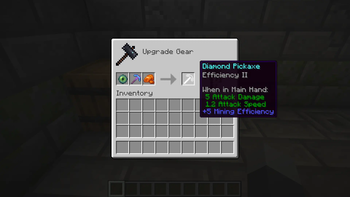
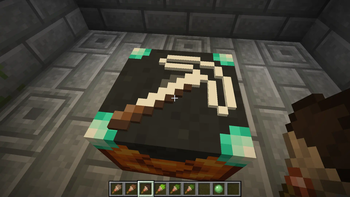
To use the glamour table, you'll need to prepare your tools in a smithing table. Add an eye of ender and a piece of glowstone, and your tool's texture will be updated to an outline. !(https://cdn.modrinth.com/data/cached_images/a93140f0f3a3acefb7b8f62e5952eb8c4e9c487f.png)
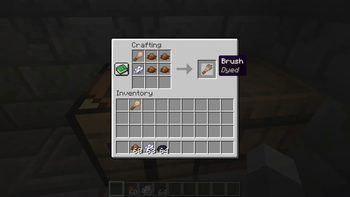
To create paint brushes, add dye to brushes in a crafting table. The final color of the paint brush is determined using the same formula as dyed armor: !(https://cdn.modrinth.com/data/cached_images/28a524a0ba89bb5d83ad615c5eb5df55e3c3297e.png)
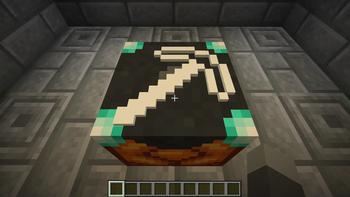
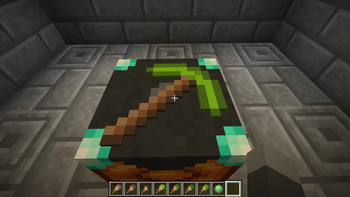
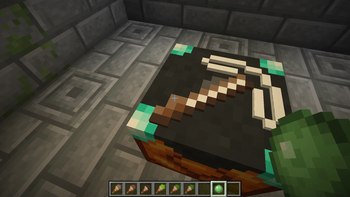
## Editing Textures Right click the glamour or paint table with the item you'd like to edit to place it. Paint tables can only edit canvases, and glamour tables can only edit items. To edit the item's texture, you can either use dyes directly, or use a paintbrush. Just right click the pixel you want to edit with the dye or brush! You can also right click with a slime ball to remove a pixel. !(https://cdn.modrinth.com/data/cached_images/9a2f7070f5371dd58ec0bece608731c1be53756d.png) !(https://cdn.modrinth.com/data/cached_images/59784fcd307e6d83999a397440a213650d5f3ede.png)
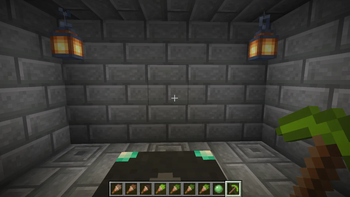
Once you're satisfied with the updated texture, just right click with an empty hand to retrieve your tool! !(https://cdn.modrinth.com/data/cached_images/9358f9a42dda070a9639fec515f3697d0265f39e.png)
If you want to remove the texture from a tool, place it on the glamour table and right click with a wet sponge. The custom texture will be removed from your item.
Items that can have glamours applied include: - All pickaxes, axes, shovels, hoes, and swords. - Maces
## Texture Helper Tool With some help from (https://github.com/ArubikU), I've put together a webapp to help create items compatible with this resource pack. This tool can either generate a give command for an item with exact RGB values for each pixel, or reduce the colors in the texture to those obtainable by dyes and generate a paint-by-number template to create the texture in survival. The tool can be accessed here: (https://dqwertyc.github.io/glamour-table/) !(https://cdn.modrinth.com/data/cached_images/5700baf52f86afadc0f6238cbf74b64f5966b04a.png)
📊 Mod Details
- Game
- Minecraft Mods
- Author
- dqwertyc.dev
- Version
- 26.2.0+mod
- Downloads
- 5,664
- Endorsements
- 86
- Category
- datapack
- Created
- 11/10/2024
- Updated
- 7/8/2026
- Game Versions
- 26.2
- Tags
- equipment, game-mechanics
🔧 How to Install Minecraft Mods Mods
Download from Modrinth. Use Prism Launcher or drop into your mods folder.
📖 Full step-by-step install guide for Minecraft Mods →
Visit the official mod page for specific installation instructions for this mod.
🎮 Need cheat codes or console commands? Check ur gaming wiki for Minecraft Mods commands, item IDs, and more.
❓ Frequently Asked Questions
Which Minecraft Mods versions does Glamour Table support?
The author lists 26.2. Other versions may work but are untested by the author.
What is the latest version of Glamour Table?
Version 26.2.0+mod, published 2026-07-08 with 5,664 downloads recorded at the source.
Keep browsing — more Minecraft Mods mods await