Geodesy
🟡 Updated this year⚠️ Install Order · 2 steps
Install in this order, then this mod last — most mods fail to load without their framework and dependencies in place.
🖼️ Gallery (1 images)
🔍 Analysis
- 👍 0.5% endorsement rate
- 🏆 #367 of 901 fabric mods in this game by downloads
📋 About This Mod
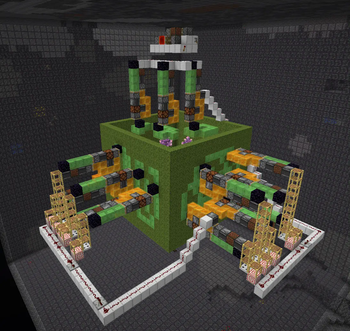
# Geodesy (https://img.shields.io/badge/chat%20on-discord-7289DA?logo=discord&logoColor=white)](https://kosma.pl/discord) (http://cf.way2muchnoise.eu/title/geodesy.svg)](https://www.curseforge.com/minecraft/mc-mods/geodesy) (https://img.shields.io/badge/Buy%20me%20a-Ko--Fi-ff69b4?logo=ko-fi)](https://ko-fi.com/kosmolot) Small Fabric mod for calculating amethyst farm flying machine layout. Inspired by the original (https://www.youtube.com/watch?v=fY90xF3ug84) and the flying machine based farm made by neffty87. ## Usage You should only run this in disposable worlds, either in single player or on servers where you have op. Command blocks must also be enabled. **The mod *will* destroy the immediate surroundings of the geode!** ### Video Tutorial by ilmango (https://raw.githubusercontent.com/kosma/geodesy-fabric/master/assets/video.jpg)](https://www.youtube.com/watch?v=9tfW5cx58CY) ### Step 1: Geode Run `/geodesy` without any arguments to acquire The Unholy Book of Geodesy, as well as the set of blocks you will need to build the farm. Scout out a nice geode. For our tutorial this small one will do. Note: this method of amethyst farming tends to struggle with very large geodes, because of how many collisions they usually cause. Small to medium sized ones work best. !(https://raw.githubusercontent.com/kosma/geodesy-fabric/master/assets/geode1.png) ### Step 2: Area Run `/geodesy area (first corner) (second corner)` to clear out the surrounding area of any junk and calculate the geode area. The geode will be highlighted for you to verify you've entered correct coordinates. You don't have to be exact with the corner coordinates - you can select a larger volume and the mod will find the geode anyway. The only time you have to be careful is when you have two geodes very close to each other (this is also the reason we don't have autodetection - it easily got confused with multiple geodes nearby). Here I run `/geodesy area 701 -24 -945 712 -15 -934`: !(https://raw.githubusercontent.com/kosma/geodesy-fabric/master/assets/geode2.png) ### Step 3: Analyze Run `/geodesy analyze` to perform combinations of projections on all axes and calculate their efficiency. While the best possible efficiency is achieved by running the flying machines on all three axes, sometimes just two are good enough. The exact numbers vary depending on the specific geode layout. Here I run `/geodesy analyze`: !(https://raw.githubusercontent.com/kosma/geodesy-fabric/master/assets/geode3.png) ### Step 4: Project Run `/geodesy project (directions)` to project the geode onto three planes and create the farm structure: * Pumpkin means this location contains amethyst clusters to be pushed and destroyed. * Crying obsidian block means this location contains budding amethyst blocks, so the flying machine must not fly through that location. * Moss marks the outer frame of the machine. * Buttons inside the farm mark spots that can't be harvested; you should have those buttons in the farm to prevent items from landing on unharvested amethyst clusters. You can change the directions in three different aspects, without influencing the efficiency of the farm: * You can change east/west and north/south to change the direction - this is useful when you have other geodes nearby and you don't want to collide with them. Technically you can also change up/down but that will make item collection pretty weird. * You can choose to only include one or two directions instead of the usual three. This will lower the farm's efficiency but can also mean much less work to do. * You can change the order of the directions to influence the shapes of the pumpkin formations. Some formations are easier to cover with sticky blocks than other. Experiment to find out. Here I run `/geodesy project east south up`: !(https://raw.githubusercontent.com/kosma/geodesy-fabric/master/assets/geode4.png) ### Step 5: Sticky blocks Place the slime and honey blocks outside the structure, as shown by ilmango in the video. All pumpkin blocks should be covered; no crying obsidian blocks should be covered. If you can't cover all pumpkin blocks, the efficiency of the farm will be slightly reduced. !(https://raw.githubusercontent.com/kosma/geodesy-fabric/master/assets/geode5.png) ### Step 6: Marker blocks Using the supplied mob heads, place markers to indicate where the flying machines should go. Black mob head markes a blocker obsidian block, three green mob heads indicate a flying machine. !(https://raw.githubusercontent.com/kosma/geodesy-fabric/master/assets/geode6.png) ### Step 7: Assemble Run `/geodesy assemble` to "push" the sticky block structures inside the obsidian frame and generate fl
[!(https://img.shields.io/badge/chat%20on-discord-7289DA?logo=discord&logoColor=white)](https://kosma.pl/discord) [!(http://cf.way2muchnoise.eu/title/geodesy.svg)](https://www.curseforge.com/minecraft/mc-mods/geodesy) [!(https://img.shields.io/badge/Buy%20me%20a-Ko--Fi-ff69b4?logo=ko-fi)](https://ko-fi.com/kosmolot)
Small Fabric mod for calculating amethyst farm flying machine layout. Inspired by the original (https://www.youtube.com/watch?v=fY90xF3ug84) and the flying machine based farm made by neffty87.
You should only run this in disposable worlds, either in single player or on servers where you have op. Command blocks must also be enabled.
*The mod will destroy the immediate surroundings of the geode!
### Video Tutorial by ilmango
[!(https://raw.githubusercontent.com/kosma/geodesy-fabric/master/assets/video.jpg)](https://www.youtube.com/watch?v=9tfW5cx58CY)
### Step 1: Geode
Run `/geodesy` without any arguments to acquire The Unholy Book of Geodesy, as well as the set of blocks you will need to build the farm.
Scout out a nice geode. For our tutorial this small one will do.
!(https://raw.githubusercontent.com/kosma/geodesy-fabric/master/assets/geode1.png)
### Step 2: Area
Run `/geodesy area (first corner) (second corner)` to clear out the surrounding area of any junk and calculate the geode area. The geode will be highlighted for you to verify you've entered correct coordinates.
You don't have to be exact with the corner coordinates - you can select a larger volume and the mod will find the geode anyway. The only time you have to be careful is when you have two geodes very close to each other (this is also the reason we don't have autodetection - it easily got confused with multiple geodes nearby).
Here I run `/geodesy area 701 -24 -945 712 -15 -934`:
!(https://raw.githubusercontent.com/kosma/geodesy-fabric/master/assets/geode2.png)
### Step 3: Analyze
Run `/geodesy analyze` to perform combinations of projections on all axes and calculate their efficiency. While the best possible efficiency is achieved by running the flying machines on all three axes, sometimes just two are good enough. The exact numbers vary depending on the specific geode layout.
Here I run `/geodesy analyze`:
!(https://raw.githubusercontent.com/kosma/geodesy-fabric/master/assets/geode3.png)
### Step 4: Project
Run `/geodesy project (directions)` to project the geode onto three planes and create the farm structure:
Pumpkin means this location contains amethyst clusters to be pushed and destroyed. Crying obsidian block means this location contains budding amethyst blocks, so the flying machine must not fly through that location. Moss marks the outer frame of the machine. Buttons inside the farm mark spots that can't be harvested; you should have those buttons in the farm to prevent items from landing on unharvested amethyst clusters.
You can change the directions in three different aspects, without influencing the efficiency of the farm:
You can change east/west and north/south to change the direction - this is useful when you have other geodes nearby and you don't want to collide with them. Technically you can also change up/down but that will make item collection pretty weird. You can choose to only include one or two directions instead of the usual three. This will lower the farm's efficiency but can also mean much less work to do. You can change the order of the directions to influence the shapes of the pumpkin formations. Some formations are easier to cover with sticky blocks than other. Experiment to find out.
Here I run `/geodesy project east south up`:
!(https://raw.githubusercontent.com/kosma/geodesy-fabric/master/assets/geode4.png)
### Step 5: Sticky blocks
Place the slime and honey blocks outside the structure, as shown by ilmango in the video. All pumpkin blocks should be covered; no crying obsidian blocks should be covered. If you can't cover all pumpkin blocks, the efficiency of the farm will be slightly reduced.
!(https://raw.githubusercontent.com/kosma/geodesy-fabric/master/assets/geode5.png)
### Step 6: Marker blocks
Using the supplied mob heads, place markers to indicate where the flying machines should go. Black mob head markes a blocker obsidian block, three green mob heads indicate a flying machine.
!(https://raw.githubusercontent.com/kosma/geodesy-fabric/master/assets/geode6.png)
### Step 7: Assemble
Run `/geodesy assemble` to "push" the sticky block structures inside the obsidian frame and generate fl
📊 Mod Details
- Game
- Minecraft Mods
- Author
- Kosmolot
- Version
- 3.3
- Downloads
- 13,099
- Endorsements
- 70
- Category
- fabric
- Created
- 4/17/2023
- Updated
- 6/24/2026
- Game Versions
- 26.2
- Tags
- utility
🔧 How to Install Minecraft Mods Mods
Download from Modrinth. Use Prism Launcher or drop into your mods folder.
📖 Full step-by-step install guide for Minecraft Mods →
Visit the official mod page for specific installation instructions for this mod.
🎮 Need cheat codes or console commands? Check ur gaming wiki for Minecraft Mods commands, item IDs, and more.
❓ Frequently Asked Questions
Which Minecraft Mods versions does Geodesy support?
The author lists 26.2. Other versions may work but are untested by the author.
What is the latest version of Geodesy?
Version 3.3, published 2026-06-24 with 13,099 downloads recorded at the source.
Keep browsing — more Minecraft Mods mods await