Gear Swapper
⚪ Last updated 2023⚠️ Install Order · 2 steps
Install in this order, then this mod last — most mods fail to load without their framework and dependencies in place.
🖼️ Gallery (1 images)
🔍 Analysis
- 👍 0.2% endorsement rate
- 🏆 #245 of 295 equipment mods in this game by downloads
📋 About This Mod
# Gear Swapper With Gear Swapper you can easily define up to four different sets of hotbar + armor and switch with them easily. It works in-game with a block. By default it works as follows: - Sneak-left-click on one of the four slots to remember your current hotbar+armor selection in that slot. Your armor and hotbar remains on you. The block will also remember how many you had of the given item and it will attempt to restore that amount later. - Right-click on one of the four slots to restore the hotbar+armor as it was remembered then. All items currently in your hotbar or armor that are in the way for the remembered items will be stored in your inventory. All slots that were empty when you remembered your setup will be unchanged (i.e. it will by default not empty them). - When restoring a selection the block will first look in the player inventory, then in the local inventory (a 4x4 internal buffer) and finally in any possible adjacent inventories until it finds the items it needs. - The Bauble inventory (when present) is also supported. However, this block can be configured for more control. If you right-click the block on the 'Settings...' label or on the sides of the block then it will show a GUI: !(https://cdn.modrinth.com/data/NCMXRZyQ/images/4c98ce9503c8bdb4ac91c7b0b4be67f2f1e551c8.png) The example above shows a gui with four different configurations: - The top-left configuration (top row in the gui) is configured with your prefered mining gear. i.e. sword, pickaxe, torches, some sand and good armor. The slots that are crossed out (two of them in this selection) will be cleared. The other two slots are left alone (i.e. whatever is there will remain there). - The top-right configuration (second row in the gui) is configured for gardening. No armor is desired here. - The bottom-left configuration (third row in the gui) is configured for tech work. - The bottom-right configuration (last row in the gui) is configured to clear the hotbar and armor slots completely. The three icons on the top-left of the gui show the preference for storing items from your hotbar and armor when you restore a different selection. The default settings are to first store items back in the players inventory. If that is full it will go to the internal inventory and if that also fails it will store it in an adjacent inventory. If that final fallback would also fail it will simply throw the items in the world. Nothing will be lost. By clicking those three icons you can change the priority. For example. If you prefer that armor and tools that are stored away should go to the internal inventory then you can change the top icon until it resembles the wooden icon with the four boxes on it. There are five different gear swappers (stone, wood, lapis lazuli, iron, and glass) and you can also configure another one with a modded texture through the config. ## Modpacks Feel free to use this in any modpack. ## Demonstration video <iframe src="https://www.youtube-nocookie.com/embed/Ukzr3Au1Qt0" width="560" height="315" title="Gear Swapper 1.0.0" frameborder="0" allowfullscreen></iframe>
# Gear Swapper
With Gear Swapper you can easily define up to four different sets of hotbar + armor and switch with them easily. It works in-game with a block.
By default it works as follows: - Sneak-left-click on one of the four slots to remember your current hotbar+armor selection in that slot. Your armor and hotbar remains on you. The block will also remember how many you had of the given item and it will attempt to restore that amount later. - Right-click on one of the four slots to restore the hotbar+armor as it was remembered then. All items currently in your hotbar or armor that are in the way for the remembered items will be stored in your inventory. All slots that were empty when you remembered your setup will be unchanged (i.e. it will by default not empty them). - When restoring a selection the block will first look in the player inventory, then in the local inventory (a 4x4 internal buffer) and finally in any possible adjacent inventories until it finds the items it needs. - The Bauble inventory (when present) is also supported.
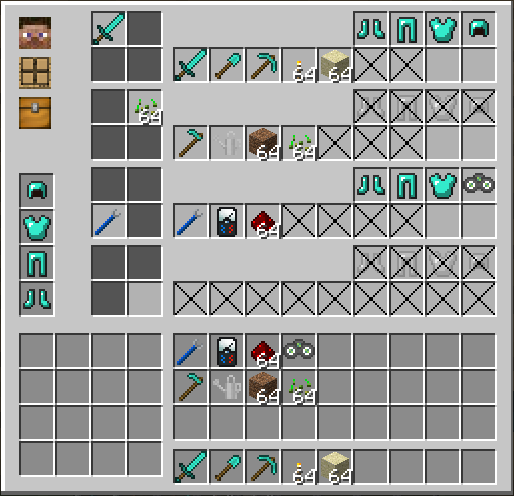
However, this block can be configured for more control. If you right-click the block on the 'Settings...' label or on the sides of the block then it will show a GUI:
!(https://cdn.modrinth.com/data/NCMXRZyQ/images/4c98ce9503c8bdb4ac91c7b0b4be67f2f1e551c8.png)
The example above shows a gui with four different configurations: - The top-left configuration (top row in the gui) is configured with your prefered mining gear. i.e. sword, pickaxe, torches, some sand and good armor. The slots that are crossed out (two of them in this selection) will be cleared. The other two slots are left alone (i.e. whatever is there will remain there). - The top-right configuration (second row in the gui) is configured for gardening. No armor is desired here. - The bottom-left configuration (third row in the gui) is configured for tech work. - The bottom-right configuration (last row in the gui) is configured to clear the hotbar and armor slots completely.
The three icons on the top-left of the gui show the preference for storing items from your hotbar and armor when you restore a different selection. The default settings are to first store items back in the players inventory. If that is full it will go to the internal inventory and if that also fails it will store it in an adjacent inventory. If that final fallback would also fail it will simply throw the items in the world. Nothing will be lost.
By clicking those three icons you can change the priority. For example. If you prefer that armor and tools that are stored away should go to the internal inventory then you can change the top icon until it resembles the wooden icon with the four boxes on it.
There are five different gear swappers (stone, wood, lapis lazuli, iron, and glass) and you can also configure another one with a modded texture through the config.
## Modpacks Feel free to use this in any modpack.
## Demonstration video
📊 Mod Details
- Game
- Minecraft Mods
- Author
- McJty
- Version
- 1.1.0
- Downloads
- 3,050
- Endorsements
- 5
- Category
- equipment
- Created
- 1/27/2023
- Updated
- 1/26/2023
- Game Versions
- 1.7.10
- Tags
- equipment, storage
🔧 How to Install Minecraft Mods Mods
Download from Modrinth. Use Prism Launcher or drop into your mods folder.
📖 Full step-by-step install guide for Minecraft Mods →
Visit the official mod page for specific installation instructions for this mod.
🎮 Need cheat codes or console commands? Check ur gaming wiki for Minecraft Mods commands, item IDs, and more.
❓ Frequently Asked Questions
Which Minecraft Mods versions does Gear Swapper support?
The author lists 1.7.10. Other versions may work but are untested by the author.
What is the latest version of Gear Swapper?
Version 1.1.0, published 2023-01-26 with 3,050 downloads recorded at the source.
Keep browsing — more Minecraft Mods mods await