Gateway of Doom
🟡 Updated this year⚠️ Install Order · 2 steps
Install in this order, then this mod last — most mods fail to load without their framework and dependencies in place.
🖼️ Gallery (12 images)
🔍 Analysis
- 👍 0.7% endorsement rate
- 🏆 #491 of 581 adventure mods in this game by downloads
📋 About This Mod
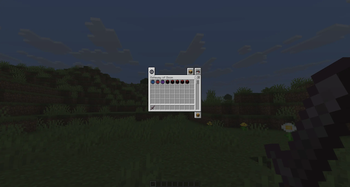
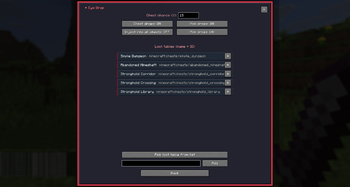
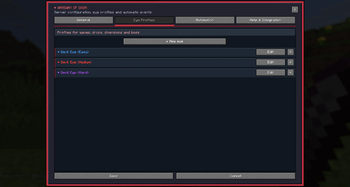
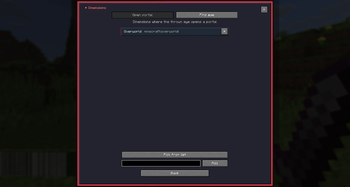
# Gateway of Doom **Throw a Devil Eye, open a Gateway and survive whatever comes through it.** Gateway of Doom is a combat-focused mod built around wave encounters. The basic idea is pretty simple: you throw a Devil Eye, it searches for a suitable place nearby and opens a floating Gateway. Once the Gateway is active, enemies start appearing in waves. Kill everything before the time runs out, deal with the boss if the profile has one, and collect the rewards at the end. I originally wanted the mod to be something that works in normal survival without needing a lot of setup, but at the same time gives server owners and modpack creators enough options to build their own encounters around it. Because of that, most parts of the system can be changed directly in-game. You can also let Gateways appear automatically while players explore or after a random amount of time, so you do not have to use Devil Eyes at all if that does not fit your modpack or server. --- # Main Features - Wave-based combat encounters - Animated floating Gateways - Throwable Devil Eyes - Automatic Gateway events - Exploration-based encounters - Random timer events - Server-wide or per-player events - Fixed or randomized waves - Configurable bosses and guard mobs - Custom mob health, damage and movement speed - Custom weapons and armor for Gateway mobs - Configurable rewards and experience - Failure effects - Chest loot integration - Mob drop integration - Custom Devil Eye profiles - Different Portal and Eye designs - RGB and HEX portal colors - Different Gateway sound modes - Five craftable Hell Wards - Protected areas from 1 x 1 up to 5 x 5 chunks - Player and server limits - Command block support - Server-side API - Multiplayer support - Persistent encounters - In-game configuration menu For normal configuration you do not have to edit config files manually. Open the operator menu with: ```text /doom ``` --- # How a Gateway Encounter Works ## Throwing a Devil Eye A Devil Eye works a little like an Eye of Ender. After throwing it, the Eye flies forward and tries to find a suitable place for the Gateway. It checks the surrounding area before opening anything. Among other things, the placement system checks for: - Solid ground - Enough open space - Water - Lava - Dangerous floor blocks - Walls and enclosed spaces - Protected chunks - Other active Gateways If it cannot find a safe location, the Eye is returned to the player instead of simply being lost. ## Opening the Gateway Once a valid position has been found, the Devil Eye opens a floating Gateway a few blocks above the ground. The appearance depends on the Eye profile being used. Profiles can have their own portal style, animation, particles, colors, Eye design and boss bar settings. ## Fighting the Waves Enemies spawn around the Gateway and fall down into the arena with a slow-falling effect. During the encounter, the boss bar shows information such as: - Current wave - Remaining enemies - Remaining time - Boss health when a boss is active All enemies in a wave have to be defeated before the timer runs out. After a wave is finished, there is a configurable pause before the next one begins. Gateway mobs are also kept around the arena. If they move too far away, the mod pulls them back instead of letting them wander across the world. ## Boss Encounters A Devil Eye profile can optionally have a final boss wave. Bosses can be configured with: - One or multiple bosses - Custom size - Additional health - Additional damage - Increased movement speed - Separate time limits - Guard mobs - Additional supporting bosses The boss does not have to be a normal hostile mob either. You can technically turn something like a pig or cow into a Gateway boss, and the mod will give it hostile behavior for the encounter. ## Rewards When the Gateway is completed successfully, the configured rewards drop from the portal. Every reward can have its own: - Minimum amount - Maximum amount - Drop chance The profile can also give experience after completion. Vanilla and modded items can both be used. ## Failing an Encounter If the timer reaches zero before the wave is completed, the Gateway fails. Nearby players can then receive configurable status effects. Each effect can have its own: - Effect level - Duration - Combination with other effects This can be used for things like Weakness, Slowness, Blindness, Hunger, Poison, Mining Fatigue or compatible effects from other mods. --- # Automatic Gateway Events Gateways do not have to be opened by players manually. The mod has an automation system that can create encounters while players are exploring or after a randomized timer. Automatic events use the same normal Gateway systems, including: - Eye profiles - Placement checks - Player limits - Server limits - Hell Ward protection - Sounds - Rewards - Failure effects - Cleanup Automation rules are configured through the **Automation** section of: ```text /doom ``` ## Ex
# Gateway of Doom
Throw a Devil Eye, open a Gateway and survive whatever comes through it.
Gateway of Doom is a combat-focused mod built around wave encounters.
The basic idea is pretty simple: you throw a Devil Eye, it searches for a suitable place nearby and opens a floating Gateway. Once the Gateway is active, enemies start appearing in waves. Kill everything before the time runs out, deal with the boss if the profile has one, and collect the rewards at the end.
I originally wanted the mod to be something that works in normal survival without needing a lot of setup, but at the same time gives server owners and modpack creators enough options to build their own encounters around it. Because of that, most parts of the system can be changed directly in-game.
You can also let Gateways appear automatically while players explore or after a random amount of time, so you do not have to use Devil Eyes at all if that does not fit your modpack or server.
# Main Features
- Wave-based combat encounters
- Animated floating Gateways
- Throwable Devil Eyes
- Automatic Gateway events
- Exploration-based encounters
- Random timer events
- Server-wide or per-player events
- Fixed or randomized waves
- Configurable bosses and guard mobs
- Custom mob health, damage and movement speed
- Custom weapons and armor for Gateway mobs
- Configurable rewards and experience
- Failure effects
- Chest loot integration
- Mob drop integration
- Custom Devil Eye profiles
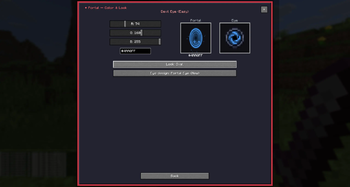
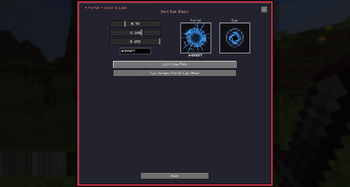
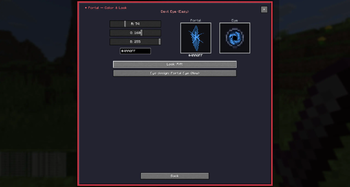
- Different Portal and Eye designs
- RGB and HEX portal colors
- Different Gateway sound modes
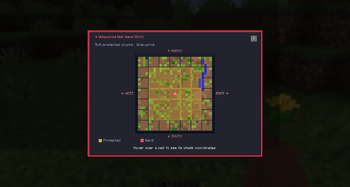
- Five craftable Hell Wards
- Protected areas from 1 x 1 up to 5 x 5 chunks
- Player and server limits
- Command block support
- Server-side API
- Multiplayer support
- Persistent encounters
- In-game configuration menu
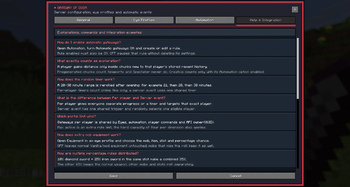
For normal configuration you do not have to edit config files manually.
Open the operator menu with:
```text /doom ```
# How a Gateway Encounter Works
## Throwing a Devil Eye
A Devil Eye works a little like an Eye of Ender.
After throwing it, the Eye flies forward and tries to find a suitable place for the Gateway. It checks the surrounding area before opening anything.
Among other things, the placement system checks for:
- Solid ground
- Enough open space
- Water
- Lava
- Dangerous floor blocks
- Walls and enclosed spaces
- Protected chunks
- Other active Gateways
If it cannot find a safe location, the Eye is returned to the player instead of simply being lost.
## Opening the Gateway
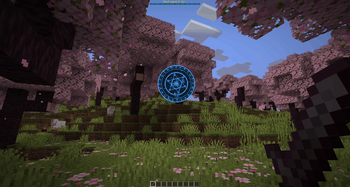
Once a valid position has been found, the Devil Eye opens a floating Gateway a few blocks above the ground.
The appearance depends on the Eye profile being used. Profiles can have their own portal style, animation, particles, colors, Eye design and boss bar settings.
## Fighting the Waves
Enemies spawn around the Gateway and fall down into the arena with a slow-falling effect.
During the encounter, the boss bar shows information such as:
- Current wave
- Remaining enemies
- Remaining time
- Boss health when a boss is active
All enemies in a wave have to be defeated before the timer runs out.
After a wave is finished, there is a configurable pause before the next one begins.
Gateway mobs are also kept around the arena. If they move too far away, the mod pulls them back instead of letting them wander across the world.
## Boss Encounters
A Devil Eye profile can optionally have a final boss wave.
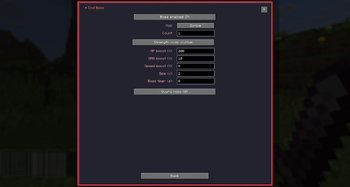
Bosses can be configured with:
- One or multiple bosses
- Custom size
- Additional health
- Additional damage
- Increased movement speed
- Separate time limits
- Guard mobs
- Additional supporting bosses
The boss does not have to be a normal hostile mob either. You can technically turn something like a pig or cow into a Gateway boss, and the mod will give it hostile behavior for the encounter.
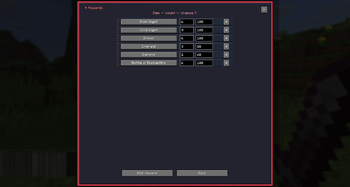
When the Gateway is completed successfully, the configured rewards drop from the portal.
Every reward can have its own:
- Minimum amount
- Maximum amount
- Drop chance
The profile can also give experience after completion.
Vanilla and modded items can both be used.
## Failing an Encounter
If the timer reaches zero before the wave is completed, the Gateway fails.
Nearby players can then receive configurable status effects.
Each effect can have its own:
- Effect level
- Duration
- Combination with other effects
This can be used for things like Weakness, Slowness, Blindness, Hunger, Poison, Mining Fatigue or compatible effects from other mods.
# Automatic Gateway Events
Gateways do not have to be opened by players manually.
The mod has an automation system that can create encounters while players are exploring or after a randomized timer.
Automatic events use the same normal Gateway systems, including:
- Eye profiles
- Placement checks
- Player limits
- Server limits
- Hell Ward protection
- Sounds
- Rewards
- Failure effects
- Cleanup
Automation rules are configured through the Automation section of:
```text /doom ```
📊 Mod Details
- Game
- Minecraft Mods
- Author
- MrStilu2k6
- Version
- 2.2.0
- Downloads
- 4,373
- Endorsements
- 29
- Category
- adventure
- Created
- 4/9/2026
- Updated
- 8/21/2026
- Game Versions
- 26.2
- Tags
- adventure
🔧 How to Install Minecraft Mods Mods
Download from Modrinth. Use Prism Launcher or drop into your mods folder.
📖 Full step-by-step install guide for Minecraft Mods →
Visit the official mod page for specific installation instructions for this mod.
🎮 Need cheat codes or console commands? Check ur gaming wiki for Minecraft Mods commands, item IDs, and more.
❓ Frequently Asked Questions
Which Minecraft Mods versions does Gateway of Doom support?
The author lists 26.2. Other versions may work but are untested by the author.
What is the latest version of Gateway of Doom?
Version 2.2.0, published 2026-08-21 with 4,373 downloads recorded at the source.
Keep browsing — more Minecraft Mods mods await