FSit
🟡 Updated this year⚠️ Install Order · 2 steps
Install in this order, then this mod last — most mods fail to load without their framework and dependencies in place.
🖼️ Gallery (6 images)

🔍 Analysis
- 👍 0.1% endorsement rate
- 🏆 #1136 of 1284 fabric mods in this game by downloads
📋 About This Mod
# FSit Customizable server-side mod that allows players to sit, crawl, and ride each other. Client-side is supported too, it allows players to improve their experience by using client configuration and adding some client-side mod behaviour improvements. > > Inspired by Spigot plugin. ## Usage Having this mod installed on the server is enough, players are not forced to have it to be able to use it. However, installation on the client will bring some QoL improvements for players using this mod. Such as client configuration, better crawling, and key bindings. ### Interacting with blocks Interact with the topside of the block, that can be sat on, to start sitting on them. !(https://cdn.modrinth.com/data/cached_images/9cef22e6f4de70054dea512d74262e514c1ef0e8.jpeg) Controlled with (#block-interaction). ### Interacting with players Interact with any player to start riding them. !(https://cdn.modrinth.com/data/cached_images/910dafbda6436124e72696ee5bac6736be3d5702.jpeg) Control angle difference with (#riding-minimum-yaw) ### Sneaking Double sneak while looking down to sit right away. Doing the same, but near the hole, will start crawling otherwise. ((#sneak-crawling)) Minimal pitch and maximum sneak window can be configured with (#sneak-minimum-pitch) and (#sneak-window) accordingly. ### Commands `/sit` and `/crawl` commands for corresponding actions are available. ### Key bindings (client) Use key bindings to start sitting (default: RCtrl) or crawling (default: RAlt). Key bindings have three modes: **Hold**, **Toggle**, and **Hybrid**. **Hold** and **Toggle** works the same as Vanilla. **Hybrid** is an in-between mechanic, that works as Toggle on single-use and as Hold on holding. The **Hybrid** window between **Hold** and **Toggle** can be configured from the Configuration Screen. ## Configuration As was stated before, players can use their own configurations if they have this mod installed on the client. Otherwise, server configuration will be used. Configuration can be reloaded from the file with `/fsit reload`. For clients, configuration can be modified with and installed. ### Default configuration file ```yaml use-server: false seats-trait: moveable seats-centered: false block-interaction: true block-interaction-ids: - '#minecraft:slabs' - '#minecraft:stairs' - '#minecraft:logs' - '#minecraft:fences' riding-minimum-yaw: 45 sneak-window: 10 sneak-minimum-pitch: 60 sneak-crawling: true commands: root: fsit sit: sit crawl: crawl lay: lay ``` <details> <summary>Options details</summary> ### `use-server` When set to `true`, forces all players (server) or player (client) to use server configuration. Enabling this option will ignore client pose updates, leaving only server-to-client synchronization. ### `seats-trait` Controls sitting behaviour. Possible values: `static`, `attached`, `moveable`. * `static` – does nothing, ignores everything; * `attached` – seats will be discarded if they do not have any supporting block underneath; * `moveable` – seats can be pushed by fluids, pistons, etc. Will start falling without a supporting block. ### `seats-centered` Place seats in the centre of the block. ### `block-interaction` Allows sitting by interacting with blocks. ### `riding-minimum-yaw` When 1..180, allows riding by interacting with players. Setting to 0 disables riding interactions, and 180 removes restriction. The option controls a difference between players' horizontal facing angle to allow riding by interaction. ### `block-interaction-ids` List of blocks and block tags that are available to interact with. ### `sneak-crawling` Starts crawling instead of sitting if there is a hole nearby. ### `sneak-minimum-pitch` Minimal required player pitch to start registering sneak actions. Where 90 is straight down, and -90 ignores player pitch. ### `sneak-window` The window in ticks between sneaks to be recognized as double sneak action. Setting to 0 disables sneak actions. </details> ## Contributing Pull requests are welcome. For major changes, please open an issue first to discuss what you would like to change. ### Translations New or updated translations are more than appreciated, they can be found at (./src/main/resources/assets/fsit/lang). Fields with keys `*.description.1` are indefinite and can have any number of lines, you are free to create new or remove keys with `description.<n>` when needed. ### Building The project uses and for multi-versioning. ```shell > ./gradlew build ``` To run a specific version, switch to that version with Stonecutter, and run version configuration provided by IDE, or ```shell > ./gradlew "Set active project to " > ./gradlew :runClient # or > ./gradlew :r
Customizable server-side mod that allows players to sit, crawl, and ride each other. Client-side is supported too, it allows players to improve their experience by using client configuration and adding some client-side mod behaviour improvements.
> [!NOTE] > Inspired by Spigot plugin.
Having this mod installed on the server is enough, players are not forced to have it to be able to use it.
However, installation on the client will bring some QoL improvements for players using this mod. Such as client configuration, better crawling, and key bindings.
### Interacting with blocks
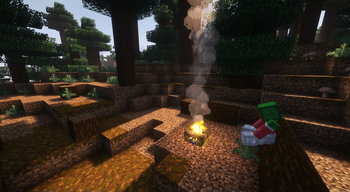
Interact with the topside of the block, that can be sat on, to start sitting on them.
!(https://cdn.modrinth.com/data/cached_images/9cef22e6f4de70054dea512d74262e514c1ef0e8.jpeg)
Controlled with [`block-interaction`](#block-interaction).
### Interacting with players
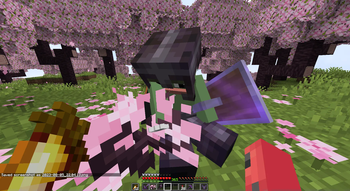
Interact with any player to start riding them.
!(https://cdn.modrinth.com/data/cached_images/910dafbda6436124e72696ee5bac6736be3d5702.jpeg)
Control angle difference with [`riding-minimum-yaw`](#riding-minimum-yaw)
### Sneaking
Double sneak while looking down to sit right away.
Doing the same, but near the hole, will start crawling otherwise. ([`sneak-crawling`](#sneak-crawling))
Minimal pitch and maximum sneak window can be configured with [`sneak-minimum-pitch`](#sneak-minimum-pitch) and [`sneak-window`](#sneak-window) accordingly.
### Commands
`/sit` and `/crawl` commands for corresponding actions are available.
### Key bindings (client)
Use key bindings to start sitting (default: RCtrl) or crawling (default: RAlt).
Key bindings have three modes: Hold, Toggle, and Hybrid. Hold and Toggle works the same as Vanilla. Hybrid is an in-between mechanic, that works as Toggle on single-use and as Hold on holding. The Hybrid window between Hold and Toggle can be configured from the Configuration Screen.
## Configuration
As was stated before, players can use their own configurations if they have this mod installed on the client. Otherwise, server configuration will be used.
Configuration can be reloaded from the file with `/fsit reload`.
For clients, configuration can be modified with and installed.
### Default configuration file
```yaml use-server: false seats-trait: moveable seats-centered: false block-interaction: true block-interaction-ids: - '#minecraft:slabs' - '#minecraft:stairs' - '#minecraft:logs' - '#minecraft:fences' riding-minimum-yaw: 45 sneak-window: 10 sneak-minimum-pitch: 60 sneak-crawling: true commands: root: fsit sit: sit crawl: crawl lay: lay ```
Options details
### `use-server`
When set to `true`, forces all players (server) or player (client) to use server configuration.
Enabling this option will ignore client pose updates, leaving only server-to-client synchronization.
### `seats-trait`
Controls sitting behaviour. Possible values: `static`, `attached`, `moveable`.
`static` – does nothing, ignores everything; `attached` – seats will be discarded if they do not have any supporting block underneath; `moveable` – seats can be pushed by fluids, pistons, etc. Will start falling without a supporting block.
### `seats-centered`
Place seats in the centre of the block.
### `block-interaction`
Allows sitting by interacting with blocks.
### `riding-minimum-yaw`
When 1.. 180, allows riding by interacting with players. Setting to 0 disables riding interactions, and 180 removes restriction.
The option controls a difference between players' horizontal facing angle to allow riding by interaction.
### `block-interaction-ids`
List of blocks and block tags that are available to interact with.
### `sneak-crawling`
Starts crawling instead of sitting if there is a hole nearby.
### `sneak-minimum-pitch`
Minimal required player pitch to start registering sneak actions. Where 90 is straight down, and -90 ignores player pitch.
### `sneak-window`
The window in ticks between sneaks to be recognized as double sneak action. Setting to 0 disables sneak actions.
## Contributing
Pull requests are welcome. For major changes, please open an issue first to discuss what you would like to change.
### Translations
New or updated translations are more than appreciated, they can be found at (./src/main/resources/assets/fsit/lang).
Fields with keys `.description. 1` are indefinite and can have any number of lines,
you are free to create new or remove keys with `description.
### Building
The project uses and for multi-versioning.
```shell > ./gradlew build ```
To run a specific version, switch to that version with Stonecutter, and run version configuration provided by IDE, or
```shell > ./gradlew "Set active project to " > ./gradlew :runClient # or > ./gradlew :r
📊 Mod Details
- Game
- Minecraft Mods
- Author
- rvbsm
- Version
- 3.0.0-beta.1+mc26.1
- Downloads
- 536,884
- Endorsements
- 348
- Category
- fabric
- Created
- 3/14/2023
- Updated
- 3/24/2026
- Game Versions
- 26.1, 26.1.1, 26.1.2
- Tags
- game-mechanics, social, utility
🔧 How to Install Minecraft Mods Mods
Download from Modrinth. Use Prism Launcher or drop into your mods folder.
📖 Full step-by-step install guide for Minecraft Mods →
Visit the official mod page for specific installation instructions for this mod.
🎮 Need cheat codes or console commands? Check ur gaming wiki for Minecraft Mods commands, item IDs, and more.
❓ Frequently Asked Questions
Which Minecraft Mods versions does FSit support?
The author lists 26.1, 26.1.1, 26.1.2. Other versions may work but are untested by the author.
What is the latest version of FSit?
Version 3.0.0-beta.1+mc26.1, published 2026-03-24 with 536,884 downloads recorded at the source.
Keep browsing — more Minecraft Mods mods await