FrogMod
🟡 Updated this year⚠️ Install Order · 2 steps
Install in this order, then this mod last — most mods fail to load without their framework and dependencies in place.
🖼️ Gallery (6 images)

🔍 Analysis
- 👍 0.6% endorsement rate
- 🏆 #565 of 896 fabric mods in this game by downloads
📋 About This Mod
# FrogMod Show Your Game Status on Discord, group chat messages into tabs and use other features for (https://froglight.net) server <img src="https://cdn.modrinth.com/data/sEsFrvUL/510de021e735542048762134006afe7b39be5808.webp" alt="FrogMod" width="200"/> <a href="https://froglight.net/" target="_blank"> <img src="https://cdn.modrinth.com/data/sEsFrvUL/images/00e9d3ea429dc8d447ad42d038dfb912071460db.png" alt="Froglight.NET" width="400"/> </a> !(https://img.shields.io/badge/license-ARR-yellow?style=flat-square) !(https://img.shields.io/badge/users-2-f50?style=flat-square) ## Description This mod is designed to work with the (https://froglight.net) server, showing your game status on Discord so you can easily see who's online and what they're playing. Chat messages can be organized into tabs for better management. The mod also has other features, which are listed below. ## Features - show your game status on Discord - chat tabs for easier chat management - quick action buttons in chat hud (for party management and command actions) - display timestamp of messages in the chat indicator - see your skin if you are nicked (default disabled; **requires permission for `/nick`**) - `Froglight.NET` is automatically added to the server list - Quick join button for the server in the main menu - configuration of the mod - joining requests and invites for games and parties (optional) - automatic update check - modmenu integration ## What is displayed in Discord (configurable) - the server you are playing on - the time you are on the server - the game you are playing on the server - the map of the game - the game status (Waiting/Ingame) - the player count - the game time - the party you are in - the party size - your minecraft skin and username - the player count of the network - if you are not connected to the server ## Chat Tabs Easily manage your chat with different tabs. Messages are filtered into different tabs, such as All, Server, Party, and Private Messages. You can directly write messages to a specific tab by selecting it without the need to use commands like `/msg` or `/chat party`. Tabs with unread messages are highlighted, so you can easily see where new messages are. Each tab can be closed by clicking the trash icon twice while hovering over it. This deletes all selected messages from the history. Temporary tabs (Party and Private Messages) can be minimized instead of deleted, so you don't lose the chat history. (This feature can be toggled in the config.) ### `/tab` Command | Command | Description | |----------------------|------------------------------------------------------------------------| | `/tab open <name>` | Open the given tab. You can use this to reopen minimized tabs. | | `/tab delete <name>` | Delete all messages from the tab irrevocably | | `/tab closePrivate` | Minimize all private message tabs. Reopen them with `/tab open <name>` | ## Configuration ### Discord Settings | Option | Description | Default | |--------------------------------------|---------------------------------------------------------------------------|----------| | `Connect To Discord` | if the connection to discord fails, you can retry by clicking this option | - | | `Discord Status` | shows (https://froglight.net) as your activity on Discord | `ON` | | `Status When Not Connected` | shows 'not connected' when you are not connected to the server | `ON` | | `Game Joining Requests` | enables/disables joining requests for games | `ON` | | `Game Spectating` | enables/disables spectating for games | `ON` | | `Show Parties In Status` | options: Always, Only If Public, Never | `Always` | | `Party Joining Requests And Invites` | enables/disables others to join the party via discord | `ON` | | `Accept New Invites` | options: Always, Only Parties, Notify, Silent | `Notify` | | `Sound On New Notification` | plays a sound when you get a notification | `ON` | ### Chat Settings | Option | Description | Default | |------------------------------------------------|-------------------------------------------------------------------------------------------------------------------------|-------------| | `Chat Tabs` | filter chat in tab
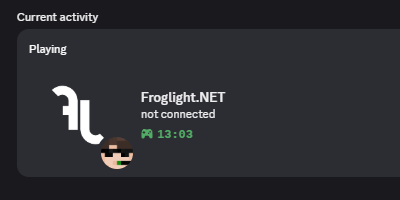
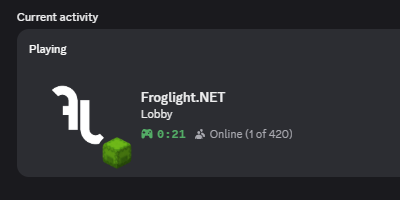
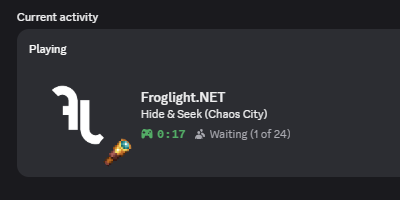
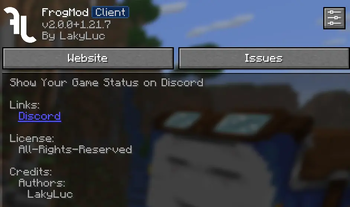
Show Your Game Status on Discord, group chat messages into tabs and use other features for (https://froglight.net) server


!(https://img.shields.io/badge/license-ARR-yellow?style=flat-square) !(https://img.shields.io/badge/users-2-f50?style=flat-square)
## Description
This mod is designed to work with the (https://froglight.net) server, showing your game status on Discord so you can easily see who's online and what they're playing. Chat messages can be organized into tabs for better management. The mod also has other features, which are listed below.
## Features
- show your game status on Discord
- chat tabs for easier chat management
- quick action buttons in chat hud (for party management and command actions)
- display timestamp of messages in the chat indicator
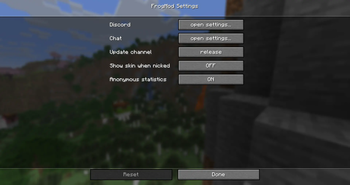
- see your skin if you are nicked (default disabled; requires permission for `/nick`)
- `Froglight. NET` is automatically added to the server list
- Quick join button for the server in the main menu
- configuration of the mod
- joining requests and invites for games and parties (optional)
- automatic update check
- modmenu integration
## What is displayed in Discord (configurable)
- the server you are playing on
- the time you are on the server
- the game you are playing on the server
- - the map of the game
- - the game status (Waiting/Ingame)
- - the player count
- - the game time
- the party you are in
- - the party size
- your minecraft skin and username
- the player count of the network
- if you are not connected to the server
## Chat Tabs
Easily manage your chat with different tabs. Messages are filtered into different tabs, such as All, Server, Party, and Private Messages. You can directly write messages to a specific tab by selecting it without the need to use commands like `/msg` or `/chat party`. Tabs with unread messages are highlighted, so you can easily see where new messages are. Each tab can be closed by clicking the trash icon twice while hovering over it. This deletes all selected messages from the history. Temporary tabs (Party and Private Messages) can be minimized instead of deleted, so you don't lose the chat history. (This feature can be toggled in the config.)
### `/tab` Command
| Command | Description |
|----------------------|------------------------------------------------------------------------|
| `/tab open
## Configuration
### Discord Settings
| Option | Description | Default | |--------------------------------------|---------------------------------------------------------------------------|----------| | `Connect To Discord` | if the connection to discord fails, you can retry by clicking this option | - | | `Discord Status` | shows (https://froglight.net) as your activity on Discord | `ON` | | `Status When Not Connected` | shows 'not connected' when you are not connected to the server | `ON` | | `Game Joining Requests` | enables/disables joining requests for games | `ON` | | `Game Spectating` | enables/disables spectating for games | `ON` | | `Show Parties In Status` | options: Always, Only If Public, Never | `Always` | | `Party Joining Requests And Invites` | enables/disables others to join the party via discord | `ON` | | `Accept New Invites` | options: Always, Only Parties, Notify, Silent | `Notify` | | `Sound On New Notification` | plays a sound when you get a notification | `ON` |
### Chat Settings
| Option | Description | Default | |------------------------------------------------|-------------------------------------------------------------------------------------------------------------------------|-------------| | `Chat Tabs` | filter chat in tab
📊 Mod Details
- Game
- Minecraft Mods
- Author
- LakyLuc
- Version
- 2.0.12+1.21.11
- Downloads
- 510
- Endorsements
- 3
- Category
- fabric
- Created
- 5/2/2023
- Updated
- 3/15/2026
- Game Versions
- 1.21.11
- Tags
- optimization, social, utility
🔧 How to Install Minecraft Mods Mods
Download from Modrinth. Use Prism Launcher or drop into your mods folder.
📖 Full step-by-step install guide for Minecraft Mods →
Visit the official mod page for specific installation instructions for this mod.
🎮 Need cheat codes or console commands? Check ur gaming wiki for Minecraft Mods commands, item IDs, and more.
❓ Frequently Asked Questions
Which Minecraft Mods versions does FrogMod support?
The author lists 1.21.11. Other versions may work but are untested by the author.
What is the latest version of FrogMod?
Version 2.0.12+1.21.11, published 2026-03-15 with 510 downloads recorded at the source.
Keep browsing — more Minecraft Mods mods await