FontSwap
🟡 Updated this year⚠️ Install Order · 2 steps
Install in this order, then this mod last — most mods fail to load without their framework and dependencies in place.
🖼️ Gallery (6 images)




🔍 Analysis
- 👍 1.2% endorsement rate — high engagement, a strong quality signal
- 🏆 #210 of 243 decoration mods in this game by downloads
📋 About This Mod
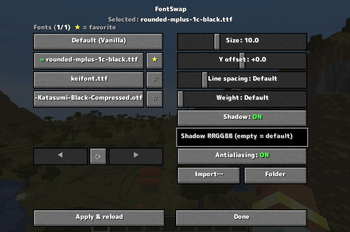
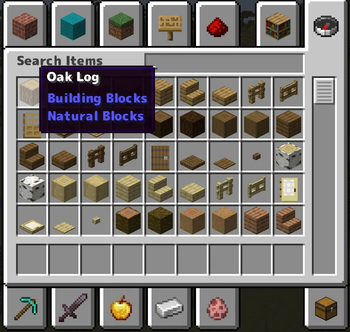
FontSwap lets you drop in any `.ttf` / `.otf` font and applies it to the entire game — chat, menus, books, signs, tooltips, everything — live, without restarting. Everything is controlled from a clean in-game menu (default key: K).
## ✨ Features - 🔤 Whole-game font swap — import any font file and the whole UI switches to it instantly - ⭐ Favorites — pin the fonts you use most to the top of the list - 🔧 Fine control — adjust size, vertical offset, line spacing (works in books & signs too) and weight (faux-bold) - 🌑 Custom text shadow — turn the drop shadow on/off or recolor it with a hex code - 🟦 Antialiasing toggle — switch to a crunchy pixel-art look for crisp, retro text - 🌍 10 languages — EN · 日本語 · 简体中文 · 繁體中文 · 한국어 · DE · FR · ES · RU · PT-BR - ⚡ Client-side only — works on any server, nothing to install server-side
## 🎮 How to use 1. Press K in game to open the FontSwap menu (rebindable in Controls) 2. Click Import… and pick a `.ttf` / `.otf` file — or drop fonts into `config/fontswap/fonts/` 3. Select a font, tweak the sliders, and hit Apply & reload
## 📦 Supported versions - Forge: 1. 20. 1 / 1. 20. 2 / 1. 20. 4 / 1. 20. 6 - NeoForge: 1. 21. 1 / 1. 21. 3 / 1. 21. 4 / 1. 21. 5 / 1. 21. 8 / 1. 21. 10 / 1. 21. 11 / 26. 1
> ℹ️ Download the file matching both your MC version and loader. On 26. 1 / 26. 1. 1, NeoForge is still in beta — a beta loader is required there.
## ℹ️ Notes - You supply your own font files — please respect the license of any commercial fonts. - "Weight" thickens the font (normal → bold); it can't make a font thinner than its design. For a light look, import a Light/Thin variant.
## 💛 Support If FontSwap is useful to you, you can support development on **(https://ko-fi.com/nekozame_garo)**. Thank you!
📊 Mod Details
- Game
- Minecraft Mods
- Author
- NEKOZAME_Garo
- Version
- 1.0.0
- Downloads
- 602
- Endorsements
- 7
- Category
- decoration
- Created
- 6/15/2026
- Updated
- 6/12/2026
- Game Versions
- 26.1, 26.1.1, 26.1.2
- Tags
- decoration, utility
🔧 How to Install Minecraft Mods Mods
Download from Modrinth. Use Prism Launcher or drop into your mods folder.
📖 Full step-by-step install guide for Minecraft Mods →
Visit the official mod page for specific installation instructions for this mod.
🎮 Need cheat codes or console commands? Check ur gaming wiki for Minecraft Mods commands, item IDs, and more.
❓ Frequently Asked Questions
Which Minecraft Mods versions does FontSwap support?
The author lists 26.1, 26.1.1, 26.1.2. Other versions may work but are untested by the author.
What is the latest version of FontSwap?
Version 1.0.0, published 2026-06-12 with 602 downloads recorded at the source.
Keep browsing — more Minecraft Mods mods await