⚠️ Install Order · 2 steps
Install in this order, then this mod last — most mods fail to load without their framework and dependencies in place.
🖼️ Gallery (8 images)
🔍 Analysis
- 👍 0.1% endorsement rate
- 🏆 #658 of 1284 fabric mods in this game by downloads
📋 About This Mod
!(https://cdn.imb11.dev/requires_fabric_api.png) (https://cdn.imb11.dev/mineblock%20badge_64h.png)](https://discord.imb11.dev/) (https://cdn.imb11.dev/steve.png)](https://discord.gg/KbWxgGg) <small>Requires Fabric API (for Fabric), M.R.U and Architectury API.</small> # Fog <iframe width="560" height="315" src="https://www.youtube-nocookie.com/embed/ontx7EfnZ8w" title="YouTube video player" frameborder="0" allow="accelerometer; autoplay; clipboard-write; encrypted-media; gyroscope; picture-in-picture; web-share" allowfullscreen></iframe> As it says on the tin - Fog is a mod that completely revamps how Minecraft handles fog, including its color, start, and end points. It creates a greater sense of depth and atmosphere in Minecraft by shifting the fog start forward, maintaining the same view distance while greatly improving the visuals of the game. ## Features It should be noted that the majority of these features can be fully customized via the configuration screen or resource packs - if you're using Fabric, you will need Mod Menu to access the configuration screen. ### Cave Fog As you go deeper underground, the fog gets thicker. This adds to the spooky and mysterious feel of caves, making exploration more intense and immersive. It helps create a sense of depth, making the underground environment feel more alive and engaging. !(https://cdn.modrinth.com/data/WuGVWUF2/images/4c298cc1a03e59f9b9c1a5d587a4204cae504a39.png) ### Weather Fog Modifiers The fog adjusts with the weather, so during rain or snow, the fog will change accordingly. This adds to the overall atmosphere, making each weather condition feel distinct and visually appealing. !(https://cdn.modrinth.com/data/WuGVWUF2/images/6f087fdd81ee3a08bef1990eceefec91508cf8a4.png) ### Time-based Modifiers Fog becomes more colorful and vibrant during sunsets, sunrises. During night the fog colour will be dependent on the current moon cycle. !(https://cdn.modrinth.com/data/WuGVWUF2/images/20ff61b713aa0cc96dade0aacb2036c6553ddc70.png) !(https://cdn.modrinth.com/data/WuGVWUF2/images/8cd00399374a9495f8f7ee3188cc76767db61a0b.png) ### Biome Fog Colors Fog changes color based on the biome you're in, giving each area a unique look and feel. This helps create a coherent visual experience as you move through different biomes. It supports modded biomes and is easy to customize using resource packs, allowing for a highly personalized game experience. !(https://cdn.modrinth.com/data/WuGVWUF2/images/aa4957070b5d3af4a1e8e870a8c213271a0f76ef.png) ### Sky Fixes When flying with an elytra above the clouds, the fog gradually fades away, offering a clear view of the sky without any strange horizon lines. Additionally, clouds maintain their natural look and are not affected by fog color, ensuring they always appear consistent and visually appealing. !(https://cdn.modrinth.com/data/WuGVWUF2/images/5eb2c55f853792271abb509ba853dbbad6e4fdf4.png) ## Configuration Fog is extremely customizable thanks to (https://modrinth.com/mod/yacl), you should check the configuration screen accessible via Mod Menu on Fabric, or the Mods List on NeoForge for a full list of configuration options. !(https://cdn.modrinth.com/data/WuGVWUF2/images/c4c87fd79998fe2b1360383958ffec45d067bdf5.png) ## Dependencies ### Required - (https://modrinth.com/mod/fabric-api) - (https://modrinth.com/mod/yacl) - (https://modrinth.com/mod/mru) ## Compatibility info ### Compatible mods - (https://modrinth.com/mod/modmenu): allows access to the configuration screen - (https://modrinth.com/mod/sodium): fully compatible, ensuring that your visuals remain consistent even with performance-enhancing mods - (https://modrinth.com/mod/true-darkness) - Whilst we haven't added explicit compatibility, the mod works well with our moon phase modifiers that weaken biome fog strength depending on the moon phase. - Shaders that use Minecraft’s default fog settings: fully compatible - (https://modrinth.com/mod/distanthorizons): planned for the future ### Incompatibilities See the (https://github.com/IMB11/Fog/issues?q=is%3Aissue+is%3Aopen+sort%3Aupdated-desc+label%3Acompat) for a list of incompatibilities. ## Download Fog is available for NeoForge and Fabric for 1.21-1.21.4 versions. You can download
!(https://cdn.imb11.dev/requires_fabric_api.png) [!(https://cdn.imb11.dev/mineblock%20badge_64h.png)](https://discord.imb11.dev/) [!(https://cdn.imb11.dev/steve.png)](https://discord.gg/KbWxgGg)
Requires Fabric API (for Fabric), M. R. U and Architectury API.
As it says on the tin - Fog is a mod that completely revamps how Minecraft handles fog, including its color, start, and end points. It creates a greater sense of depth and atmosphere in Minecraft by shifting the fog start forward, maintaining the same view distance while greatly improving the visuals of the game.
## Features
It should be noted that the majority of these features can be fully customized via the configuration screen or resource packs - if you're using Fabric, you will need Mod Menu to access the configuration screen.
### Cave Fog
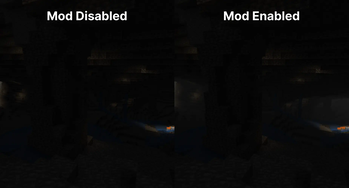
As you go deeper underground, the fog gets thicker. This adds to the spooky and mysterious feel of caves, making exploration more intense and immersive. It helps create a sense of depth, making the underground environment feel more alive and engaging.
!(https://cdn.modrinth.com/data/WuGVWUF2/images/4c298cc1a03e59f9b9c1a5d587a4204cae504a39.png)
### Weather Fog Modifiers
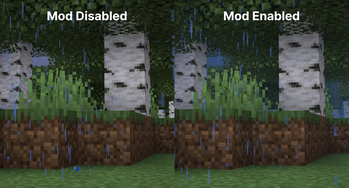
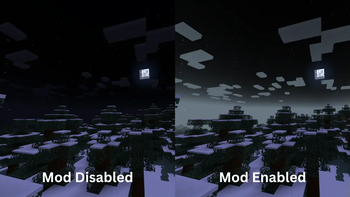
The fog adjusts with the weather, so during rain or snow, the fog will change accordingly. This adds to the overall atmosphere, making each weather condition feel distinct and visually appealing.
!(https://cdn.modrinth.com/data/WuGVWUF2/images/6f087fdd81ee3a08bef1990eceefec91508cf8a4.png)
### Time-based Modifiers
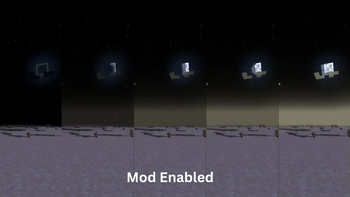
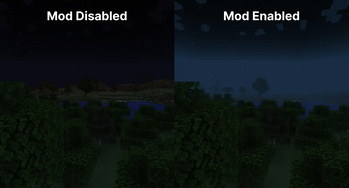
Fog becomes more colorful and vibrant during sunsets, sunrises. During night the fog colour will be dependent on the current moon cycle.
!(https://cdn.modrinth.com/data/WuGVWUF2/images/20ff61b713aa0cc96dade0aacb2036c6553ddc70.png) !(https://cdn.modrinth.com/data/WuGVWUF2/images/8cd00399374a9495f8f7ee3188cc76767db61a0b.png)
### Biome Fog Colors
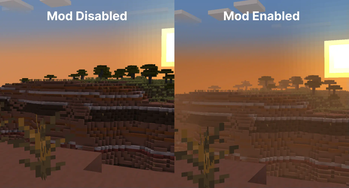
Fog changes color based on the biome you're in, giving each area a unique look and feel. This helps create a coherent visual experience as you move through different biomes. It supports modded biomes and is easy to customize using resource packs, allowing for a highly personalized game experience. !(https://cdn.modrinth.com/data/WuGVWUF2/images/aa4957070b5d3af4a1e8e870a8c213271a0f76ef.png)
### Sky Fixes
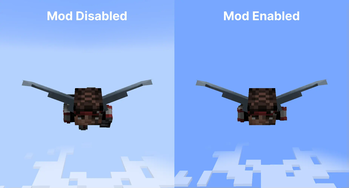
When flying with an elytra above the clouds, the fog gradually fades away, offering a clear view of the sky without any strange horizon lines.
Additionally, clouds maintain their natural look and are not affected by fog color, ensuring they always appear consistent and visually appealing.
!(https://cdn.modrinth.com/data/WuGVWUF2/images/5eb2c55f853792271abb509ba853dbbad6e4fdf4.png)
## Configuration
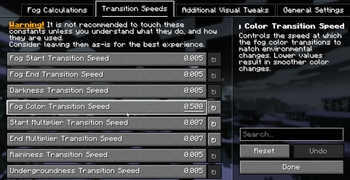
Fog is extremely customizable thanks to (https://modrinth.com/mod/yacl), you should check the configuration screen accessible via Mod Menu on Fabric, or the Mods List on NeoForge for a full list of configuration options.
!(https://cdn.modrinth.com/data/WuGVWUF2/images/c4c87fd79998fe2b1360383958ffec45d067bdf5.png) ## Dependencies
### Required
- (https://modrinth.com/mod/fabric-api)
- (https://modrinth.com/mod/yacl)
- (https://modrinth.com/mod/mru)
## Compatibility info
### Compatible mods
- (https://modrinth.com/mod/modmenu): allows access to the configuration screen
- (https://modrinth.com/mod/sodium): fully compatible, ensuring that your visuals remain consistent even with performance-enhancing mods
- (https://modrinth.com/mod/true-darkness) - Whilst we haven't added explicit compatibility, the mod works well with our moon phase modifiers that weaken biome fog strength depending on the moon phase.
- Shaders that use Minecraft’s default fog settings: fully compatible
- (https://modrinth.com/mod/distanthorizons): planned for the future
### Incompatibilities
See the (https://github.com/IMB11/Fog/issues?q=is%3Aissue+is%3Aopen+sort%3Aupdated-desc+label%3Acompat) for a list of incompatibilities.
## Download
Fog is available for NeoForge and Fabric for 1. 21-1. 21. 4 versions. You can download
📊 Mod Details
- Game
- Minecraft Mods
- Author
- IMB11
- Version
- 1.11.0+1.21.9-fabric
- Downloads
- 1,655,149
- Endorsements
- 1,386
- Category
- fabric
- Created
- 1/22/2023
- Updated
- 10/7/2025
- Game Versions
- 1.21.9, 1.21.10
- Tags
- game-mechanics, utility
🔧 How to Install Minecraft Mods Mods
Download from Modrinth. Use Prism Launcher or drop into your mods folder.
📖 Full step-by-step install guide for Minecraft Mods →
Visit the official mod page for specific installation instructions for this mod.
🎮 Need cheat codes or console commands? Check ur gaming wiki for Minecraft Mods commands, item IDs, and more.
❓ Frequently Asked Questions
Which Minecraft Mods versions does Fog support?
The author lists 1.21.9, 1.21.10. Other versions may work but are untested by the author.
What is the latest version of Fog?
Version 1.11.0+1.21.9-fabric, published 2025-10-07 with 1.7M downloads recorded at the source.
Keep browsing — more Minecraft Mods mods await