Flashback Extras
🟡 Updated this year⚠️ Install Order · 2 steps
Install in this order, then this mod last — most mods fail to load without their framework and dependencies in place.
🖼️ Gallery (2 images)
🔍 Analysis
- 👍 0.0% endorsement rate
- 🏆 #815 of 983 fabric mods in this game by downloads
📋 About This Mod
# Flashback Extras Flashback Extras extends the Flashback replay editor with additional features and fixes. All features can be toggled on or off. ## Features - `Export Presets` Adds built-in presets for common output targets, such as YouTube 1440p, and lets you create your own presets so you can save the settings you use again and again instead of rebuilding them every time. This is especially useful if you are exporting the same replay in multiple formats. !(https://cdn.modrinth.com/data/cached_images/688db6c3d09d8333ee2dbac766f4c8d1e4aafb27_0.webp) !(https://cdn.modrinth.com/data/cached_images/7d253eac43c8c6836152a59c9f7b88c3421c26e2_0.webp) - `Export Preview Overlay` When you are exporting for formats like TikTok or YouTube Shorts, it is not always clear how the final video will look inside a vertical frame. This adds an overlay that shows that shape on screen, so you can line things up more easily before exporting. !(https://cdn.modrinth.com/data/cached_images/ed82523a7d5331b581c8b37e65e86f587284953b.jpeg) - `Timeline Horizontal Scroll` Enables horizontal scrolling of the Flashback timeline with a mouse side wheel, horizontal wheel, or trackpad. ## Fixes - `Faster First Export` Opening the export menu can freeze Flashback for a couple of seconds. This mod prepares export tools in the background shortly after you open a replay, so the export window opens without long waiting times. - `Audio Track Sync for Timelapses` Timelapses and other speed changes in Flashback can make audio sound wrong and break the waveform display. This mod fixes that, so audio plays normally and the visual audio track scales correctly with timeline speed. ## Configure - You can open the Flashback Extras menu with `Right Alt + P` by default. - The shortcut can be changed in Minecraft Controls. - You can also open the menu through the Mod Menu mod. ## Requirements - Fabric - Flashback
# Flashback Extras
Flashback Extras extends the Flashback replay editor with additional features and fixes. All features can be toggled on or off.
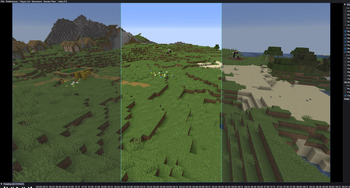
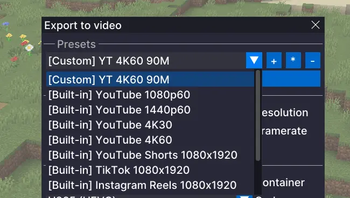
## Features - `Export Presets` Adds built-in presets for common output targets, such as YouTube 1440p, and lets you create your own presets so you can save the settings you use again and again instead of rebuilding them every time. This is especially useful if you are exporting the same replay in multiple formats.
!(https://cdn.modrinth.com/data/cached_images/688db6c3d09d8333ee2dbac766f4c8d1e4aafb27_0.webp) !(https://cdn.modrinth.com/data/cached_images/7d253eac43c8c6836152a59c9f7b88c3421c26e2_0.webp)
- `Export Preview Overlay`
- When you are exporting for formats like TikTok or YouTube Shorts, it is not always clear how the final video will look inside a vertical frame. This adds an overlay that shows that shape on screen, so you can line things up more easily before exporting.
!(https://cdn.modrinth.com/data/cached_images/ed82523a7d5331b581c8b37e65e86f587284953b.jpeg)
- `Timeline Horizontal Scroll`
- Enables horizontal scrolling of the Flashback timeline with a mouse side wheel, horizontal wheel, or trackpad.
## Fixes - `Faster First Export` Opening the export menu can freeze Flashback for a couple of seconds. This mod prepares export tools in the background shortly after you open a replay, so the export window opens without long waiting times.
- `Audio Track Sync for Timelapses`
- Timelapses and other speed changes in Flashback can make audio sound wrong and break the waveform display. This mod fixes that, so audio plays normally and the visual audio track scales correctly with timeline speed.
## Configure - You can open the Flashback Extras menu with `Right Alt + P` by default. - The shortcut can be changed in Minecraft Controls. - You can also open the menu through the Mod Menu mod.
## Requirements - Fabric - Flashback
📊 Mod Details
- Game
- Minecraft Mods
- Author
- bitbeats
- Version
- 1.2.0
- Downloads
- 39,822
- Endorsements
- 17
- Category
- fabric
- Created
- 3/25/2026
- Updated
- 7/15/2026
- Game Versions
- 26.2
- Tags
- management, optimization, utility
🔧 How to Install Minecraft Mods Mods
Download from Modrinth. Use Prism Launcher or drop into your mods folder.
📖 Full step-by-step install guide for Minecraft Mods →
Visit the official mod page for specific installation instructions for this mod.
🎮 Need cheat codes or console commands? Check ur gaming wiki for Minecraft Mods commands, item IDs, and more.
❓ Frequently Asked Questions
Which Minecraft Mods versions does Flashback Extras support?
The author lists 26.2. Other versions may work but are untested by the author.
What is the latest version of Flashback Extras?
Version 1.2.0, published 2026-07-15 with 39,822 downloads recorded at the source.
Keep browsing — more Minecraft Mods mods await