Firorize
🟡 Updated this year⚠️ Install Order · 2 steps
Install in this order, then this mod last — most mods fail to load without their framework and dependencies in place.
🖼️ Gallery (6 images)
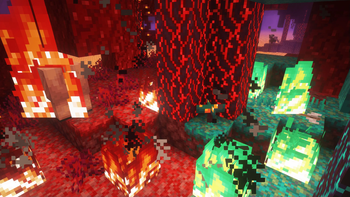
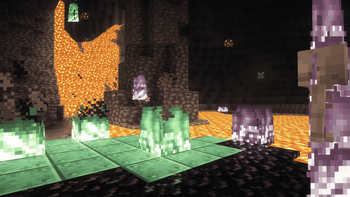
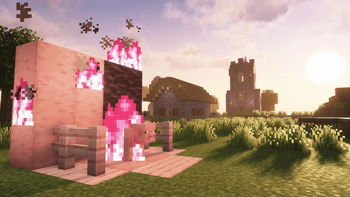
🔍 Analysis
- 👍 0.2% endorsement rate
- 🏆 #30 of 354 decoration mods in this game by downloads
📋 About This Mod
# Firorize ### Full colour customization for Minecraft fire <a href="https://www.modrinth.com/mod/modmenu" target="_blank" rel="nofollow noopener"><img src="https://cdn.raffers.co.uk/requiresModMenu.png" alt="Requires Mod Menu" width="200" height="67"></a> <img src="https://img.shields.io/badge/environment-client-1976d2?style=flat-square" alt="Client side"> <img src="https://img.shields.io/badge/loader-fabric-dbb072?style=flat-square" alt="Fabric"> <img src="https://img.shields.io/badge/minecraft-1.21.11-44cc11?style=flat-square" alt="Minecraft 1.21.11"> <br/><br/> <a href="https://ko-fi.com/rufflesteels" target="_blank" rel="nofollow noopener"><img src="https://cdn.raffers.co.uk/kofi.png" alt="Support me on Ko-fi" width="224" height="46"></a> --- ## What's this mod? Are you bored of that same old orange fire? In need of more atmospheric nether biomes? Wishing for some colorful variety next time you decide to burn your friend's house down? **Firorize** lets you recolour fire however you like – per **biome**, per **block it sits on**, and per **block tag** – with a priority system to settle any clashes. Group your colours into named **profiles**, and now **share them with the whole community or send them straight to a friend, right inside the game.** It's fully **client-side**, so it works on any server without installing anything server-side. <p align="center"> <img src="https://github.com/RuffleSteels/Firorize/raw/master/images/editor-hero.jpg" alt="The Firorize colour editor: a colour wheel and lightness slider on the left, an active profile list, a per-block search list, and a recoloured golden fire burning in-world" width="900"> </p> --- ## Features #### Colour customization - Recolour the **base fire** to any colour you like - Per-**biome** fire colours - Per-**block** fire colours (based on the block the fire is ignited on) - Per-**block-tag** fire colours - Independent **base** and **overlay** tint control - Adjustable **priority hierarchy** to resolve any colour conflicts - Built-in **colour presets** for quick customizations #### Profiles - Save complete colour setups as named **profiles** - Activate / deactivate and reorder profiles to get the customisation you want - One-click **reset** back to a profile's defaults - A preloaded **nether** profile to get you started #### Online sharing - **Built-in Gallery** – take a pick from many built-in fire profiles made by me - **Community Gallery** – browse fire profiles shared by other players and import them with a single click - **Upload** your own profiles to share them publicly - **Inbox** – privately send your custom profiles to friends #### Quality of life - Simple, flexible configuration menu (open with **I** by default) - Adjustable **fire-overlay height** - Fixes the vanilla **soul-fire overlay** bug - Works with **modded** blocks, biomes and block tags - Compatible with **Iris** shaders --- ## Fire height #### Adjust the first-person fire height Shrink the first-person fire overlay so it's less obtrusive when you're on fire. <p align="center"> <img src="https://github.com/RuffleSteels/Firorize/raw/master/images/fire-height.jpg" alt="First-person view with the fire-overlay height slider set to 67, lowering the flames at the bottom of the screen" width="820"> </p> --- ## Profiles & sharing #### Built-in profiles, ready to import Ship straight from a curated set – like the **Soul Fire** profile that restores the classic blue to soul sand and soul soil – and import them with one click. <p align="center"> <img src="https://github.com/RuffleSteels/Firorize/raw/master/images/builtin-profiles.jpg" alt="The Built-in Profiles browser, showing a Soul Fire block profile and a Nether Biomes profile, each with an Import button" width="820"> </p> #### Browse and import from the community Discover fire profiles shared by other players and add them to your collection instantly. <p align="center"> <img src="https://github.com/RuffleSteels/Firorize/raw/master/images/community-profiles.jpg" alt="The Community Profiles browser listing player-shared Glazed Terracotta profiles alongside the profile list and block search" width="820"> </p> #### Send profiles straight to friends Your **Inbox** collects profiles other players have sent you, and lets you share your own privately. <p align="center"> <img src="https://github.com/RuffleSteels/Firorize/raw/master/images/inbox.jpg" alt="The Inbox screen for receiving and sending profiles between players" width="820"> </p> --- ## Compatibility | Mod | Notes | | --- | --- | | (https://www.modrinth.com/mod/fabric-api) | **Required** | | (https://www.modrinth.com/mod/modmenu) | Suggested (for opening config) | | (https://www.modrinth.com/mod/sodium) | Compatible | | (https://www.modrinth.com/mod/indium) | Required **if** Sodium is installed | | Iris shaders | Compatible | | OptiFabric | Incompatible |
### Full colour customization for Minecraft fire





## What's this mod?
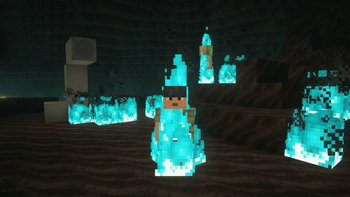
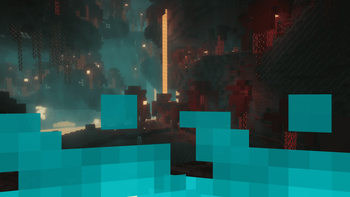
Are you bored of that same old orange fire? In need of more atmospheric nether biomes? Wishing for some colorful variety next time you decide to burn your friend's house down?
Firorize lets you recolour fire however you like – per biome, per block it sits on, and per block tag – with a priority system to settle any clashes. Group your colours into named profiles, and now share them with the whole community or send them straight to a friend, right inside the game.
It's fully client-side, so it works on any server without installing anything server-side.

## Features
#### Colour customization - Recolour the base fire to any colour you like - Per-biome fire colours - Per-block fire colours (based on the block the fire is ignited on) - Per-block-tag fire colours - Independent base and overlay tint control - Adjustable priority hierarchy to resolve any colour conflicts - Built-in colour presets for quick customizations
#### Profiles - Save complete colour setups as named profiles - Activate / deactivate and reorder profiles to get the customisation you want - One-click reset back to a profile's defaults - A preloaded nether profile to get you started
#### Online sharing - Built-in Gallery – take a pick from many built-in fire profiles made by me - Community Gallery – browse fire profiles shared by other players and import them with a single click - Upload your own profiles to share them publicly - Inbox – privately send your custom profiles to friends
#### Quality of life - Simple, flexible configuration menu (open with I by default) - Adjustable fire-overlay height - Fixes the vanilla soul-fire overlay bug - Works with modded blocks, biomes and block tags - Compatible with Iris shaders
## Fire height
#### Adjust the first-person fire height
Shrink the first-person fire overlay so it's less obtrusive when you're on fire.

## Profiles & sharing
#### Built-in profiles, ready to import
Ship straight from a curated set – like the Soul Fire profile that restores the classic blue to soul sand and soul soil – and import them with one click.

#### Browse and import from the community
Discover fire profiles shared by other players and add them to your collection instantly.

#### Send profiles straight to friends
Your Inbox collects profiles other players have sent you, and lets you share your own privately.

## Compatibility
| Mod | Notes | | --- | --- | | (https://www.modrinth.com/mod/fabric-api) | Required | | (https://www.modrinth.com/mod/modmenu) | Suggested (for opening config) | | (https://www.modrinth.com/mod/sodium) | Compatible | | (https://www.modrinth.com/mod/indium) | Required if Sodium is installed | | Iris shaders | Compatible | | OptiFabric | Incompatible |
📊 Mod Details
- Game
- Minecraft Mods
- Author
- RuffleSteels
- Version
- 1.5.0
- Downloads
- 81,743
- Endorsements
- 161
- Category
- decoration
- Created
- 7/4/2023
- Updated
- 7/2/2026
- Game Versions
- 26.1.2
- Tags
- decoration, game-mechanics, utility
🔧 How to Install Minecraft Mods Mods
Download from Modrinth. Use Prism Launcher or drop into your mods folder.
📖 Full step-by-step install guide for Minecraft Mods →
Visit the official mod page for specific installation instructions for this mod.
🎮 Need cheat codes or console commands? Check ur gaming wiki for Minecraft Mods commands, item IDs, and more.
❓ Frequently Asked Questions
Which Minecraft Mods versions does Firorize support?
The author lists 26.1.2. Other versions may work but are untested by the author.
What is the latest version of Firorize?
Version 1.5.0, published 2026-07-02 with 81,743 downloads recorded at the source.
Keep browsing — more Minecraft Mods mods await