FightCam
🟠 Updated over a year ago⚠️ Install Order · 2 steps
Install in this order, then this mod last — most mods fail to load without their framework and dependencies in place.
🖼️ Gallery (2 images)
🔍 Analysis
- 👍 0.6% endorsement rate
- 🏆 #193 of 893 fabric mods in this game by downloads
📋 About This Mod
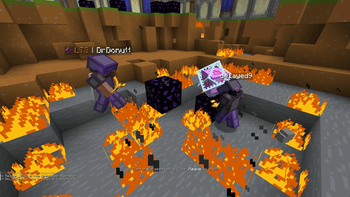
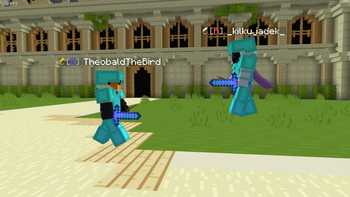
# Fight Camera **Gives a fighting game style, side on view of 2 players. Fully compatible with Flashback replays** <iframe width="560" height="315" src="https://www.youtube-nocookie.com/embed/8qUx2Dh9IQ4" title="YouTube video player" frameborder="0" allow="accelerometer; autoplay; clipboard-write; encrypted-media; gyroscope; picture-in-picture; web-share" allowfullscreen></iframe> # Usage: /fightcam players <player1> <player2> to set the camera's target players /fightcam toggle to toggle fightcam (bound to ; by default) /fightcam smooth <factor> to set the lerp factor for the camera. Values closer to 0 give smoother camera movement, values closer to 1 give more reactive camera movment. Defaults to 0.6 ### Camera distance /fightcam distance <distance> set the camera distance to the anchor position in blocks (changes camera mode to static) /fightcam distance auto makes it so the camera adjusts the distance automatically to keep the players in view (base distance is adjustable with forward and backward keys) ### Camera Height /fightcam height <height> sets the camera's height relative to the anchor position in blocks /fightcam height avg sets the camera to follow the average height of the players (good for viewing mace and crystal fights with constant height changes) /fightcam height ground sets the camera to follow the average height of the last grounded height of the players (good for gamemodes with little height change/flat terrain) ### Camera Anchor /fightcam anchor avg sets the camera to follow the average position of both players /fightcam anchor <p1/p2> sets the camera to follow the first or second player (automatically sets distance to be fixed)
# Fight Camera
Gives a fighting game style, side on view of 2 players. Fully compatible with Flashback replays
/fightcam players
/fightcam toggle to toggle fightcam (bound to ; by default)
/fightcam smooth
/fightcam distance
/fightcam distance auto makes it so the camera adjusts the distance automatically to keep the players in view (base distance is adjustable with forward and backward keys) ### Camera Height
/fightcam height
/fightcam height avg sets the camera to follow the average height of the players (good for viewing mace and crystal fights with constant height changes)
/fightcam height ground sets the camera to follow the average height of the last grounded height of the players (good for gamemodes with little height change/flat terrain) ### Camera Anchor
/fightcam anchor avg sets the camera to follow the average position of both players
/fightcam anchor
📊 Mod Details
- Game
- Minecraft Mods
- Author
- TheobaldTheBird
- Version
- 1.21-1.0.0
- Downloads
- 8,736
- Endorsements
- 55
- Category
- fabric
- Created
- 5/20/2025
- Updated
- 5/22/2025
- Game Versions
- 1.21, 1.21.1
- Tags
- game-mechanics, minigame, utility
🔧 How to Install Minecraft Mods Mods
Download from Modrinth. Use Prism Launcher or drop into your mods folder.
📖 Full step-by-step install guide for Minecraft Mods →
Visit the official mod page for specific installation instructions for this mod.
🎮 Need cheat codes or console commands? Check ur gaming wiki for Minecraft Mods commands, item IDs, and more.
❓ Frequently Asked Questions
Which Minecraft Mods versions does FightCam support?
The author lists 1.21, 1.21.1. Other versions may work but are untested by the author.
What is the latest version of FightCam?
Version 1.21-1.0.0, published 2025-05-22 with 8,736 downloads recorded at the source.
Keep browsing — more Minecraft Mods mods await