Fast Pot
🟡 Updated this year⚠️ Install Order · 2 steps
Install in this order, then this mod last — most mods fail to load without their framework and dependencies in place.
🖼️ Gallery (1 images)
🔍 Analysis
- 👍 0.1% endorsement rate
- 🏆 #22 of 284 equipment mods in this game by downloads
📋 About This Mod
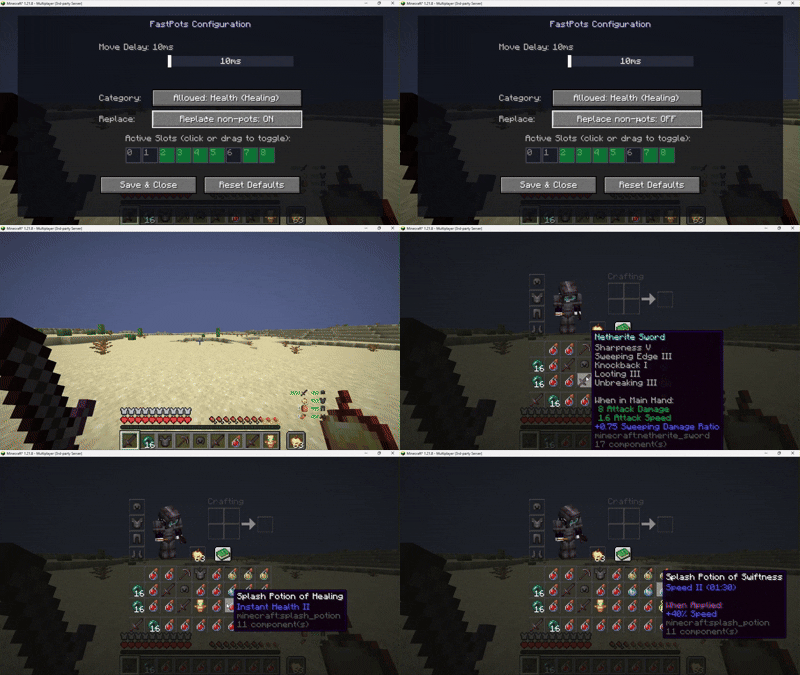
# ✨ Fast Pots Features > > Select which hotbar slots – Choose exactly which slots (1‑9) should receive potions. Customize it to your playstyle. > > Filter by potion type – Pick between healing potions, buffs (Speed, Fire Resistance, Regeneration, Strength), or both. Only the potions you want will be moved. > > Auto‑replace items – If a configured hotbar slot contains a non‑potion item, Fast Pots can automatically replace it with a potion from your inventory (optional, toggleable). > > Simple activation – Just hold Shift and hover over any potion in your inventory. It will instantly move to the next available hotbar slot you've selected. > > Adjustable delay – Set a delay between moves (10‑100 ms) to prevent accidental rapid transfers. > > Visual configuration screen – Uses Minecraft's native textures to display a grid of your hotbar and inventory. Click or drag to select slots and tweak the delay – all with a clean, intuitive interface. > > Persistent config – Your settings are saved in a JSON file and reloaded automatically. ## 📸 Screenshots > > !(https://cdn.modrinth.com/data/cached_images/8088df522a3f6be62ce7673f75cb19bb4962b047.gif) > > Config screen – Hotbar grid with green overlays for selected slots, delay slider, potion type toggles. > > In‑game – Moving potions by shift‑hovering, with auto‑replace active. ## 🔧 Requirements > > Minecraft > > Fabric Loader ≥0.18.4 > > Fabric API > > Java 21 ## 🎮 How to use > > Install the mod and launch Minecraft. > > Open the config screen with F6 (default key, changeable in Controls). > > Select the hotbar slots where you want potions to go (click or drag). > > Choose the potion types you want to move: Healing, Buffs, or Both. > > Optionally enable "Replace non‑potion items" to automatically overwrite unwanted items in your configured hotbar slots. > > Adjust the delay if needed. > > In‑game, hold Shift and hover over any eligible potion in your inventory – it will instantly move to the next free hotbar slot you've selected. ## ⚠️ Disclaimer >This mod is client-side only and does not modify game files or network packets. However, some servers may consider automated inventory management (such as quick potion moving) as an unfair advantage and therefore forbidden by their rules. > > Use this mod at your own risk. I am not responsible for any bans or other sanctions applied by server administrators. Always check the rules of the servers you play on before using any client-side modifications. ## 🐛 Bug reports & suggestions > Send me dm discord: > > ``` > marcellesa > ``` >
# ✨ Fast Pots Features > > Select which hotbar slots – Choose exactly which slots (1‑9) should receive potions. Customize it to your playstyle. > > Filter by potion type – Pick between healing potions, buffs (Speed, Fire Resistance, Regeneration, Strength), or both. Only the potions you want will be moved. > > Auto‑replace items – If a configured hotbar slot contains a non‑potion item, Fast Pots can automatically replace it with a potion from your inventory (optional, toggleable). > > Simple activation – Just hold Shift and hover over any potion in your inventory. It will instantly move to the next available hotbar slot you've selected. > > Adjustable delay – Set a delay between moves (10‑100 ms) to prevent accidental rapid transfers. > > Visual configuration screen – Uses Minecraft's native textures to display a grid of your hotbar and inventory. Click or drag to select slots and tweak the delay – all with a clean, intuitive interface. > > Persistent config – Your settings are saved in a JSON file and reloaded automatically.
## 📸 Screenshots > > !(https://cdn.modrinth.com/data/cached_images/8088df522a3f6be62ce7673f75cb19bb4962b047.gif) > > Config screen – Hotbar grid with green overlays for selected slots, delay slider, potion type toggles. > > In‑game – Moving potions by shift‑hovering, with auto‑replace active.
## 🔧 Requirements > > Minecraft > > Fabric Loader ≥0. 18. 4 > > Fabric API > > Java 21
## 🎮 How to use > > Install the mod and launch Minecraft. > > Open the config screen with F6 (default key, changeable in Controls). > > Select the hotbar slots where you want potions to go (click or drag). > > Choose the potion types you want to move: Healing, Buffs, or Both. > > Optionally enable "Replace non‑potion items" to automatically overwrite unwanted items in your configured hotbar slots. > > Adjust the delay if needed. > > In‑game, hold Shift and hover over any eligible potion in your inventory – it will instantly move to the next free hotbar slot you've selected.
## ⚠️ Disclaimer >This mod is client-side only and does not modify game files or network packets. However, some servers may consider automated inventory management (such as quick potion moving) as an unfair advantage and therefore forbidden by their rules. > > Use this mod at your own risk. I am not responsible for any bans or other sanctions applied by server administrators. Always check the rules of the servers you play on before using any client-side modifications.
## 🐛 Bug reports & suggestions
> Send me dm discord: > > ``` > marcellesa > ``` >
📊 Mod Details
- Game
- Minecraft Mods
- Author
- demoflash
- Version
- 1.0.0
- Downloads
- 2,049
- Endorsements
- 3
- Category
- equipment
- Created
- 3/27/2026
- Updated
- 3/14/2026
- Game Versions
- 1.21.3
- Tags
- equipment, utility
🔧 How to Install Minecraft Mods Mods
Download from Modrinth. Use Prism Launcher or drop into your mods folder.
📖 Full step-by-step install guide for Minecraft Mods →
Visit the official mod page for specific installation instructions for this mod.
🎮 Need cheat codes or console commands? Check ur gaming wiki for Minecraft Mods commands, item IDs, and more.
❓ Frequently Asked Questions
Which Minecraft Mods versions does Fast Pot support?
The author lists 1.21.3. Other versions may work but are untested by the author.
What is the latest version of Fast Pot?
Version 1.0.0, published 2026-03-14 with 2,049 downloads recorded at the source.
Keep browsing — more Minecraft Mods mods await