Faga's Discord Bridge
🟡 Updated this year⚠️ Install Order · 2 steps
Install in this order, then this mod last — most mods fail to load without their framework and dependencies in place.
🖼️ Gallery (4 images)
🔍 Analysis
- 🏆 #4 of 16 management mods in this game by downloads
📋 About This Mod
## Features - Minecraft -> Discord bridge for server lifecycle, player join/leave, deaths, advancements, and day milestone announcements - Discord -> Minecraft chat relay via `/mc` slash command in the configured channel (with mention sanitization) - `/mc` relays to Minecraft and echoes plain text back to Discord (`**name:** message`) - `/mc` uses linked Minecraft nickname when the Discord user is linked - Rich Discord embeds with per-event colors, timestamps, optional player head thumbnails, and plain-text fallback - Bot activity rotation with configurable activity list, interval, and type (`PLAYING`, `WATCHING`, `LISTENING`, `COMPETING`) - Admin logging channel with command redaction and structured admin embeds - Discord config slash command for admins: `/config` to update chat/admin channels and whitelist guild - Discord/Minecraft account linking via `/link` (ephemeral one-time code) and in-game `/bridge link <code>` - `/leaderboard` slash command with categories, pagination, and visibility (`private` default, optional `public`) - Leaderboards include online and offline players with saved stats - Linked players are shown as Discord mentions (`<@discordUserId>`) in leaderboard and embeds - Bot activity rotation includes a built-in online/max players status entry - Resilient startup/runtime behavior: Discord failures are logged, startup messages are queued until JDA is ready ## Discord Bot Permissions Bot permissions: - Read Messages / View Channels - Send Messages - Read Message History ## Configuration First run creates `config/mcdiscordbridge-common.toml`. ```toml # Discord bot token or env:DISCORD_BOT_TOKEN discordApiKey = "env:DISCORD_BOT_TOKEN" # Only messages from this guild are accepted whitelistGuildId = "123456789012345678" # Discord channel for chat bridge chatChannelId = "123456789012345678" # Discord channel for admin logs adminLogChannelId = "123456789012345678" # Legacy toggle for text-message relay mode (slash command `/mc` does not require this) enableMessageContentIntent = false # Send Discord embeds for richer event logs enableEmbeds = true # Hex color for embeds, for example #57A5FF embedColorHex = "#57A5FF" # Include player head thumbnail in embeds when UUID is available includePlayerHeadInEmbeds = true # URL template with %uuid% placeholder playerHeadUrlTemplate = "https://crafatar.com/avatars/%uuid%?size=128&overlay" # Rotate bot activity text from botActivities enableBotActivityRotation = true botActivities = botActivityRotateSeconds = 20 # PLAYING, WATCHING, LISTENING, COMPETING botActivityType = "WATCHING" # Send day milestone message every N minecraft days (0 disables) dayMilestoneGap = 10 # Enable Discord account linking to Minecraft players enableAccountLinking = true # How long link codes remain valid linkCodeExpirySeconds = 600 # Length of one-time account link code linkCodeLength = 6 ``` ### Token via environment variable Set: ```bash export DISCORD_BOT_TOKEN="your_token" ``` Then set in config: ```toml discordApiKey = "env:DISCORD_BOT_TOKEN" ``` ## Setup In your whitelisted Discord server, run `/config` with one or more of: - `chat_channel_id` - `admin_channel_id` - `whitelist_guild_id` Only Discord admins can run `/config`. ## Account Linking - On Discord, run slash command: `/link` - The bot replies ephemerally with a one-time code - In Minecraft, run: `/bridge link <code>` - `linkCodeExpirySeconds` controls how long the code remains valid ## Discord to Minecraft Relay - On Discord in the configured chat channel, run: `/mc <message>` - The message is relayed to Minecraft chat as ` <name> message` - The same message is echoed in Discord as plain text: `**name:** message` - If the Discord account is linked, `name` uses the linked Minecraft nickname ## Leaderboard - On Discord, run: `/leaderboard <category>` - Optional page: `/leaderboard <category> <page>` - Optional visibility: `/leaderboard <category> <page> <visibility>` where `visibility` is `private` (default) or `public` - Linked players are shown with Discord mention tags (`<@discordUserId>`) - Categories: `playtime`, `deaths`, `player_kills`, `mob_kills`, `mined_blocks`, `distance_walked` - Leaderboard responses are ephemeral by default ## Notes - This is server-only. Do not install on clients. - Discord failures are logged and do not intentionally crash server startup. - Avoid logging secrets in command usage; redaction is enabled by default.
## Features
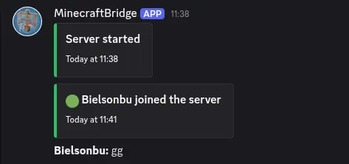
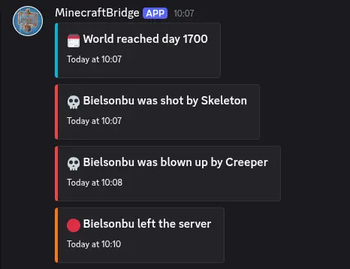
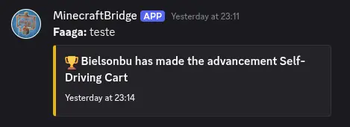
- Minecraft -> Discord bridge for server lifecycle, player join/leave, deaths, advancements, and day milestone announcements
- Discord -> Minecraft chat relay via `/mc` slash command in the configured channel (with mention sanitization)
- `/mc` relays to Minecraft and echoes plain text back to Discord (`name: message`)
- `/mc` uses linked Minecraft nickname when the Discord user is linked
- Rich Discord embeds with per-event colors, timestamps, optional player head thumbnails, and plain-text fallback
- Bot activity rotation with configurable activity list, interval, and type (`PLAYING`, `WATCHING`, `LISTENING`, `COMPETING`)
- Admin logging channel with command redaction and structured admin embeds
- Discord config slash command for admins: `/config` to update chat/admin channels and whitelist guild
- Discord/Minecraft account linking via `/link` (ephemeral one-time code) and in-game `/bridge link `
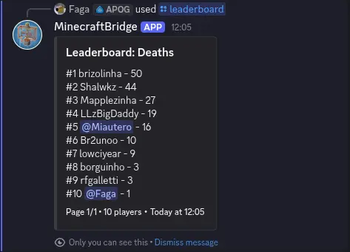
- `/leaderboard` slash command with categories, pagination, and visibility (`private` default, optional `public`)
- Leaderboards include online and offline players with saved stats
- Linked players are shown as Discord mentions (`<@discordUserId>`) in leaderboard and embeds
- Bot activity rotation includes a built-in online/max players status entry
- Resilient startup/runtime behavior: Discord failures are logged, startup messages are queued until JDA is ready
## Discord Bot Permissions Bot permissions: - Read Messages / View Channels - Send Messages - Read Message History
## Configuration First run creates `config/mcdiscordbridge-common.toml`.
```toml # Discord bot token or env:DISCORD_BOT_TOKEN discordApiKey = "env:DISCORD_BOT_TOKEN"
# Only messages from this guild are accepted whitelistGuildId = "123456789012345678"
# Discord channel for chat bridge chatChannelId = "123456789012345678"
# Discord channel for admin logs adminLogChannelId = "123456789012345678"
# Legacy toggle for text-message relay mode (slash command `/mc` does not require this) enableMessageContentIntent = false
# Send Discord embeds for richer event logs enableEmbeds = true
# Hex color for embeds, for example #57A5FF embedColorHex = "#57A5FF"
# Include player head thumbnail in embeds when UUID is available includePlayerHeadInEmbeds = true
# URL template with %uuid% placeholder playerHeadUrlTemplate = "https://crafatar.com/avatars/%uuid%?size=128&overlay"
# Rotate bot activity text from botActivities enableBotActivityRotation = true botActivities = ["Watching the server", "Bridging chat", "Tracking events"] botActivityRotateSeconds = 20
# PLAYING, WATCHING, LISTENING, COMPETING botActivityType = "WATCHING"
# Send day milestone message every N minecraft days (0 disables) dayMilestoneGap = 10
# Enable Discord account linking to Minecraft players enableAccountLinking = true
# How long link codes remain valid linkCodeExpirySeconds = 600
# Length of one-time account link code linkCodeLength = 6 ```
### Token via environment variable Set: ```bash export DISCORD_BOT_TOKEN="your_token" ```
Then set in config: ```toml discordApiKey = "env:DISCORD_BOT_TOKEN" ```
## Setup In your whitelisted Discord server, run `/config` with one or more of: - `chat_channel_id` - `admin_channel_id` - `whitelist_guild_id`
Only Discord admins can run `/config`.
## Account Linking
- On Discord, run slash command: `/link`
- The bot replies ephemerally with a one-time code
- In Minecraft, run: `/bridge link `
- `linkCodeExpirySeconds` controls how long the code remains valid
## Discord to Minecraft Relay
- On Discord in the configured chat channel, run: `/mc
## Leaderboard
- On Discord, run: `/leaderboard
## Notes - This is server-only. Do not install on clients. - Discord failures are logged and do not intentionally crash server startup. - Avoid logging secrets in command usage; redaction is enabled by default.
📊 Mod Details
- Game
- Minecraft Mods
- Author
- guilhermefaaga
- Version
- 0.1.5+mc1.21.9
- Downloads
- 233
- Endorsements
- 5
- Category
- management
- Created
- 5/18/2026
- Updated
- 5/18/2026
- Game Versions
- 1.21.9
- Tags
- management, social
🔧 How to Install Minecraft Mods Mods
Download from Modrinth. Use Prism Launcher or drop into your mods folder.
📖 Full step-by-step install guide for Minecraft Mods →
Visit the official mod page for specific installation instructions for this mod.
🎮 Need cheat codes or console commands? Check ur gaming wiki for Minecraft Mods commands, item IDs, and more.
❓ Frequently Asked Questions
Which Minecraft Mods versions does Faga's Discord Bridge support?
The author lists 1.21.9. Other versions may work but are untested by the author.
What is the latest version of Faga's Discord Bridge?
Version 0.1.5+mc1.21.9, published 2026-05-18 with 233 downloads recorded at the source.
Keep browsing — more Minecraft Mods mods await