⚠️ Install Order · 2 steps
Install in this order, then this mod last — most mods fail to load without their framework and dependencies in place.
🖼️ Gallery (1 images)
🔍 Analysis
- 👍 0.2% endorsement rate
- 🏆 #12 of 12 babric mods in this game by downloads
📋 About This Mod
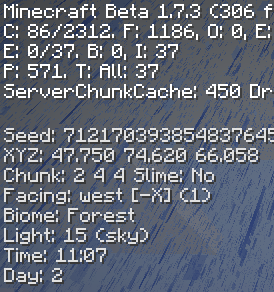
A quite simple mod that adds and reorganizes some information avaliable on the debug menu! It also makes the debug graph and entity ids toggleable by holding keys! It is somewhat configurable.
Needs **(https://babric.github.io/)**
### Toggleable graph & entity ids? To toggle these features, you need to hold both F3 and the registered keybind. Default keybinds: Debug Graph = `LMENU (Left ALT)`; Entity IDs = `RSHIFT (Right Shift)`
### Changing the keybinds To properly change the keybinds, you need to know the correct code, these are available (https://legacy.lwjgl.org/javadoc/org/lwjgl/input/Keyboard.html)!
> The config file can be found here: _`.minecraft/config/f3mod.properties`_
### Developers!
You can use the mod's entrypoint "f3mod" with a class that implements F3ModAPI to provide your own debug stuff!
📊 Mod Details
- Game
- Minecraft Mods
- Author
- Lukiiy
- Version
- 1.2
- Downloads
- 1,590
- Endorsements
- 3
- Category
- babric
- Created
- 6/7/2025
- Updated
- 1/3/2026
- Game Versions
- b1.7.3
- Tags
- utility
🔧 How to Install Minecraft Mods Mods
Download from Modrinth. Use Prism Launcher or drop into your mods folder.
📖 Full step-by-step install guide for Minecraft Mods →
Visit the official mod page for specific installation instructions for this mod.
🎮 Need cheat codes or console commands? Check ur gaming wiki for Minecraft Mods commands, item IDs, and more.
❓ Frequently Asked Questions
Which Minecraft Mods versions does F3Mod support?
The author lists b1.7.3. Other versions may work but are untested by the author.
What is the latest version of F3Mod?
Version 1.2, published 2026-01-03 with 1,590 downloads recorded at the source.
Keep browsing — more Minecraft Mods mods await