Eymistaken's HUD
🟡 Updated this year⚠️ Install Order · 2 steps
Install in this order, then this mod last — most mods fail to load without their framework and dependencies in place.
🖼️ Gallery (9 images)
🔍 Analysis
- 👍 0.1% endorsement rate
- 🏆 #854 of 901 fabric mods in this game by downloads
📋 About This Mod
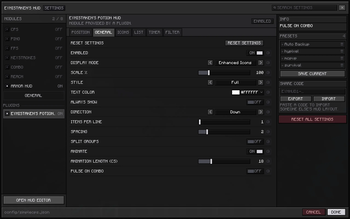
# Eymistaken's HUD **A modular PvP HUD for Fabric — seven modules, a drag & drop editor, and a plugin API.** > **(https://eymistaken.github.io/Eymistaken-s-HUD-Website/)** > > Module showcases, the Keystrokes Designer guide and the full API documentation live there. Eymistaken's HUD gives you the competitive overlay of a modded client without the modded client. Everything is drawn client-side, placed exactly where you want it, and stored in a single config file you can share as a string of text. !(https://cdn.modrinth.com/data/cached_images/873a71bbe1338e043affb5ebc3a783347dbe530d.png) --- ## Why this mod | | | |---|---| | **Everything is movable** | Drag any module anywhere with a live in-game editor. Snapping, an optional grid, align & distribute tools, and per-element nudging. | | **Everything is themeable** | Per-module color, scale, rainbow mode, background color + opacity, custom label text, text outline and five bundled fonts. | | **Nothing is bloated** | Zero runtime GUI library dependencies. Client-side only — no server install, no mixin into gameplay logic. | | **Layouts are portable** | Save named presets, auto-remember a layout per server, or export the whole HUD as a share code and paste it to a friend. | | **Extensible** | A public API lets other mods register their own HUD modules, with their own settings tabs, and subscribe to combat events. | --- ## Modules ### CPS Left and right click counters with a configurable separator and free-text prefixes/suffixes, so you can render `12 | 4`, `CPS: 12`, or anything else you like. !(https://cdn.modrinth.com/data/cached_images/6e3a61785877549ee43b4f36610131a36a8abc00.png) ### Keystrokes A fully custom keystroke display, not a fixed WASD block. The bundled Keystrokes Designer lets you draw your own layout: add any key or mouse button, resize it, drag its label independently, recolor individual keys, and pick a press animation (none, squish, ripple, or both). Any key can carry its own CPS counter. !(https://cdn.modrinth.com/data/cached_images/4461e1826a8dbef2ef5ce7c7ffcc382f822d4fb2_0.webp) !(https://cdn.modrinth.com/data/cached_images/1273c874e4e9f50897d6c6bd9db23d39d91358fb.png) ### Combo A hit-streak counter with a heatmap: the number changes color as your streak climbs, and shakes at the top tier. Three difficulty curves decide where those tiers sit. | Heatmap mode | Tier 1 | Tier 2 | Tier 3 (shake) | |---|---|---|---| | Easy | 3 hits | 5 hits | 7 hits | | Medium *(default)* | 5 hits | 8 hits | 12 hits | | Hard | 10 hits | 40 hits | 60 hits | It also understands how you fight. **Classic** mode counts every swing; **Modern** mode respects the 1.9+ attack cooldown so spam clicking doesn't inflate your streak. You choose whether the combo breaks on any damage taken, whether it survives switching targets, and how long it lingers before timing out. !(https://cdn.modrinth.com/data/cached_images/5b162662bf5d421b3941378678c491be78c2f076.png) ### Reach Shows the exact distance of your last hit, with decimals. Optionally filters to players only, and can stay on screen with a custom "no hit yet" label instead of disappearing. !(https://cdn.modrinth.com/data/cached_images/407954e883b943b5d10d2214ce06aa678879410b.png) ### Armor Your armor, main hand and off hand as item icons with durability bars. Lay them out vertically or horizontally, draw them on hotbar-style slot backgrounds, print exact durability numbers, and flash a slot red when it takes damage. Every slot is an independently placeable element — you can scatter them around the screen individually if you want. !(https://cdn.modrinth.com/data/cached_images/216e12a28fa31640dc5481fa9e83b13c88843407.png) ### FPS & Ping Lightweight performance readouts with custom label text, color, scale and background — for when you want the numbers without opening F3. !(https://cdn.modrinth.com/data/cached_images/05682f04d7acba27afbb421224624b4df6af2696.png) --- ## The layout editor Press **Right Shift** in game to open the editor. Everything you see is the real HUD, live. - **Drag** any module — or any individual armor slot — to place it exactly. - **Right-click** an element for a context menu of its own settings, straight from the HUD. - **Multi-select** two or more elements to unlock align left/center/right, align top/middle/bottom, and distribute horizontally/vertically. - **Snapping** to other modules' edges, plus an optional pixel grid (4/8/16/32). - **Prevent Overlap** keeps two modules from ever covering the same pixels. - **Right-click empty space** for the global menu: settings, presets, server configs, share codes and a full layout reset. !(https://cdn.modrinth.com/data/cached_images/e275f795011c66be1f28b2cc4c8b68f164478f42_0.webp) !(https://cdn.modrinth.com/data/cached_images/843895321707c036eb73b089bc855445253ad740.png) --- ## The settin
# Eymistaken's HUD
A modular PvP HUD for Fabric — seven modules, a drag & drop editor, and a plugin API.
> (https://eymistaken.github.io/Eymistaken-s-HUD-Website/)** > > Module showcases, the Keystrokes Designer guide and the full API documentation live there.
Eymistaken's HUD gives you the competitive overlay of a modded client without the modded client. Everything is drawn client-side, placed exactly where you want it, and stored in a single config file you can share as a string of text.
!(https://cdn.modrinth.com/data/cached_images/873a71bbe1338e043affb5ebc3a783347dbe530d.png)
## Why this mod
| | | |---|---| | Everything is movable | Drag any module anywhere with a live in-game editor. Snapping, an optional grid, align & distribute tools, and per-element nudging. | | Everything is themeable | Per-module color, scale, rainbow mode, background color + opacity, custom label text, text outline and five bundled fonts. | | Nothing is bloated | Zero runtime GUI library dependencies. Client-side only — no server install, no mixin into gameplay logic. | | Layouts are portable | Save named presets, auto-remember a layout per server, or export the whole HUD as a share code and paste it to a friend. | | Extensible* | A public API lets other mods register their own HUD modules, with their own settings tabs, and subscribe to combat events. |
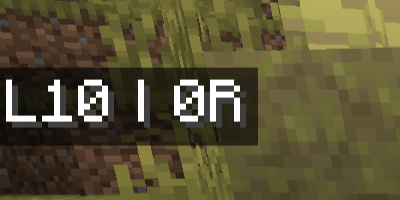
Left and right click counters with a configurable separator and free-text prefixes/suffixes, so you can render `12 | 4`, `CPS: 12`, or anything else you like.
!(https://cdn.modrinth.com/data/cached_images/6e3a61785877549ee43b4f36610131a36a8abc00.png)
### Keystrokes
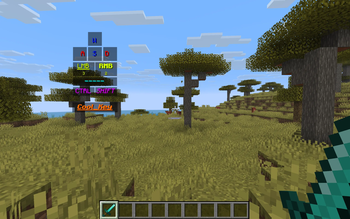
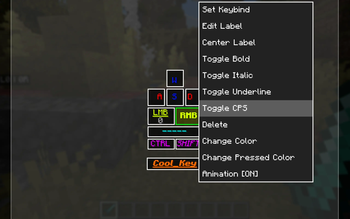
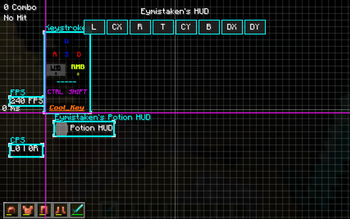
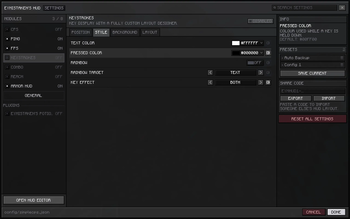
A fully custom keystroke display, not a fixed WASD block. The bundled Keystrokes Designer lets you draw your own layout: add any key or mouse button, resize it, drag its label independently, recolor individual keys, and pick a press animation (none, squish, ripple, or both). Any key can carry its own CPS counter.
!(https://cdn.modrinth.com/data/cached_images/4461e1826a8dbef2ef5ce7c7ffcc382f822d4fb2_0.webp)
!(https://cdn.modrinth.com/data/cached_images/1273c874e4e9f50897d6c6bd9db23d39d91358fb.png)
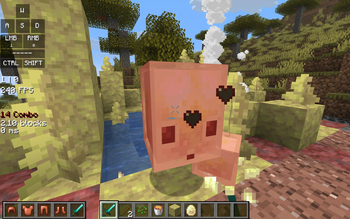
A hit-streak counter with a heatmap: the number changes color as your streak climbs, and shakes at the top tier. Three difficulty curves decide where those tiers sit.
| Heatmap mode | Tier 1 | Tier 2 | Tier 3 (shake) | |---|---|---|---| | Easy | 3 hits | 5 hits | 7 hits | | Medium (default)* | 5 hits | 8 hits | 12 hits | | Hard | 10 hits | 40 hits | 60 hits |
It also understands how you fight. Classic mode counts every swing; Modern mode respects the 1. 9+ attack cooldown so spam clicking doesn't inflate your streak. You choose whether the combo breaks on any damage taken, whether it survives switching targets, and how long it lingers before timing out.
!(https://cdn.modrinth.com/data/cached_images/5b162662bf5d421b3941378678c491be78c2f076.png)
Shows the exact distance of your last hit, with decimals. Optionally filters to players only, and can stay on screen with a custom "no hit yet" label instead of disappearing.
!(https://cdn.modrinth.com/data/cached_images/407954e883b943b5d10d2214ce06aa678879410b.png)
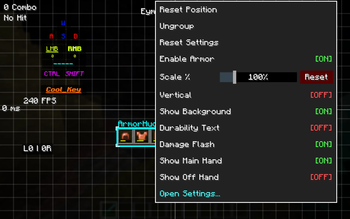
Your armor, main hand and off hand as item icons with durability bars. Lay them out vertically or horizontally, draw them on hotbar-style slot backgrounds, print exact durability numbers, and flash a slot red when it takes damage. Every slot is an independently placeable element — you can scatter them around the screen individually if you want.
!(https://cdn.modrinth.com/data/cached_images/216e12a28fa31640dc5481fa9e83b13c88843407.png)
### FPS & Ping
Lightweight performance readouts with custom label text, color, scale and background — for when you want the numbers without opening F3.
!(https://cdn.modrinth.com/data/cached_images/05682f04d7acba27afbb421224624b4df6af2696.png)
## The layout editor
Press Right Shift in game to open the editor. Everything you see is the real HUD, live.
- Drag any module — or any individual armor slot — to place it exactly.
- Right-click an element for a context menu of its own settings, straight from the HUD.
- Multi-select two or more elements to unlock align left/center/right, align top/middle/bottom, and distribute horizontally/vertically.
- Snapping to other modules' edges, plus an optional pixel grid (4/8/16/32).
- Prevent Overlap keeps two modules from ever covering the same pixels.
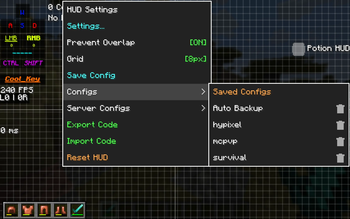
- Right-click empty space for the global menu: settings, presets, server configs, share codes and a full layout reset.
!(https://cdn.modrinth.com/data/cached_images/e275f795011c66be1f28b2cc4c8b68f164478f42_0.webp)
!(https://cdn.modrinth.com/data/cached_images/843895321707c036eb73b089bc855445253ad740.png)
## The settin
📊 Mod Details
- Game
- Minecraft Mods
- Author
- Eymistaken
- Version
- 1.1.1-9
- Downloads
- 9,907
- Endorsements
- 9
- Category
- fabric
- Created
- 1/23/2026
- Updated
- 8/17/2026
- Game Versions
- 26.1, 26.1.1, 26.1.2, 26.2
- Tags
- library, utility
🔧 How to Install Minecraft Mods Mods
Download from Modrinth. Use Prism Launcher or drop into your mods folder.
📖 Full step-by-step install guide for Minecraft Mods →
Visit the official mod page for specific installation instructions for this mod.
🎮 Need cheat codes or console commands? Check ur gaming wiki for Minecraft Mods commands, item IDs, and more.
❓ Frequently Asked Questions
Which Minecraft Mods versions does Eymistaken's HUD support?
The author lists 26.1, 26.1.1, 26.1.2, 26.2. Other versions may work but are untested by the author.
What is the latest version of Eymistaken's HUD?
Version 1.1.1-9, published 2026-08-17 with 9,907 downloads recorded at the source.
Keep browsing — more Minecraft Mods mods await