Express Carts
🟡 Updated this year⚠️ Install Order · 2 steps
Install in this order, then this mod last — most mods fail to load without their framework and dependencies in place.
🖼️ Gallery (2 images)
🔍 Analysis
- 👍 0.5% endorsement rate
- 🏆 #147 of 920 fabric mods in this game by downloads
📋 About This Mod
# Express Carts <a href="https://modrinth.com/mod/express-carts"><img alt="modrinth" height="56" src="https://cdn.jsdelivr.net/npm/@intergrav/devins-badges@3/assets/cozy/available/modrinth_vector.svg"></a> <a href="https://github.com/Seercat3160/express-carts"><img alt="github" height="56" src="https://cdn.jsdelivr.net/npm/@intergrav/devins-badges@3/assets/cozy/available/github_vector.svg"></a> <a href="https://modrinth.com/mod/fabric-api"><img alt="fabric-api" height="56" src="https://cdn.jsdelivr.net/npm/@intergrav/devins-badges@3/assets/cozy/requires/fabric-api_vector.svg"></a> Express Carts is a serverside Fabric mod<!-- modrinth_exclude.start --> for Minecraft<!-- modrinth_exclude.end --> which adds a new type of minecart with a faster speed, improved behaviour, and new features. It gives your players a better minecart experience without requiring clientside mods or breaking any technical builds. - Minecarts become a useful (and fun!) method of travel - Twice the speed of vanilla minecarts (configurable) - Uses Minecraft's experimental Minecart Improvements physics without requiring it be enabled for the world - Vanilla minecarts unaffected, so it doesn't break technical builds or cartstone - No clientside mods required (and they never will be) - Inspired by TaterCart, though without aiming to support all its features It adds the "Express Minecart", which has a default maximum speed of 16 blocks per second (compared to the vanilla 8) and uses the behaviours from Minecraft's Minecart Improvements experimental feature without requiring that feature to be enabled for the world. The behaviour and speed of all vanilla minecarts is unaffected, allowing technical cartstone builds to coexist with passenger rail networks that make use of faster Express Minecarts. ## Installation Install the Express Carts mod itself and ensure you also have Fabric API present. The mod also depends on Polymer, MixinExtras, the Server Translations API, and BetterConfig, but these are bundled and need not be installed. However, we highly recommend making Polymer's generated resource pack available to players, such as by using (https://polymer.pb4.eu/latest/user/resource-pack-hosting/) which requires installing that mod separately. Singleplayer works, but is not as actively maintained as use with dedicated servers. ## Usage An Express Minecart can be crafted using a normal minecart and a redstone torch. The Express Minecart item will be seen by Vanilla players as a normal minecart item with an enchantment glint, and players with the Polymer-generated resource pack will see a custom item texture. Only a normal (passenger) minecart variant is available, not any of the other Vanilla minecart types. It is used exactly like normal, it just has twice the maximum speed and substantially improved physics behaviours. When placed in the world, an Express Minecart will appear as a minecart with a red carpet inside, to distinguish it from a normal minecart. ### Braking If the configuration option `brakingEnabled` is `true` (the default), a player can hold their backwards movement key while inside an Express Minecart to slow the minecart down. The acceleration applied is configurable. ## Configuration Express Carts can be configured by using the commands under `/config expresscarts` (`/cconfig expresscarts` in singleplayer), or by editing `config/expresscarts/config.json` while the server is stopped. The following configuration options are available: - `maxMinecartSpeed` (default 16): The maximum speed that can be reached by Express Minecarts, in blocks per second. - `waterSpeedMultiplier` (default 0.5): The scaling factor applied to an Express Minecart's maximum speed when it is in water. - `brakingEnabled` (default `true`): Whether players can hold the backwards movement key to brake. - `brakeSlowdown` (default 0.8): Amount by which an Express Minecart's velocity is scaled each tick their passenger holds the brakes. - `fastUnpoweredSlowdown` (default `false`): Stop faster on unpowered powered rails. May improve compatibility with builds such as minecart stations. - `loadChunks` (default `false`): Load chunks around Express Minecarts, in the same way as ender pearls. - `fallDamageMultiplier` (default 1.0): Fall damage multiplier for an Express Minecart's passengers. - `blockSpeedMultipliers`: A map from block ids (e.g. `minecraft:dirt`) to multiplier values for the maximum cart speed if the rail is placed on that block. ## Version Support The latest version of Minecraft is the primary target for feature additions and bug fixes, but the mod may simultaneously be maintained for older Minecraft versions at our discretion. Please let us know if you would like a particular Minecraft version to be supported.
# Express Carts



Express Carts is a serverside Fabric mod for Minecraft which adds a new type of minecart with a faster speed, improved behaviour, and new features. It gives your players a better minecart experience without requiring clientside mods or breaking any technical builds.
- Minecarts become a useful (and fun!) method of travel
- Twice the speed of vanilla minecarts (configurable)
- Uses Minecraft's experimental Minecart Improvements physics without requiring it be enabled for the world
- Vanilla minecarts unaffected, so it doesn't break technical builds or cartstone
- No clientside mods required (and they never will be)
- Inspired by TaterCart, though without aiming to support all its features
It adds the "Express Minecart", which has a default maximum speed of 16 blocks per second (compared to the vanilla 8) and uses the behaviours from Minecraft's Minecart Improvements experimental feature without requiring that feature to be enabled for the world. The behaviour and speed of all vanilla minecarts is unaffected, allowing technical cartstone builds to coexist with passenger rail networks that make use of faster Express Minecarts.
## Installation
Install the Express Carts mod itself and ensure you also have Fabric API present. The mod also depends on Polymer, MixinExtras, the Server Translations API, and BetterConfig, but these are bundled and need not be installed.
However, we highly recommend making Polymer's generated resource pack available to players, such as by using (https://polymer.pb4.eu/latest/user/resource-pack-hosting/) which requires installing that mod separately.
Singleplayer works, but is not as actively maintained as use with dedicated servers.
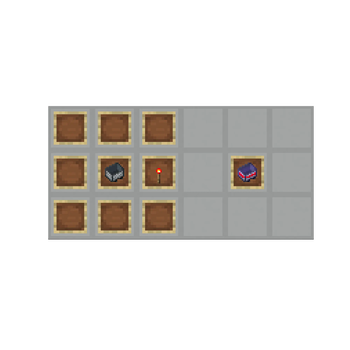
An Express Minecart can be crafted using a normal minecart and a redstone torch. The Express Minecart item will be seen by Vanilla players as a normal minecart item with an enchantment glint, and players with the Polymer-generated resource pack will see a custom item texture.
Only a normal (passenger) minecart variant is available, not any of the other Vanilla minecart types. It is used exactly like normal, it just has twice the maximum speed and substantially improved physics behaviours.
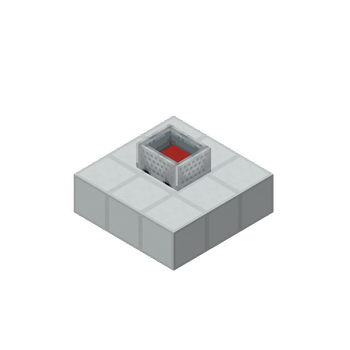
When placed in the world, an Express Minecart will appear as a minecart with a red carpet inside, to distinguish it from a normal minecart.
### Braking
If the configuration option `brakingEnabled` is `true` (the default), a player can hold their backwards movement key while inside an Express Minecart to slow the minecart down. The acceleration applied is configurable.
## Configuration
Express Carts can be configured by using the commands under `/config expresscarts` (`/cconfig expresscarts` in singleplayer), or by editing `config/expresscarts/config.json` while the server is stopped. The following configuration options are available:
- `maxMinecartSpeed` (default 16): The maximum speed that can be reached by Express Minecarts, in blocks per second.
- `waterSpeedMultiplier` (default 0. 5): The scaling factor applied to an Express Minecart's maximum speed when it is in water.
- `brakingEnabled` (default `true`): Whether players can hold the backwards movement key to brake.
- `brakeSlowdown` (default 0. 8): Amount by which an Express Minecart's velocity is scaled each tick their passenger holds the brakes.
- `fastUnpoweredSlowdown` (default `false`): Stop faster on unpowered powered rails. May improve compatibility with builds such as minecart stations.
- `loadChunks` (default `false`): Load chunks around Express Minecarts, in the same way as ender pearls.
- `fallDamageMultiplier` (default 1. 0): Fall damage multiplier for an Express Minecart's passengers.
- `blockSpeedMultipliers`: A map from block ids (e.g. `minecraft:dirt`) to multiplier values for the maximum cart speed if the rail is placed on that block.
## Version Support
The latest version of Minecraft is the primary target for feature additions and bug fixes, but the mod may simultaneously be maintained for older Minecraft versions at our discretion. Please let us know if you would like a particular Minecraft version to be supported.
📊 Mod Details
- Game
- Minecraft Mods
- Author
- seercat
- Version
- 1.4.2+26.2
- Downloads
- 5,695
- Endorsements
- 30
- Category
- fabric
- Created
- 4/21/2025
- Updated
- 7/1/2026
- Game Versions
- 26.2
- Tags
- game-mechanics, technology, transportation
🔧 How to Install Minecraft Mods Mods
Download from Modrinth. Use Prism Launcher or drop into your mods folder.
📖 Full step-by-step install guide for Minecraft Mods →
Visit the official mod page for specific installation instructions for this mod.
🎮 Need cheat codes or console commands? Check ur gaming wiki for Minecraft Mods commands, item IDs, and more.
❓ Frequently Asked Questions
Which Minecraft Mods versions does Express Carts support?
The author lists 26.2. Other versions may work but are untested by the author.
What is the latest version of Express Carts?
Version 1.4.2+26.2, published 2026-07-01 with 5,695 downloads recorded at the source.
Keep browsing — more Minecraft Mods mods await