Epic RPG: Salvage Inventory
🟡 Updated this year⚠️ Install Order · 2 steps
Install in this order, then this mod last — most mods fail to load without their framework and dependencies in place.
🖼️ Gallery (1 images)
🔍 Analysis
- 👍 0.2% endorsement rate
- 🏆 #144 of 369 forge mods in this game by downloads
📋 About This Mod
<div style="text-align:center"> <h1 style="font-size:24px;font-weight:bold">Salvage Inventory</h1> <p style="font-size:18px;line-height:1.6"> <strong>Salvage Inventory</strong> is a utility mod that adds an RPG-style salvage interface to help you recycle unwanted gear directly from your inventory. Instead of simply throwing items away, you can destroy them and receive configurable rewards based on Datapack rules. </p> <p style="font-size:18px;line-height:1.6"> When you open the player inventory, you can access the Salvage Inventory screen using a configurable keybind from the controls menu. By default, this key is <strong>R</strong>, but it can be changed to any other key in the settings. </p> <p style="font-size:18px;line-height:1.6"> Inside this interface, you will find a 27-slot upper storage area where you can place the items you want to salvage. Once the items are there, pressing the salvage button will process them using the configured rules, allowing items to be destroyed and optionally return rewards. </p> <p style="font-size:18px;line-height:1.6"> The salvage system is fully editable through Datapacks, making it possible to define custom item-based and tag-based rules, reward outputs, and optional <strong>chance</strong> values. This allows modpack creators to customize the feature for their own progression and balancing needs. </p> <p style="font-size:18px;line-height:1.6"> The mod also includes compatibility with <strong>Epic RPG: Rarity System</strong> and <strong>Legendary Tabs</strong>. When supported mods are present, salvage rewards can react to item rarity and the salvage screen can be accessed more conveniently from inventory tabs. </p> </div> *** <div style="text-align:center"> <h1 style="font-size:24px;font-weight:bold">Datapack Integration</h1> <p style="font-size:18px;line-height:1.6"> Any mod or Datapack can add its own salvage rules by placing JSON files in the following paths: <br><strong>data/salvageinventory/salvage/by_id</strong> <br><strong>data/salvageinventory/salvage/by_tag</strong> </p> <p style="font-size:18px;line-height:1.6"> File names do not need to match the ones included with the mod. Any valid <strong>.json</strong> file placed in those folders will be loaded, as long as it follows the correct salvage rule format. </p> <p style="font-size:18px;line-height:1.6"> Rules can be registered by item ID or by tag, allowing broad compatibility with other mods without requiring direct code integration. This makes it possible to support both specific items and whole categories of items through Datapack definitions. </p> </div> *** <div style="text-align:center;background-color:transparent"> <h1 style="font-size:28px;font-weight:bold">🌐 Join Our Discord Community</h1> <p>Do you have ideas, suggestions, or found a bug? This is the perfect place to share them!</p> <p>In our Discord community you can:</p> <p>💡 Share proposals and suggestions to improve the mods.</p> <p>🛠️ Report bugs and issues so we can improve everything together.</p> <p>🎮 Use my mods freely in your own modpacks.</p> <p>📢 Share your modpack with the community and show your style.</p> <p>This is a space to grow together with respect, creativity, and a passion for mods and modpacks. Your feedback is always welcome!</p> </div> <div style="text-align:center"> <a style="display:inline-block;background-color:#ff5f5f;color:#fff;font-size:18px;font-weight:bold;text-decoration:none;margin-right:15px" href="https://ko-fi.com/heroxp" target="_blank" rel="nofollow">☕ Support me on Ko-fi</a> <a style="display:inline-block;background-color:#5865f2;color:#fff;font-size:18px;font-weight:bold;text-decoration:none" href="https://discord.gg/7Qk9mycTrk" target="_blank" rel="nofollow">💬 Join Discord</a> </div> <div style="text-align:center;background-color:transparent"> <img style="width:300px" src="https://i.postimg.cc/RhnTBLJ1/Discord-XP.png" alt="Discord XP"> </div>
Salvage Inventory
Salvage Inventory is a utility mod that adds an RPG-style salvage interface to help you recycle unwanted gear directly from your inventory. Instead of simply throwing items away, you can destroy them and receive configurable rewards based on Datapack rules.
When you open the player inventory, you can access the Salvage Inventory screen using a configurable keybind from the controls menu. By default, this key is R, but it can be changed to any other key in the settings.
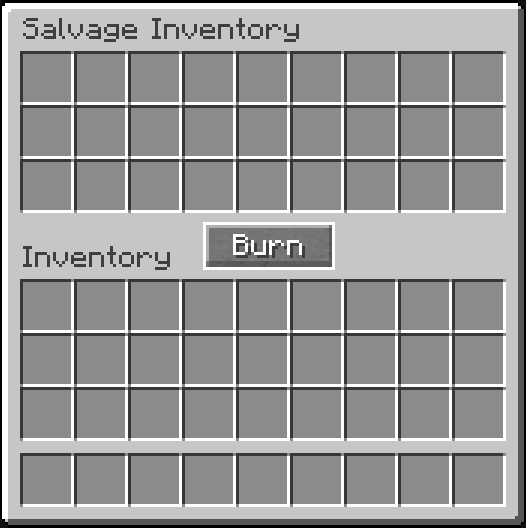
Inside this interface, you will find a 27-slot upper storage area where you can place the items you want to salvage. Once the items are there, pressing the salvage button will process them using the configured rules, allowing items to be destroyed and optionally return rewards.
The salvage system is fully editable through Datapacks, making it possible to define custom item-based and tag-based rules, reward outputs, and optional chance values. This allows modpack creators to customize the feature for their own progression and balancing needs.
The mod also includes compatibility with Epic RPG: Rarity System and Legendary Tabs. When supported mods are present, salvage rewards can react to item rarity and the salvage screen can be accessed more conveniently from inventory tabs.
Datapack Integration
Any mod or Datapack can add its own salvage rules by placing JSON files in the following paths: data/salvageinventory/salvage/by_id data/salvageinventory/salvage/by_tag
File names do not need to match the ones included with the mod. Any valid .json file placed in those folders will be loaded, as long as it follows the correct salvage rule format.
Rules can be registered by item ID or by tag, allowing broad compatibility with other mods without requiring direct code integration. This makes it possible to support both specific items and whole categories of items through Datapack definitions.
🌐 Join Our Discord Community
Do you have ideas, suggestions, or found a bug? This is the perfect place to share them!
In our Discord community you can:
💡 Share proposals and suggestions to improve the mods.
🛠️ Report bugs and issues so we can improve everything together.
🎮 Use my mods freely in your own modpacks.
📢 Share your modpack with the community and show your style.
This is a space to grow together with respect, creativity, and a passion for mods and modpacks. Your feedback is always welcome!

📊 Mod Details
- Game
- Minecraft Mods
- Author
- HER0XP
- Version
- 1.0.0
- Downloads
- 666
- Endorsements
- 1
- Category
- forge
- Created
- 5/10/2026
- Updated
- 8/15/2026
- Game Versions
- 1.21.1
- Tags
- utility
🔧 How to Install Minecraft Mods Mods
Download from Modrinth. Use Prism Launcher or drop into your mods folder.
📖 Full step-by-step install guide for Minecraft Mods →
Visit the official mod page for specific installation instructions for this mod.
🎮 Need cheat codes or console commands? Check ur gaming wiki for Minecraft Mods commands, item IDs, and more.
❓ Frequently Asked Questions
Which Minecraft Mods versions does Epic RPG: Salvage Inventory support?
The author lists 1.21.1. Other versions may work but are untested by the author.
What is the latest version of Epic RPG: Salvage Inventory?
Version 1.0.0, published 2026-08-15 with 666 downloads recorded at the source.
Keep browsing — more Minecraft Mods mods await