Entity Distance 1.12.2
🟠 Updated over a year ago⚠️ Install Order · 2 steps
Install in this order, then this mod last — most mods fail to load without their framework and dependencies in place.
🖼️ Gallery (1 images)
🔍 Analysis
- 👍 0.0% endorsement rate
- 🏆 #318 of 386 forge mods in this game by downloads
📋 About This Mod
# (https://github.com/YDMsama/EntityDistance-1.12.2#entity-distance-mod) Rendering entities from greater distances or reduce that for improved performance. (Customizable for each entity type) ## (https://github.com/YDMsama/EntityDistance-1.12.2#introduction) This simple mod allows you to customize the rendering and tracking distances for entities in Minecraft1.12.2. For instance, you can opt to see hostile entities from farther away and render neutral entities like animals at closer distances, thus optimizing both FPS and network performance. !(https://media.forgecdn.net/attachments/735/871/render-sheep.png) ### (https://github.com/YDMsama/EntityDistance-1.12.2#glossary) * **Entity Rendering Distance**: The maximum distance at which entities are visually displayed on the client-side. This setting directly impacts client-side performance. * _Example_: Setting the rendering distance to its maximum allows all entities to be visually displayed at the full extent of their tracking distance. Conversely, setting it to zero results in no entities being rendered, although they are still being tracked by the server. * _Practical Tip_: If you're using a potato computer, you can decrease the rendering distance to ensure entities are only visually displayed when they are closer, which can help improve performance. * **Entity Tracking Distance**: This refers to the range within which the server communicates information about entities to the client, making it possible for them to be tracked and eventually rendered. This setting affects server performance. * _Note_: For an entity to be rendered, it must first be within the tracking distance. __**Thus, the actual rendering distance of an entity is the lesser of the set rendering and tracking distances.**__ > **<span style="color: #ff0000;">Note: If you aim to increase an entity's rendering distance, you must also increase its tracking distance. An entity must first be tracked before it can be rendered.</span>** ## (https://github.com/YDMsama/EntityDistance-1.12.2#features) * Adjust entity rendering distance. * Adjust entity tracking distance. * Provides a slider in the settings menu for easy adjustments. * Entity Blacklist/Whitelist * Custom Entity Track Multipliers ## (https://github.com/YDMsama/EntityDistance-1.12.2#commands) * `/entitydistance <configName> <value>` (Possible `<configName>`: renderDistanceMultiplier, trackDistanceMultiplier, Whitelist, entityblacklist, customentitytrackmultipliers) * `/setrenderdistance <value>` * `/settrackdistance <value>` * `/entitylistadd <entityID>` * `/entitylistremove <entityID>` * `/customlistadd <entityID>,<multiplier>` * `/customlistremove <entityID>` ## (https://github.com/YDMsama/EntityDistance-1.12.2#installation) 1. Download the latest version of Entity Distance Mod. 2. Place the downloaded jar file into the Minecraft mods folder. 3. After installing the mod, navigate to the settings menu where you'll find sliders to adjust the entity rendering and tracking distances. Adjust them to your preference and enjoy the game! ## (https://github.com/YDMsama/EntityDistance-1.12.2#faq) **Q**: Can this mod be used alongside other performance mods? **A**: Yes, this mod is compatible with most performance mods. <span style="color: #ff0000;">However, ensure to test it before using in tandem with other mods.</span> **Q**: Is this mod server-side or client-side? **A**: This mod can function on both the server and client sides. ## (https://github.com/YDMsama/EntityDistance-1.12.2#futurefuture-plans) * Global settings for hostile (and other faction) entities. * Custom configurations for specific entities, e.g., projectiles. ## (https://github.com/YDMsama/EntityDistance-1.12.2#contributing) If you've identified a bug or wish to propose a new feature, kindly create an issue on our GitHub page. Should you desire to contribute code-wise, feel free to fork the repository and submit a pull request. ## (https://github.com/YDMsama/EntityDistance-1.12.2#license) This mod is released under the MIT license. Kindly refer to the LICENSE file for more details. ## (https://github.com/YDMsama/EntityDistance-1.12.2#other) thanks to (https://github.com/mouse0w0/forge-mixin-example) for their mixin template!
# (https://github.com/YDMsama/EntityDistance-1. 12. 2#entity-distance-mod)
Rendering entities from greater distances or reduce that for improved performance. (Customizable for each entity type)
## (https://github.com/YDMsama/EntityDistance-1. 12. 2#introduction)
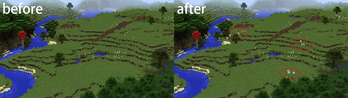
This simple mod allows you to customize the rendering and tracking distances for entities in Minecraft1. 12. 2. For instance, you can opt to see hostile entities from farther away and render neutral entities like animals at closer distances, thus optimizing both FPS and network performance.
!(https://media.forgecdn.net/attachments/735/871/render-sheep.png)
### (https://github.com/YDMsama/EntityDistance-1. 12. 2#glossary)
Entity Rendering Distance: The maximum distance at which entities are visually displayed on the client-side. This setting directly impacts client-side performance. _Example_: Setting the rendering distance to its maximum allows all entities to be visually displayed at the full extent of their tracking distance. Conversely, setting it to zero results in no entities being rendered, although they are still being tracked by the server. _Practical Tip_: If you're using a potato computer, you can decrease the rendering distance to ensure entities are only visually displayed when they are closer, which can help improve performance. Entity Tracking Distance: This refers to the range within which the server communicates information about entities to the client, making it possible for them to be tracked and eventually rendered. This setting affects server performance. _Note_: For an entity to be rendered, it must first be within the tracking distance. __Thus, the actual rendering distance of an entity is the lesser of the set rendering and tracking distances.__
> Note: If you aim to increase an entity's rendering distance, you must also increase its tracking distance. An entity must first be tracked before it can be rendered.
## (https://github.com/YDMsama/EntityDistance-1. 12. 2#features)
Adjust entity rendering distance. Adjust entity tracking distance. Provides a slider in the settings menu for easy adjustments. Entity Blacklist/Whitelist Custom Entity Track Multipliers
## (https://github.com/YDMsama/EntityDistance-1. 12. 2#commands)
`/entitydistance
## (https://github.com/YDMsama/EntityDistance-1. 12. 2#installation)
1. Download the latest version of Entity Distance Mod. 2. Place the downloaded jar file into the Minecraft mods folder. 3. After installing the mod, navigate to the settings menu where you'll find sliders to adjust the entity rendering and tracking distances. Adjust them to your preference and enjoy the game!
## (https://github.com/YDMsama/EntityDistance-1. 12. 2#faq)
Q: Can this mod be used alongside other performance mods? A: Yes, this mod is compatible with most performance mods. However, ensure to test it before using in tandem with other mods.
Q: Is this mod server-side or client-side? A: This mod can function on both the server and client sides.
## (https://github.com/YDMsama/EntityDistance-1. 12. 2#futurefuture-plans)
Global settings for hostile (and other faction) entities. * Custom configurations for specific entities, e.g., projectiles.
## (https://github.com/YDMsama/EntityDistance-1. 12. 2#contributing)
If you've identified a bug or wish to propose a new feature, kindly create an issue on our GitHub page. Should you desire to contribute code-wise, feel free to fork the repository and submit a pull request.
## (https://github.com/YDMsama/EntityDistance-1. 12. 2#license)
This mod is released under the MIT license. Kindly refer to the LICENSE file for more details.
## (https://github.com/YDMsama/EntityDistance-1. 12. 2#other)
thanks to (https://github.com/mouse0w0/forge-mixin-example) for their mixin template!
📊 Mod Details
- Game
- Minecraft Mods
- Author
- ydmsama
- Version
- 1.0.3
- Downloads
- 42,973
- Endorsements
- 1
- Category
- forge
- Created
- 6/21/2025
- Updated
- 6/14/2025
- Game Versions
- 1.12.2
- Tags
- game-mechanics, optimization, utility
🔧 How to Install Minecraft Mods Mods
Download from Modrinth. Use Prism Launcher or drop into your mods folder.
📖 Full step-by-step install guide for Minecraft Mods →
Visit the official mod page for specific installation instructions for this mod.
🎮 Need cheat codes or console commands? Check ur gaming wiki for Minecraft Mods commands, item IDs, and more.
❓ Frequently Asked Questions
Which Minecraft Mods versions does Entity Distance 1.12.2 support?
The author lists 1.12.2. Other versions may work but are untested by the author.
What is the latest version of Entity Distance 1.12.2?
Version 1.0.3, published 2025-06-14 with 42,973 downloads recorded at the source.
Keep browsing — more Minecraft Mods mods await