Entity Debugger
🟠 Updated over a year ago⚠️ Install Order · 2 steps
Install in this order, then this mod last — most mods fail to load without their framework and dependencies in place.
🖼️ Gallery (2 images)

🔍 Analysis
- 🏆 #779 of 909 fabric mods in this game by downloads
📋 About This Mod
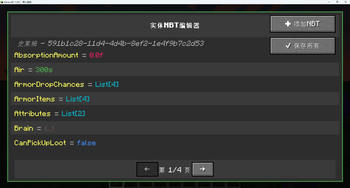
# Entity Debugger !(https://cdn.modrinth.com/data/cached_images/d08e674506d8fd517c21f0d7a0ef74653eb0d98b.png) ## Overview Entity Debugger is a powerful Minecraft Fabric mod that provides an intuitive entity NBT data editing interface for players and developers. With a simple right-click, you can view and modify any entity's NBT data with real-time synchronization to the game world. ## Key Features ### 🎯 Visual NBT Editor - **Real-time Editing**: Edit entity NBT data directly in-game without exiting the world - **Type Highlighting**: Different NBT types displayed in distinct colors for easy identification - **Boolean Dropdown**: Intuitive dropdown selection for boolean values (true/false) - **List Editor**: Dedicated multi-line list editor with syntax highlighting ### 🔧 Advanced Editing Features - **Special Tag Synchronization**: Critical tags (Pos, Rotation, Health, etc.) take effect immediately - **Batch Operations**: Support for adding new NBT tags and batch saving all modifications - **Pagination System**: Browse large amounts of NBT data with pagination support - **Data Validation**: Input validation and error prompts to prevent invalid modifications ### 🎨 User-Friendly Interface - **Modern UI**: Dark theme design that matches Minecraft's style - **Real-time Preview**: Modifications show immediate effects without restarting the game - **Undo Protection**: Prompt for unsaved changes before closing - **Keyboard Shortcuts**: Support for shortcuts like Enter to save, Esc to cancel ## How to Use 1. **Obtain Debug Stick**: Find the "Entity Debug Stick" in creative mode operator tab 2. **Select Entity**: Right-click any entity while holding the debug stick 3. **Start Editing**: View and modify NBT data in the opened interface 4. **Save Changes**: Click the "Save All" button to apply modifications ## Technical Features - **Fabric API**: Developed based on the latest Fabric architecture - **Multi-language Support**: Complete Chinese and English localization - **Performance Optimized**: Efficient memory management and rendering optimization - **Compatibility**: Compatible with most mods without affecting game performance ## Installation Requirements - Minecraft 1.20+ - Fabric Loader - Fabric API ## Developer Features For mod developers, this tool can: - Quickly debug entity data - Test NBT structures - Validate data synchronization logic - Learn Minecraft entity data structures ## Safety Notice ⚠️ **Warning**: Incorrect NBT modifications may cause game crashes or entity corruption. Recommended to use in creative mode or test worlds. Backup your world before making important changes. ## Roadmap - Support for more NBT types - Search and filter functionality - Preset template system - History tracking feature - Export/import NBT data ## Support & Feedback If you encounter any issues or have feature suggestions, please submit an Issue on the project's GitHub page. We welcome community contributions and feedback!
# Entity Debugger !(https://cdn.modrinth.com/data/cached_images/d08e674506d8fd517c21f0d7a0ef74653eb0d98b.png) ## Overview
Entity Debugger is a powerful Minecraft Fabric mod that provides an intuitive entity NBT data editing interface for players and developers. With a simple right-click, you can view and modify any entity's NBT data with real-time synchronization to the game world.
## Key Features
### 🎯 Visual NBT Editor - Real-time Editing: Edit entity NBT data directly in-game without exiting the world - Type Highlighting: Different NBT types displayed in distinct colors for easy identification - Boolean Dropdown: Intuitive dropdown selection for boolean values (true/false) - List Editor: Dedicated multi-line list editor with syntax highlighting
### 🔧 Advanced Editing Features - Special Tag Synchronization: Critical tags (Pos, Rotation, Health, etc.) take effect immediately - Batch Operations: Support for adding new NBT tags and batch saving all modifications - Pagination System: Browse large amounts of NBT data with pagination support - Data Validation: Input validation and error prompts to prevent invalid modifications
### 🎨 User-Friendly Interface - Modern UI: Dark theme design that matches Minecraft's style - Real-time Preview: Modifications show immediate effects without restarting the game - Undo Protection: Prompt for unsaved changes before closing - Keyboard Shortcuts: Support for shortcuts like Enter to save, Esc to cancel
## How to Use
1. Obtain Debug Stick: Find the "Entity Debug Stick" in creative mode operator tab 2. Select Entity: Right-click any entity while holding the debug stick 3. Start Editing: View and modify NBT data in the opened interface 4. Save Changes: Click the "Save All" button to apply modifications
## Technical Features
- Fabric API: Developed based on the latest Fabric architecture
- Multi-language Support: Complete Chinese and English localization
- Performance Optimized: Efficient memory management and rendering optimization
- Compatibility: Compatible with most mods without affecting game performance
## Installation Requirements
- Minecraft 1. 20+
- Fabric Loader
- Fabric API
## Developer Features
For mod developers, this tool can: - Quickly debug entity data - Test NBT structures - Validate data synchronization logic - Learn Minecraft entity data structures
## Safety Notice
- [ ] Support for more NBT types
- [ ] Search and filter functionality
- [ ] Preset template system
- [ ] History tracking feature
- [ ] Export/import NBT data
## Support & Feedback
If you encounter any issues or have feature suggestions, please submit an Issue on the project's GitHub page. We welcome community contributions and feedback!
📊 Mod Details
- Game
- Minecraft Mods
- Author
- driver166
- Version
- 1.1.1
- Downloads
- 248
- Endorsements
- 2
- Category
- fabric
- Created
- 8/22/2025
- Updated
- 8/23/2025
- Game Versions
- 1.20.1
- Tags
- game-mechanics, technology, utility
🔧 How to Install Minecraft Mods Mods
Download from Modrinth. Use Prism Launcher or drop into your mods folder.
📖 Full step-by-step install guide for Minecraft Mods →
Visit the official mod page for specific installation instructions for this mod.
🎮 Need cheat codes or console commands? Check ur gaming wiki for Minecraft Mods commands, item IDs, and more.
❓ Frequently Asked Questions
Which Minecraft Mods versions does Entity Debugger support?
The author lists 1.20.1. Other versions may work but are untested by the author.
What is the latest version of Entity Debugger?
Version 1.1.1, published 2025-08-23 with 248 downloads recorded at the source.
Keep browsing — more Minecraft Mods mods await