EnderTanks
🟠 Updated over a year ago⚠️ Install Order · 2 steps
Install in this order, then this mod last — most mods fail to load without their framework and dependencies in place.
🖼️ Gallery (9 images)






🔍 Analysis
- 👍 0.0% endorsement rate
- 🏆 #1026 of 1284 fabric mods in this game by downloads
📋 About This Mod
<center> <p><img style="display: block; margin-left: auto; margin-right: auto;" src="https://cdn.modrinth.com/data/zZwEA08D/images/9d69bf08e3df8e4a95a9da6ae7e96a3777e2037b.png" width="840" height="105" /></p> <p><img style="display: block; margin-left: auto; margin-right: auto;" src="https://cdn.modrinth.com/data/zZwEA08D/images/c9fda40b859cdef9563019bdca6bf6da06c01277.png" alt="" width="800" height="115" /></p> <p style="text-align: center;"><span style="color: #ff6600;">*** <a style="color: #ff6600;" href="https://modrinth.com/mod/shetiphiancore" rel="nofollow">ShetiPhianCore</a> Required! ***</span></p> <p style="text-align: center;"> </p> <p style="text-align: center;"><span style="font-size: 18px;">Store liquids in another dimension.</span></p> <details> <summary>Click for Recipes+</summary> <p><img style="display: block; margin-left: auto; margin-right: auto;" src="https://cdn.modrinth.com/data/zZwEA08D/images/7cc085996d24251016d2c088bddd7c72ae91f797.png" width="300" height="142" /></p> <p> </p> <p><img style="display: block; margin-left: auto; margin-right: auto;" src="https://cdn.modrinth.com/data/zZwEA08D/images/3c2bfdf3ad1a7ba0d7d90e71ea49da45805ef5aa.png" width="300" height="142" /></p> <p style="text-align: center;"><span style="font-size: 18px;"><strong>Networks</strong></span></p> <p style="text-align: center;"><span style="font-size: 12px;">Tanks are linked only if both color and ownership match.</span></p> <p style="text-align: center;">Change each bands color by shift-right-click with a dye.</p> <p style="text-align: center;">Change ownership by shift-right-click with a diamond or a emerald on a global tank.</p> <p style="text-align: center;">Remove ownership by picking up while holding shift.</p> <p style="text-align: center;"> </p> <p style="text-align: center;"><span style="font-size: 18px;"><strong>Global <span style="font-size: 12px; color: #ffcc00;">(golden)</span></strong></span></p> <p style="text-align: center;">Anyone can use this network.</p> <p style="text-align: center;"> </p> <p style="text-align: center;"><span style="font-size: 18px;"><strong>Private <span style="font-size: 12px; color: #00ffff;">(diamond)</span></strong></span></p> <p style="text-align: center;"><span style="font-size: 12px;">Personal colors. No need to worry about who's using what colors.</span></p> <p style="text-align: center;"> </p> <p style="text-align: center;"><span style="font-size: 18px;"><strong>Teams <span style="color: #339966; font-size: 12px;">(emerald)</span></strong></span></p> <p style="text-align: center;"><span style="font-size: 1.2rem;">Allows people in the same team to share. Tank colors are unique to your team.</span></p> <p style="text-align: center;">See <a href="https://curseforge.com/minecraft/mc-mods/shetiphiancore/pages/spc-teams"><span style="color: #3366ff;">spc-teams</span></a> page for help setting one up.</p> <p style="text-align: center;"><span style="font-size: 18px;"><strong>Upgrades</strong></span></p> <p style="text-align: center;">Apply by shift-right-click with upgrade in hand.</p> <p style="text-align: center;"> </p> <p style="text-align: center;">Starts with a 32 bucket capacity.</p> <p style="text-align: center;">Ender Pearl adds 8 and Ender Eye adds 16, up to 256 buckets.</p> <p style="text-align: center;">Capacity upgrades are permanent and apply to the current owner/color configuration.</p> <p style="text-align: center;"> </p> <p style="text-align: center;">Starts with a transfer speed of 0.25 buckets a second.</p> <p style="text-align: center;">Up to 4 pistons can be applied for a total of 4 buckets a second.</p> <p style="text-align: center;">Pump pushes liquid out bottom if fluid inventory exists and pulls from top.</p> <p style="text-align: center;">Redstone signal enables pump. (Pipes pull without limit).</p> <p style="text-align: center;"> </p> <p style="text-align: center;"><strong>See mod configs to change values.</strong></p> </details> <p><img style="display: block; margin-left: auto; margin-right: auto;" src="https://cdn.modrinth.com/data/zZwEA08D/images/10d7dda31fa8d60f6246523f97ab9e30084be830.png" alt="" width="640" height="85" /></p> <p><span><font size=6><strong>Ender Tanks</strong></font></span></p> <p style="text-align: center;"><span style="font-size: 18px;">All tanks of the same color are connected, always.</span></p> <p style="text-align: center;"><span style="font-size: 18px;">Global, Personal, and Team available.</span></p> <p style="text-align: center;"><span style="font-size: 12px;">shift-right-click on a tank with dye to change band colors.</span></p> <p><img style="display: block; margin-left: auto; margin-right: auto;" src="https://cdn.modrinth.com/data/zZwEA08D/images/b12d557df49f036f739aac8813351cbf64987401.png" alt="" width="500" height="459" /></p> <p style="text-align: center;"> </p> <p><img style="display: block; margin-left: auto; margin-right: auto;" src="https:
ShetiPhianCore Required!
Store liquids in another dimension.
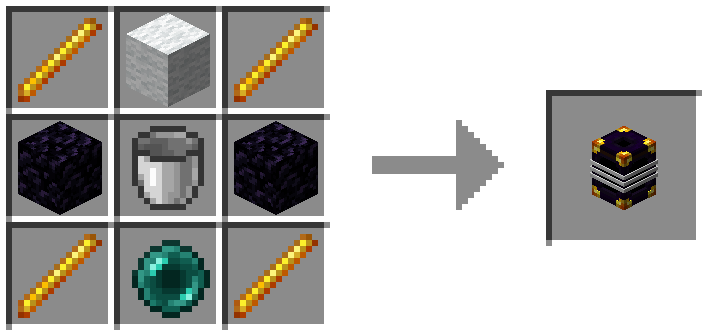
Networks Tanks are linked only if both color and ownership match. Change each bands color by shift-right-click with a dye. Change ownership by shift-right-click with a diamond or a emerald on a global tank. Remove ownership by picking up while holding shift. Global (golden) Anyone can use this network. Private (diamond) Personal colors. No need to worry about who's using what colors. Teams (emerald) Allows people in the same team to share. Tank colors are unique to your team. See spc-teams page for help setting one up. Upgrades Apply by shift-right-click with upgrade in hand. Starts with a 32 bucket capacity. Ender Pearl adds 8 and Ender Eye adds 16, up to 256 buckets. Capacity upgrades are permanent and apply to the current owner/color configuration. Starts with a transfer speed of 0. 25 buckets a second. Up to 4 pistons can be applied for a total of 4 buckets a second. Pump pushes liquid out bottom if fluid inventory exists and pulls from top. Redstone signal enables pump. (Pipes pull without limit). See mod configs to change values.Click for Recipes+
Ender Tanks
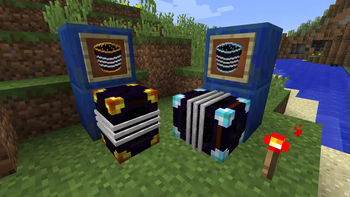
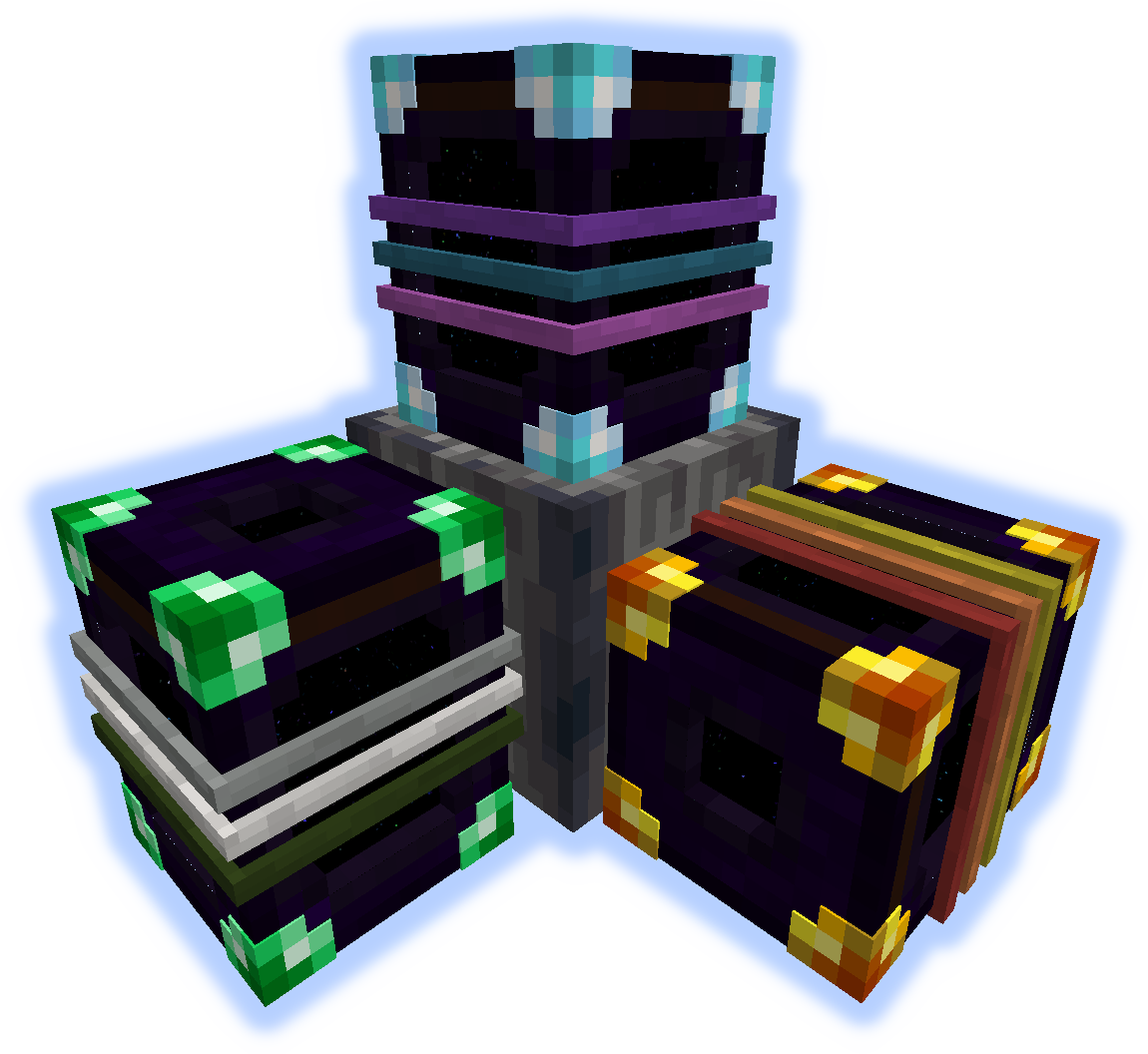
All tanks of the same color are connected, always.
Global, Personal, and Team available.
shift-right-click on a tank with dye to change band colors.
🤖 AI-enhanced — based on mod data
📊 Mod Details
- Game
- Minecraft Mods
- Author
- ShetiPhian
- Version
- 1.21.1-1.0
- Downloads
- 667,364
- Endorsements
- 65
- Category
- fabric
- Created
- 1/13/2023
- Updated
- 8/22/2025
- Game Versions
- 1.21.1
- Tags
- storage, transportation
🔧 How to Install Minecraft Mods Mods
Download from Modrinth. Use Prism Launcher or drop into your mods folder.
📖 Full step-by-step install guide for Minecraft Mods →
Visit the official mod page for specific installation instructions for this mod.
🎮 Need cheat codes or console commands? Check ur gaming wiki for Minecraft Mods commands, item IDs, and more.
❓ Frequently Asked Questions
Which Minecraft Mods versions does EnderTanks support?
The author lists 1.21.1. Other versions may work but are untested by the author.
What is the latest version of EnderTanks?
Version 1.21.1-1.0, published 2025-08-22 with 667,364 downloads recorded at the source.
Keep browsing — more Minecraft Mods mods await