ElytraHUD
🟡 Updated this year⚠️ Install Order · 2 steps
Install in this order, then this mod last — most mods fail to load without their framework and dependencies in place.
🖼️ Gallery (2 images)
🔍 Analysis
- 👍 0.3% endorsement rate
- 🏆 #16 of 299 equipment mods in this game by downloads
📋 About This Mod
[!(https://img.shields.io/badge/JOIN%20OUR%20DISCORD-5865F2?style=for-the-badge&logo=discord&logoColor=white)](https://discord.gg/HTkn94BXmA)
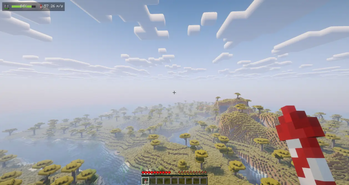
A clean, minimalist HUD that keeps the one thing that matters while flying — how much elytra you have left — right where you can see it, without cluttering your screen. At a glance it shows your elytra durability, how many firework rockets you are carrying, and your current flight speed, all in a single compact row.
!(https://cdn.modrinth.com/data/cached_images/9a73c8e392bf402915267f16d505f6e7cfd2db0a_0.webp)
Client-side only (no server installation required). Fully compatible with singleplayer and multiplayer.
Please report any bugs, errors, or feature suggestions on Discord: (https://discord.gg/4XUPywnEyE)
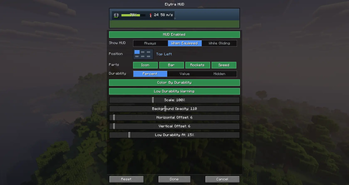
What it shows: - A live durability bar that smoothly shifts green → amber → red as your elytra wears down, with the remaining percentage or the exact value. - A pulsing low-durability warning so you know when to land or swap wings (configurable threshold). - Your firework rocket count (counts your inventory and your offhand). - Your current flight speed. - Real elytra and rocket item icons, drawn straight from the game.
Fully customizable, with a live preview: - Choose when the HUD appears: Always, only When Equipped, or only While Gliding. - Place it in any of six screen positions from a visual grid, with free offsets and 50–200% scaling. - Toggle each element on or off (icon, bar, rockets, speed), and switch the durability text between percent, value, or hidden. - Tune background opacity, color-by-durability, and the low-durability warning. - Every change is reflected instantly in the in-settings preview — what you configure is exactly what you get in game.
Usage: Open the settings screen with the `/elytrahud` command (alias `/ehud`) or a customizable hotkey. On NeoForge you can also open it from the in-game mod list.
Details: - All settings are stored locally in your client config folder (`config/elytrahud.json`). - Available for Fabric, NeoForge, and Forge across a wide range of Minecraft versions. - Fully translated into 10 languages: English, Russian, Simplified Chinese, Spanish, French, German, Japanese, Brazilian Portuguese, Korean, and Italian.
📊 Mod Details
- Game
- Minecraft Mods
- Author
- Nikrecs
- Version
- 1.0.0
- Downloads
- 934
- Endorsements
- 3
- Category
- equipment
- Created
- 6/23/2026
- Updated
- 6/20/2026
- Game Versions
- 26.2
- Tags
- equipment, transportation, utility
🔧 How to Install Minecraft Mods Mods
Download from Modrinth. Use Prism Launcher or drop into your mods folder.
📖 Full step-by-step install guide for Minecraft Mods →
Visit the official mod page for specific installation instructions for this mod.
🎮 Need cheat codes or console commands? Check ur gaming wiki for Minecraft Mods commands, item IDs, and more.
❓ Frequently Asked Questions
Which Minecraft Mods versions does ElytraHUD support?
The author lists 26.2. Other versions may work but are untested by the author.
What is the latest version of ElytraHUD?
Version 1.0.0, published 2026-06-20 with 934 downloads recorded at the source.
Keep browsing — more Minecraft Mods mods await