Elytra HUD Health
🟡 Updated this year⚠️ Install Order · 2 steps
Install in this order, then this mod last — most mods fail to load without their framework and dependencies in place.
🖼️ Gallery (3 images)
🔍 Analysis
- 👍 0.1% endorsement rate
- 🏆 #55 of 284 equipment mods in this game by downloads
📋 About This Mod
<div align="center"> # ✨ Elytra HUD Health ❤️ Minimal, pixel-perfect durability HUD for your elytra with live warnings, localization, and a nostalgic vanilla-style config screen. !(https://cdn.modrinth.com/data/cached_images/92b0e3d3e0a8aab03c31bb4966addd98a732cb6f.gif) </div> ## 🧭 Overview Elytra HUD Health keeps you updated on the exact durability of your wings without opening the inventory. The HUD mimics the original Minecraft UI, can be placed anywhere on screen, and even removes elytra automatically before they shatter. Built for Fabric-based clients (1.21.x, tested on 1.21.4) with full localization (EN / RU / UK / JA) and optional chat warnings. !(https://cdn.modrinth.com/data/cached_images/1dc1d899e708dcfcfbb19303e179e120adf2d47c_0.webp) --- ## 🚀 Features - **Vanilla-styled HUD** – Icon, bar, and percentage share Minecraft's original beveled borders so the overlay feels native. - **Precise positioning & scaling** – Offset the HUD using percentage-based sliders and tweak icon/bar height individually. - **Configurable notifications** – Toggle chat warnings, sounds, percentage text, icon, and progress bar independently. - **Auto-remove safety** – Automatically swap elytra into the hotbar once durability hits a custom threshold; warns you 10% before removal. - **Localization ready** – Built-in English, Russian, Ukrainian, and Japanese translations for both UI and chat; one-click language cycle inside the config. - **Slider preview dimming** – Adjusting sliders momentarily dims the world to improve readability without freezing gameplay. --- ## 📦 Requirements | Dependency | Version | Notes | | ------------------------------------------------- | ----------------- | ------------------------------------ | | (https://fabricmc.net/use/) | 0.16+ | Matches your Minecraft version | | (https://modrinth.com/mod/fabric-api) | Latest for 1.21.x | Needed for HUD events and keybinding | > Optional: (https://modrinth.com/mod/modmenu) for easily opening the config screen in-game. --- ## 🧑💻 Installation 1. Install Fabric Loader for your Minecraft version. 2. Drop Fabric API and `elytra_hud_health-x.y.z.jar` into `/.minecraft/mods` (client-side only). 3. Launch Minecraft once to let the config file `config/elytra_health.json` generate. 4. Press the configured hotkey (default: bound to your existing ElytraBar key) or open via Mod Menu to access the UI. --- ## 🎛️ Configuration Highlights | Setting | Location | Description | | ----------------------------------------------- | ------------------------------------ | --------------------------------------------------------------------- | | `scale`, `offsetX`, `offsetY` | Config screen / `elytra_health.json` | Move and resize the HUD per your resolution | | `showIcon`, `showProgressBar`, `showPercentage` | Same | Toggle individual HUD elements | | `soundsEnabled`, `showWarnings` | Same | Enable ping sounds and chat notifications | | `autoRemove` + `autoRemoveThreshold` | Same | Auto unequip elytra when below threshold, warning 10% prior | | `locale` | Config screen | Cycle between EN / RU / UK / JA; defaults to Minecraft language or EN | > Tip: The config screen uses scrollable sections, a footer credit link, and a dedicated language button. "Done" applies immediately and saves the JSON file. --- ## 🔊 Chat & Sound Alerts - Below 50% / 25% durability: subtle bell sounds (configurable via `soundsEnabled`). - At 10% durability: localized chat warning + yellow highlight. - At 0% durability: break sound and red chat alert. - Auto-remove imminent: red chat warning if you're airborne. - Hotbar full: localized error message if auto-remove finds no empty slot. All chat messages are prefixed with `` and translate according to the selected locale. --- ## 🛠️ Development - **Language files** live in `src/main/resources/assets/elytrabar/lang/`. Add more by copying `en_us.json` and updating `Localization.java`. - **Building**: `./gradlew build` (requires JDK 21+ or JDK 22 as configured in the repo). - **Testing**: Launch the mod in a Fabric dev environment via `./gradlew runClient` to quickly iterate on HUD tweaks. - **Code style**: Vanilla-inspired UI uses manual `DrawContext` rectangles. Comments are intentionally sparse to match the pixel-art workflow. --- ## 🤝 Contributions & License - **Author**: Risefall (concept + design) • README curated wi
# ✨ Elytra HUD Health ❤️
Minimal, pixel-perfect durability HUD for your elytra with live warnings, localization, and a nostalgic vanilla-style config screen.
!(https://cdn.modrinth.com/data/cached_images/92b0e3d3e0a8aab03c31bb4966addd98a732cb6f.gif)
## 🧭 Overview
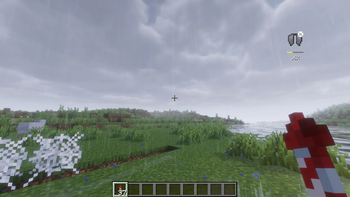
Elytra HUD Health keeps you updated on the exact durability of your wings without opening the inventory. The HUD mimics the original Minecraft UI, can be placed anywhere on screen, and even removes elytra automatically before they shatter. Built for Fabric-based clients (1. 21.x, tested on 1. 21. 4) with full localization (EN / RU / UK / JA) and optional chat warnings.
!(https://cdn.modrinth.com/data/cached_images/1dc1d899e708dcfcfbb19303e179e120adf2d47c_0.webp)
## 🚀 Features
- Vanilla-styled HUD – Icon, bar, and percentage share Minecraft's original beveled borders so the overlay feels native.
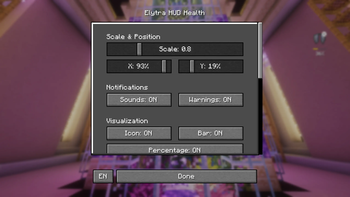
- Precise positioning & scaling – Offset the HUD using percentage-based sliders and tweak icon/bar height individually.
- Configurable notifications – Toggle chat warnings, sounds, percentage text, icon, and progress bar independently.
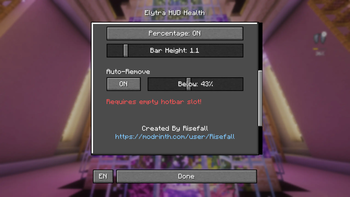
- Auto-remove safety – Automatically swap elytra into the hotbar once durability hits a custom threshold; warns you 10% before removal.
- Localization ready – Built-in English, Russian, Ukrainian, and Japanese translations for both UI and chat; one-click language cycle inside the config.
- Slider preview dimming – Adjusting sliders momentarily dims the world to improve readability without freezing gameplay.
## 📦 Requirements
| Dependency | Version | Notes | | ------------------------------------------------- | ----------------- | ------------------------------------ | | (https://fabricmc.net/use/) | 0. 16+ | Matches your Minecraft version | | (https://modrinth.com/mod/fabric-api) | Latest for 1. 21.x | Needed for HUD events and keybinding |
> Optional: (https://modrinth.com/mod/modmenu) for easily opening the config screen in-game.
## 🧑💻 Installation
1. Install Fabric Loader for your Minecraft version. 2. Drop Fabric API and `elytra_hud_health-x.y.z.jar` into `/.minecraft/mods` (client-side only). 3. Launch Minecraft once to let the config file `config/elytra_health.json` generate. 4. Press the configured hotkey (default: bound to your existing ElytraBar key) or open via Mod Menu to access the UI.
## 🎛️ Configuration Highlights
| Setting | Location | Description | | ----------------------------------------------- | ------------------------------------ | --------------------------------------------------------------------- | | `scale`, `offsetX`, `offsetY` | Config screen / `elytra_health.json` | Move and resize the HUD per your resolution | | `showIcon`, `showProgressBar`, `showPercentage` | Same | Toggle individual HUD elements | | `soundsEnabled`, `showWarnings` | Same | Enable ping sounds and chat notifications | | `autoRemove` + `autoRemoveThreshold` | Same | Auto unequip elytra when below threshold, warning 10% prior | | `locale` | Config screen | Cycle between EN / RU / UK / JA; defaults to Minecraft language or EN |
> Tip: The config screen uses scrollable sections, a footer credit link, and a dedicated language button. "Done" applies immediately and saves the JSON file.
## 🔊 Chat & Sound Alerts
- Below 50% / 25% durability: subtle bell sounds (configurable via `soundsEnabled`).
- At 10% durability: localized chat warning + yellow highlight.
- At 0% durability: break sound and red chat alert.
- Auto-remove imminent: red chat warning if you're airborne.
- Hotbar full: localized error message if auto-remove finds no empty slot.
All chat messages are prefixed with `` and translate according to the selected locale.
## 🛠️ Development
- Language files live in `src/main/resources/assets/elytrabar/lang/`. Add more by copying `en_us.json` and updating `Localization.java`.
- Building: `./gradlew build` (requires JDK 21+ or JDK 22 as configured in the repo).
- Testing: Launch the mod in a Fabric dev environment via `./gradlew runClient` to quickly iterate on HUD tweaks.
- Code style: Vanilla-inspired UI uses manual `DrawContext` rectangles. Comments are intentionally sparse to match the pixel-art workflow.
## 🤝 Contributions & License
- Author: Risefall (concept + design) • README curated wi
📊 Mod Details
- Game
- Minecraft Mods
- Author
- Risefall
- Version
- 1.0.0
- Downloads
- 1,994
- Endorsements
- 1
- Category
- equipment
- Created
- 12/14/2025
- Updated
- 12/11/2025
- Game Versions
- 1.21, 1.21.1, 1.21.2, 1.21.3, 1.21.4
- Tags
- equipment, transportation, utility
🔧 How to Install Minecraft Mods Mods
Download from Modrinth. Use Prism Launcher or drop into your mods folder.
📖 Full step-by-step install guide for Minecraft Mods →
Visit the official mod page for specific installation instructions for this mod.
🎮 Need cheat codes or console commands? Check ur gaming wiki for Minecraft Mods commands, item IDs, and more.
❓ Frequently Asked Questions
Which Minecraft Mods versions does Elytra HUD Health support?
The author lists 1.21, 1.21.1, 1.21.2, 1.21.3, 1.21.4, 1.21.5. Other versions may work but are untested by the author.
What is the latest version of Elytra HUD Health?
Version 1.0.0, published 2025-12-11 with 1,994 downloads recorded at the source.
Keep browsing — more Minecraft Mods mods await