Elite TierTagger
🟡 Updated this year⚠️ Install Order · 2 steps
Install in this order, then this mod last — most mods fail to load without their framework and dependencies in place.
🖼️ Gallery (3 images)

🔍 Analysis
- 🏆 #571 of 909 fabric mods in this game by downloads
📋 About This Mod
<div align="center"> <img src="https://cdn.modrinth.com/data/cached_images/2a4bedb6b9ef67b87829422a5940d5274be9b1b3.png" alt="Banner Elite Storm Mod TierTagger"></img> </div> # Elite TierTagger Official TierTagger of the Elite Storm Tierlist. A **Minecraft Mod** that displays (https://elitestorm.es) player tiers directly on nametags, in chat, and in the player tab list. !(https://cdn.modrinth.com/data/cached_images/993ea95c4818443d0109b4de0db81b3b6a069439.png) !(https://cdn.modrinth.com/data/cached_images/8a2e4c5f613995b564f209cf6a5cd6e608c350cd.png) !(https://cdn.modrinth.com/data/cached_images/6214d7d44a2d51770a60ec3a056f85beb2c31b86_0.webp) !(https://cdn.modrinth.com/data/cached_images/58d1a1c19383ca3dc21062eb17a7c1dbe8354aff.png) ## Features - **Nametag tiers**: Shows the player's tier rank (e.g. `⚔ HT2 | Player`) above their head. - **Chat tiers**: Displays the tier next to the player name in chat messages. - **Tab list tiers**: Shows the tier in the player list (Tab). - **Text display support**: Compatible with nametags that use `TextDisplay` entities. - **8 game modes**: UHC, Axe, Sword, Diamond Pot, Netherite Pot, SMP, Mace, and Vanilla. - **10 tiers**: HT1–HT5 and LT1–LT5, each with a customizable color. - **Display mode**: Show the player's highest tier or a specific game mode's tier. - **In-game config**: Settings screen via (https://modrinth.com/mod/modmenu) + (https://modrinth.com/mod/yacl) to toggle the mod, choose display mode, and customize tier colors. ## Requirements - Minecraft 1.21.6 - Fabric Loader ≥ 0.19.3 - Fabric API - Yet Another Config Lib (YACL) v3 - ModMenu (Optional) ## Installation 1. Install (https://fabricmc.net/use/). 2. Place the mod `.jar` in the `mods` folder. 3. Make sure Fabric API, YACL, and ModMenu are installed. ## Configuration Run `/config` or open Mods menu → Elite TierTagger. From there you can: - Enable/disable the mod. - Choose whether to show the highest tier (`HIGHEST`) or a specific game mode. - Customize each tier's color (HT1–LT5).
# Elite TierTagger
Official TierTagger of the Elite Storm Tierlist.
A Minecraft Mod that displays (https://elitestorm.es) player tiers directly on nametags, in chat, and in the player tab list.
!(https://cdn.modrinth.com/data/cached_images/993ea95c4818443d0109b4de0db81b3b6a069439.png)
!(https://cdn.modrinth.com/data/cached_images/8a2e4c5f613995b564f209cf6a5cd6e608c350cd.png)
!(https://cdn.modrinth.com/data/cached_images/6214d7d44a2d51770a60ec3a056f85beb2c31b86_0.webp)
!(https://cdn.modrinth.com/data/cached_images/58d1a1c19383ca3dc21062eb17a7c1dbe8354aff.png)
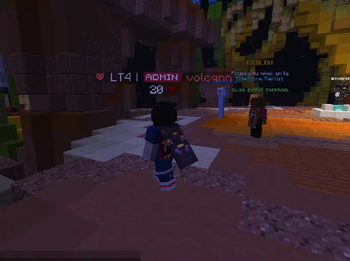
## Features - Nametag tiers: Shows the player's tier rank (e.g. `⚔ HT2 | Player`) above their head. - Chat tiers: Displays the tier next to the player name in chat messages. - Tab list tiers: Shows the tier in the player list (Tab). - Text display support: Compatible with nametags that use `TextDisplay` entities. - 8 game modes: UHC, Axe, Sword, Diamond Pot, Netherite Pot, SMP, Mace, and Vanilla. - 10 tiers: HT1–HT5 and LT1–LT5, each with a customizable color. - Display mode: Show the player's highest tier or a specific game mode's tier. - In-game config: Settings screen via (https://modrinth.com/mod/modmenu) + (https://modrinth.com/mod/yacl) to toggle the mod, choose display mode, and customize tier colors.
## Requirements
- Minecraft 1. 21. 6
- Fabric Loader ≥ 0. 19. 3
- Fabric API
- Yet Another Config Lib (YACL) v3
- ModMenu (Optional)
## Installation
1. Install (https://fabricmc.net/use/). 2. Place the mod `.jar` in the `mods` folder. 3. Make sure Fabric API, YACL, and ModMenu are installed.
## Configuration
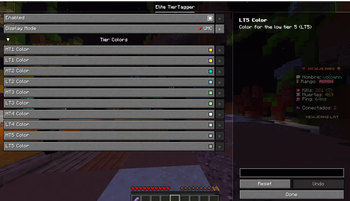
Run `/config` or open Mods menu → Elite TierTagger. From there you can:
- Enable/disable the mod.
- Choose whether to show the highest tier (`HIGHEST`) or a specific game mode.
- Customize each tier's color (HT1–LT5).
📊 Mod Details
- Game
- Minecraft Mods
- Author
- Rayo
- Version
- 1.1.1-beta+mc26.1.2
- Downloads
- 262
- Endorsements
- 2
- Category
- fabric
- Created
- 7/15/2026
- Updated
- 7/16/2026
- Game Versions
- 26.1.2
- Tags
- game-mechanics, social, utility
🔧 How to Install Minecraft Mods Mods
Download from Modrinth. Use Prism Launcher or drop into your mods folder.
📖 Full step-by-step install guide for Minecraft Mods →
Visit the official mod page for specific installation instructions for this mod.
🎮 Need cheat codes or console commands? Check ur gaming wiki for Minecraft Mods commands, item IDs, and more.
❓ Frequently Asked Questions
Which Minecraft Mods versions does Elite TierTagger support?
The author lists 26.1.2. Other versions may work but are untested by the author.
What is the latest version of Elite TierTagger?
Version 1.1.1-beta+mc26.1.2, published 2026-07-16 with 262 downloads recorded at the source.
Keep browsing — more Minecraft Mods mods await