Eggcat
⚪ Last updated 2023⚠️ Install Order · 2 steps
Install in this order, then this mod last — most mods fail to load without their framework and dependencies in place.
🖼️ Gallery (4 images)

🔍 Analysis
- 👍 0.2% endorsement rate
- 🏆 #170 of 254 decoration mods in this game by downloads
📋 About This Mod
# Eggcat Mod The Eggcat Mod is a simple Minecraft mod that adds a new decorative block to the game: the Eggcat. This block serves as a light source that can be turned on and off by clicking it. ## Getting Started ### Prerequisites To use the Eggcat Mod, you will need the following: - Fabric Loader - Fabric API ### Installing 1. Download and install Fabric Loader following the instructions on the (https://fabricmc.net/use/). 2. Download the Eggcat Mod JAR file from the (https://modrinth.com/mod/eggcat/versions). 3. Move the JAR file to the `mods` folder in your Minecraft installation directory. 4. Launch Minecraft with the Fabric profile. ### Crafting the Eggcat Block Once you have installed the mod, you can find the Eggcat block in the creative inventory or craft it in a crafting table like the pattern specified below: ``` | |O| | |O|i|O| |O|O|O| O = Egg i = Redstone Torch ``` To turn the light on or off, simply right-click the block. ## Source Code The source code can be found on (https://github.com/WinterWolfSV/eggcat) under the (https://creativecommons.org/licenses/by-nc/4.0/). More information about the license can be found under the (#license) section. ## License The Eggcat Mod is released under the (https://creativecommons.org/licenses/by-nc/4.0/). This license allows you to use, modify, and distribute the mod for non-commercial purposes, as long as you credit the original author and include a copy of the license in any redistributed versions. ## Bugs and Feedback Bug reports can be submitted either through the (https://github.com/WinterWolfSV/eggcat/issues) page of the Eggcat Mod repository or by contacting me personally over Discord (WinterWolfSV#9577). Please provide as much information as possible, including steps to reproduce the issue, error messages, and any relevant screenshots or log files. Your feedback is greatly appreciated and will help improve the mod for all users.
# Eggcat Mod
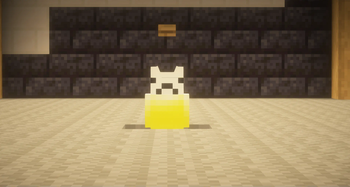
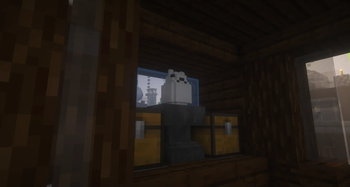
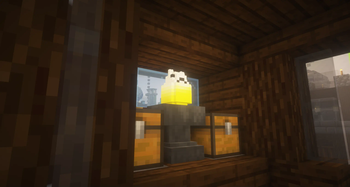
The Eggcat Mod is a simple Minecraft mod that adds a new decorative block to the game: the Eggcat. This block serves as a light source that can be turned on and off by clicking it.
## Getting Started
### Prerequisites
To use the Eggcat Mod, you will need the following:
- Fabric Loader
- Fabric API
### Installing
1. Download and install Fabric Loader following the instructions on the (https://fabricmc.net/use/). 2. Download the Eggcat Mod JAR file from the (https://modrinth.com/mod/eggcat/versions). 3. Move the JAR file to the `mods` folder in your Minecraft installation directory. 4. Launch Minecraft with the Fabric profile.
### Crafting the Eggcat Block
Once you have installed the mod, you can find the Eggcat block in the creative inventory or craft it in a crafting table like the pattern specified below:
``` | |O| | |O|i|O| |O|O|O| O = Egg i = Redstone Torch ```
To turn the light on or off, simply right-click the block.
## Source Code
The source code can be found on (https://github.com/WinterWolfSV/eggcat) under the (https://creativecommons.org/licenses/by-nc/4. 0/). More information about the license can be found under the (#license) section.
The Eggcat Mod is released under the (https://creativecommons.org/licenses/by-nc/4. 0/). This license allows you to use, modify, and distribute the mod for non-commercial purposes, as long as you credit the original author and include a copy of the license in any redistributed versions.
## Bugs and Feedback
Bug reports can be submitted either through the (https://github.com/WinterWolfSV/eggcat/issues) page of the Eggcat Mod repository or by contacting me personally over Discord (WinterWolfSV#9577). Please provide as much information as possible, including steps to reproduce the issue, error messages, and any relevant screenshots or log files. Your feedback is greatly appreciated and will help improve the mod for all users.
📊 Mod Details
- Game
- Minecraft Mods
- Author
- WinterWolfSV
- Version
- 1.0.4
- Downloads
- 504
- Endorsements
- 1
- Category
- decoration
- Created
- 2/27/2023
- Updated
- 6/9/2023
- Game Versions
- 1.20
- Tags
- decoration
🔧 How to Install Minecraft Mods Mods
Download from Modrinth. Use Prism Launcher or drop into your mods folder.
📖 Full step-by-step install guide for Minecraft Mods →
Visit the official mod page for specific installation instructions for this mod.
🎮 Need cheat codes or console commands? Check ur gaming wiki for Minecraft Mods commands, item IDs, and more.
❓ Frequently Asked Questions
Which Minecraft Mods versions does Eggcat support?
The author lists 1.20. Other versions may work but are untested by the author.
What is the latest version of Eggcat?
Version 1.0.4, published 2023-06-09 with 504 downloads recorded at the source.
Keep browsing — more Minecraft Mods mods await