Echo Wireless Redstone
🟡 Updated this year⚠️ Install Order · 2 steps
Install in this order, then this mod last — most mods fail to load without their framework and dependencies in place.
🖼️ Gallery (5 images)
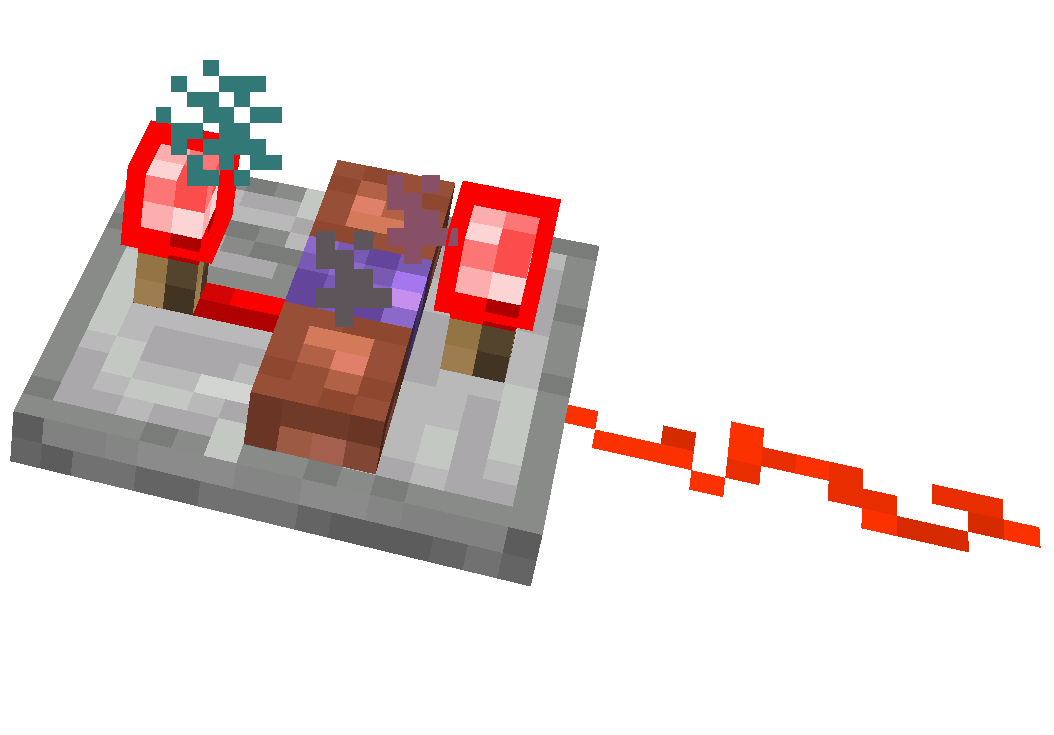
🔍 Analysis
- 👍 0.5% endorsement rate
- 🏆 #96 of 225 datapack mods in this game by downloads
📋 About This Mod
⚠️ IMPORTANT: USAGE GUIDELINES If you're planning to use this on a server or modpack, please refer to: https://gamedash43.github.io/dash-mcl-licenses/#usage !(https://cdn.modrinth.com/data/cached_images/a70b89829567d2f33922c93f5b8e0c8c59abff0b.png) # 🎥Video Overview <iframe width="560" height="315" src="https://www.youtube-nocookie.com/embed/eBsSqkuE4_8" title="YouTube video player" frameborder="0" allow="accelerometer; autoplay; clipboard-write; encrypted-media; gyroscope; picture-in-picture; web-share" allowfullscreen></iframe> Watch the video for a full demo covering setup, linking, and wireless redstone functionality using Echo Redstone components. # 📜How to Use ### 1. Crafting & Frequency - **Unique Frequency ID:** - Each crafted echo horn gets a unique frequency ID. - Only components sharing the same ID will interact. - **Check Frequency:** - Hold shift and use the echo horn, or shift right-click an emitter/receiver. ### 2. Component Setup - **Repeaters Required:** - Place receivers and emitters on repeaters. ### 3. Linking & Activation - **Linking a Receiver:** - Place the receiver on a repeater and right-click it with the echo horn. - **Using an Emitter:** - Place the emitter on a repeater and right-click with the echo horn. - Emitters need experience orbs to broadcast. - Longer repeater delays increase the cooldown between activations. - **Receiver Update:** - Trigger a block update (e.g., place redstone dust in front) to ensure proper function. ### 4. Creating a Mimic (V1.2+) - **Mimic Echo Horn:** - With an emitter set to the desired frequency and an echo shard in your inventory, shift right-click the emitter using a different echo horn. - This produces a mimic echo horn that shares the frequency ID but displays "mimic" instead of the original mob name. # 🛠️Crafting Recipes <details> <summary>Echo Horn Recipe:</summary> !(https://cdn.modrinth.com/data/cached_images/227f2cb10e9dbe16907efd8a7a620364f5147767.png) - Use any copper block (oxidized or waxed) to craft the echo horn. If crafting with a waxed copper block honeycomb can be omitted. </details> <details> <summary>Redstone Echo Receiver:</summary> !(https://cdn.modrinth.com/data/cached_images/5ab3cbb1c1e0abbef43e74341b6389593e8a80b5.png) </details> <details> <summary>Redstone Echo Emitter:</summary> !(https://cdn.modrinth.com/data/cached_images/661a97f20a9be92ebacca324e09595b4e15aa868.png) </details> <details> <summary>Legacy Recipes (Outdated):</summary> !(https://cdn.modrinth.com/data/cached_images/e73f414c5a154f5c1185be432ed88e1a8dfa42a4.png)!(https://cdn.modrinth.com/data/cached_images/3fa71176bb39592df97e620f4353db6a72b3c69e.png) </details> # ❓FAQ <details> <summary>Something is wrong/Nothing is happening</summary> Due to the complexity of this datapack, if something isn’t working correctly, join the Discord to ask for help. </details> <details> <summary>Is this datapack Multiplayer friendly?</summary> *Yes, there are over 2 billion possible frequency ID slots, making it virtually impossible to encounter ID conflicts, even on a multiplayer server. *This is only the case in version V1.1, as version V1.0 has a bug that limits it to roughly 128 channels if you are on V1.0 update to the V1.0 FIXED version. </details> <details> <summary>How does this datapack impact performance?</summary> This datapack does not include any unnecessary ticking functions for items. However, since redstone datapacks require block checks, there is a slight performance impact. No noticeable TPS drops were observed until after 1,500 receivers/emitters. </details> <details> <summary>How do I report a bug?</summary> Join the Discord and either DM me or post a message in the reports channel. </details> <details> <summary>How do I update this datapack from an older version</summary> Just run the command "/function dash.wsred:update" (if there are receivers and emitters in unloaded areas, you might need to run it more than once). </details> <details> <summary>How do I uninstall this datapack?</summary> Just run the command "/function dash.wsred:uninstall" (if there are receivers and emitters in unloaded areas, you might need to run it more than once). </details>
!(https://cdn.modrinth.com/data/cached_images/a70b89829567d2f33922c93f5b8e0c8c59abff0b.png) # 🎥Video Overview Watch the video for a full demo covering setup, linking, and wireless redstone functionality using Echo Redstone components.
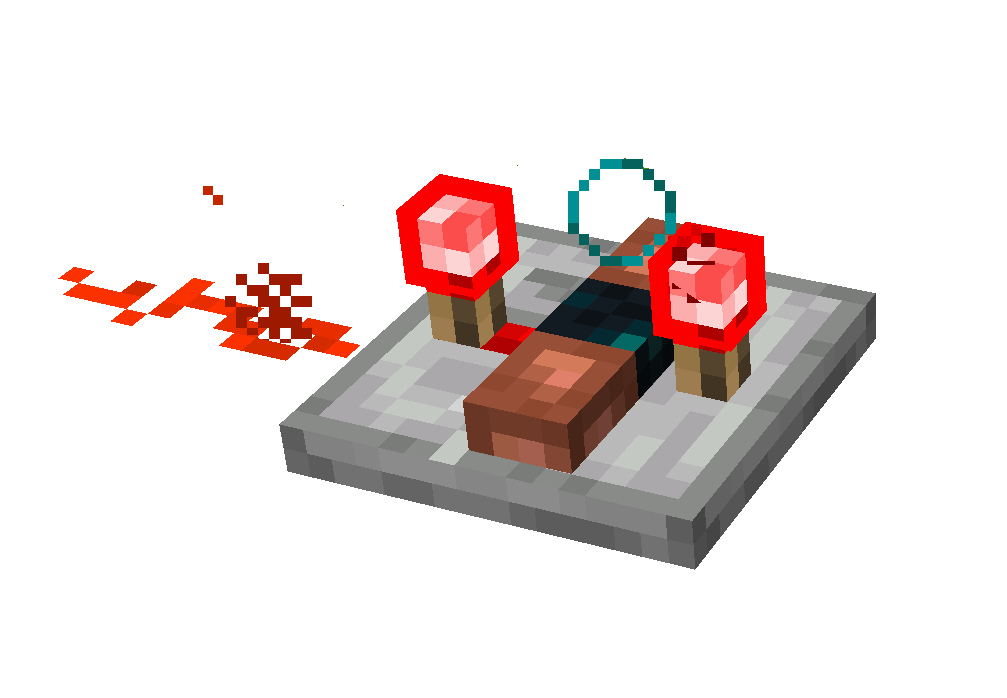
# 📜How to Use ### 1. Crafting & Frequency - Unique Frequency ID: - Each crafted echo horn gets a unique frequency ID. - Only components sharing the same ID will interact. - Check Frequency: - Hold shift and use the echo horn, or shift right-click an emitter/receiver.
### 2. Component Setup - Repeaters Required: - Place receivers and emitters on repeaters.
### 3. Linking & Activation - Linking a Receiver: - Place the receiver on a repeater and right-click it with the echo horn. - Using an Emitter: - Place the emitter on a repeater and right-click with the echo horn. - Emitters need experience orbs to broadcast. - Longer repeater delays increase the cooldown between activations. - Receiver Update: - Trigger a block update (e.g., place redstone dust in front) to ensure proper function.
### 4. Creating a Mimic (V1. 2+) - Mimic Echo Horn: - With an emitter set to the desired frequency and an echo shard in your inventory, shift right-click the emitter using a different echo horn. - This produces a mimic echo horn that shares the frequency ID but displays "mimic" instead of the original mob name.
# 🛠️Crafting Recipes
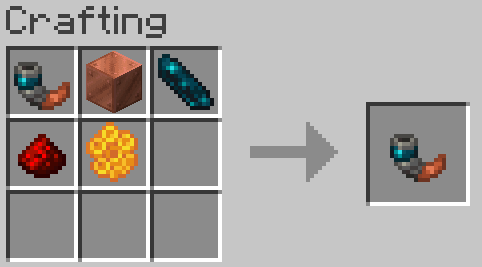
Echo Horn Recipe:
!(https://cdn.modrinth.com/data/cached_images/227f2cb10e9dbe16907efd8a7a620364f5147767.png)
- Use any copper block (oxidized or waxed) to craft the echo horn. If crafting with a waxed copper block honeycomb can be omitted.
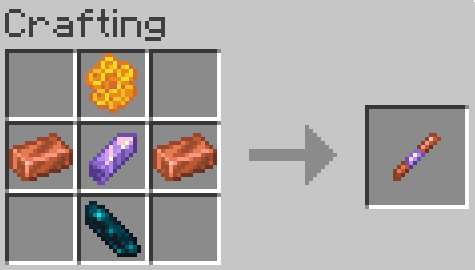
Redstone Echo Receiver:
!(https://cdn.modrinth.com/data/cached_images/5ab3cbb1c1e0abbef43e74341b6389593e8a80b5.png)
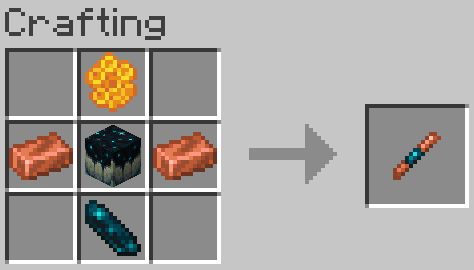
Redstone Echo Emitter:
!(https://cdn.modrinth.com/data/cached_images/661a97f20a9be92ebacca324e09595b4e15aa868.png)
Legacy Recipes (Outdated):
!(https://cdn.modrinth.com/data/cached_images/e73f414c5a154f5c1185be432ed88e1a8dfa42a4.png)!(https://cdn.modrinth.com/data/cached_images/3fa71176bb39592df97e620f4353db6a72b3c69e.png)
# ❓FAQ
Something is wrong/Nothing is happening
Due to the complexity of this datapack, if something isn’t working correctly, join the Discord to ask for help.
Is this datapack Multiplayer friendly?
Yes, there are over 2 billion possible frequency ID slots, making it virtually impossible to encounter ID conflicts, even on a multiplayer server.
This is only the case in version V1. 1, as version V1. 0 has a bug that limits it to roughly 128 channels if you are on V1. 0 update to the V1. 0 FIXED version.
How does this datapack impact performance?
This datapack does not include any unnecessary ticking functions for items. However, since redstone datapacks require block checks, there is a slight performance impact. No noticeable TPS drops were observed until after 1,500 receivers/emitters.
How do I report a bug?
Join the Discord and either DM me or post a message in the reports channel.
How do I update this datapack from an older version
Just run the command "/function dash.wsred:update" (if there are receivers and emitters in unloaded areas, you might need to run it more than once).
How do I uninstall this datapack?
Just run the command "/function dash.wsred:uninstall" (if there are receivers and emitters in unloaded areas, you might need to run it more than once).
📊 Mod Details
- Game
- Minecraft Mods
- Author
- okdashi
- Version
- 1.5+mod
- Downloads
- 2,553
- Endorsements
- 14
- Category
- datapack
- Created
- 3/18/2025
- Updated
- 3/25/2026
- Game Versions
- 26.1
- Tags
- game-mechanics, technology, utility
🔧 How to Install Minecraft Mods Mods
Download from Modrinth. Use Prism Launcher or drop into your mods folder.
📖 Full step-by-step install guide for Minecraft Mods →
Visit the official mod page for specific installation instructions for this mod.
🎮 Need cheat codes or console commands? Check ur gaming wiki for Minecraft Mods commands, item IDs, and more.
❓ Frequently Asked Questions
Which Minecraft Mods versions does Echo Wireless Redstone support?
The author lists 26.1. Other versions may work but are untested by the author.
What is the latest version of Echo Wireless Redstone?
Version 1.5+mod, published 2026-03-25 with 2,553 downloads recorded at the source.
Keep browsing — more Minecraft Mods mods await