E33Chat
🟢 Updated this month⚠️ Install Order · 2 steps
Install in this order, then this mod last — most mods fail to load without their framework and dependencies in place.
🖼️ Gallery (3 images)
🔍 Analysis
- 👍 0.0% endorsement rate
- 🏆 #283 of 354 decoration mods in this game by downloads
📋 About This Mod
!(https://cdn.modrinth.com/data/cached_images/1bd2d52ee212d0aa76310788d32a550527063459.png)
E33Chat
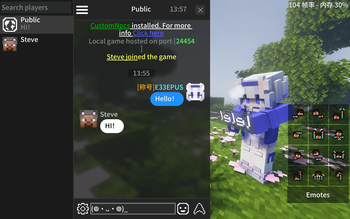
Rebuilds the vanilla chat HUD in chat-app style






## Vanilla Improvements
- 💬 Chat bubbles — Messages with player heads and names
- 💾 Chat history — Saved per world / server, restored on rejoin
- 📝 Input preserved — Typed text kept when closing chat
- 🚫 Anti-spam — Consecutive duplicate messages merged with a counter (on by default)
## Highlights
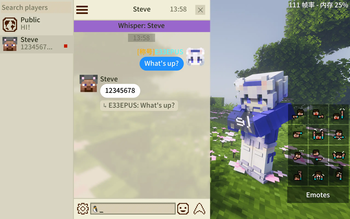
- 👥 Whisper sidebar — Online player list, click to whisper
- 🔍 Chat search — Keyword search with real-time matching
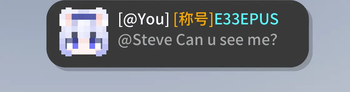
- @ Mention autocomplete — Type `@` for a popup player list, or left-click a player head
- 📌 Quick chat — Save and quick-fill common phrases
- 😊 Emoji & kaomoji — Emoji panel + kaomoji picker
- 📋 Copy & quote reply — Right-click a message to copy or quote reply
- 👤 Player head actions — Right-click a player head to teleport or whisper
- 🔔 Notification banners — Popup hints for @mentions, quotes, whispers and system messages (system banner on by default), with a jump-to-mention button
- 🔊 Notification sounds — Per-type toggles for system, @ / quote, whisper, and public messages
- 🎨 Themes — Dark/light theme with customizable bubble color, text color, and corner radius
- 🕐 Time separators — Timestamp dividers at configurable intervals
- 🌈 Colored messages — Supports `&` color/format codes (for servers with a color plugin installed)
- 🧩 Message templates — Servers that rewrite the chat format (plugins / No Chat Reports) can declare a template via `/e33chat gui`, so names and bodies are parsed correctly on every client
## Compatibility
| Mod / plugin | Status | |---|---| | No Chat Reports and similar no-report plugins | Auto-compatible since 2. 1. 0, no config needed | | ChatHeads / ChatAnimation | Work by default (the vanilla chat box keeps rendering, just shifted clear of the HUD icon) | | Quark and similar item sharing | Item icons in system messages render correctly | | CustomSkinLoader | Shows offline players' heads once installed | | ModernUI | Bounds-safe underlines / click regions on clickable text | | Nickname plugins | Partially supported | | Chat-format plugins (EssentialsChat / DeluxeChat / CMI, ...) | Adaptable via server-declared message templates (`/e33chat gui`) |
Server required? No, but installing the server-side mod enables quote reply, @mention sync, chat history sync (new players receive recent messages), and the `use_tpa` option (player-head teleport uses `/tpa`).
How to configure? Gear icon (bottom-left) → Menu → Settings
- Client config: `config/e33chat-client.toml` (Fabric: `config/e33chat-client.json`)
- Server config: `saves/
/serverconfig/e33chat-server.toml` (Fabric: `.json`)
Where is chat history? `.minecraft/e33chat/history`
How to disable chat history sync? Set `history_enabled = false` in the world's server config and restart.
Modpack? Go ahead.
Found a bug? (https://github.com/E33EPUS/E33Chat/issues)
📊 Mod Details
- Game
- Minecraft Mods
- Author
- E33EPUS
- Version
- 1.21.11
- Downloads
- 42,731
- Endorsements
- 14
- Category
- decoration
- Created
- 7/9/2026
- Updated
- 9/6/2026
- Game Versions
- 1.21.11
- Tags
- decoration, social, utility
🔧 How to Install Minecraft Mods Mods
Download from Modrinth. Use Prism Launcher or drop into your mods folder.
📖 Full step-by-step install guide for Minecraft Mods →
Visit the official mod page for specific installation instructions for this mod.
🎮 Need cheat codes or console commands? Check ur gaming wiki for Minecraft Mods commands, item IDs, and more.
❓ Frequently Asked Questions
Which Minecraft Mods versions does E33Chat support?
The author lists 1.21.11. Other versions may work but are untested by the author.
What is the latest version of E33Chat?
Version 1.21.11, published 2026-09-06 with 42,731 downloads recorded at the source.
Keep browsing — more Minecraft Mods mods await