DynamicRenderDistance
🟡 Updated this year⚠️ Install Order · 2 steps
Install in this order, then this mod last — most mods fail to load without their framework and dependencies in place.
🖼️ Gallery (3 images)

🔍 Analysis
- 👍 0.3% endorsement rate
- 🏆 #468 of 920 fabric mods in this game by downloads
📋 About This Mod
[!(https://img.shields.io/badge/JOIN%20OUR%20DISCORD-5865F2?style=for-the-badge&logo=discord&logoColor=white)](https://discord.gg/HTkn94BXmA)
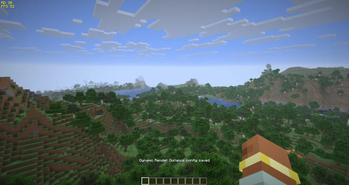
Fully client-side mod that automatically scales your view distance up or down in real-time based on your current frame rate.
It keeps your game running smoothly in heavy areas and lets you see further when performance allows it.
### Features - 100% Client-Side: Install it only on your client. No server-side installation is required, meaning you can use it on any vanilla or modded server. - Smart Scaling: Automatically increases or decreases render distance to stay within your desired FPS range. - One-Click Presets: Apply a tuned Quality, Balanced, or Performance profile instantly from the config screen or with `/drd preset`. Presets only change performance settings and keep your toggles. - Optional On-Screen HUD: A compact overlay showing your current render distance and FPS, color-coded by status (grey = off, red = below your min FPS, green = above your max FPS, yellow = in range). Automatically hidden while the F3 debug screen is open. - Configurable Limits: You set the minimum and maximum chunks — it will never drop below or rise above the limits you define. - Anti-Oscillation Cooldowns: Includes smart cooldown timers so your screen doesn't constantly flicker between distances. - Rebindable Keybinds: Open the settings (default `F8`), toggle the mod on/off, or toggle the HUD — all rebindable in Options → Controls. - In-Game UI & Commands: Fully configurable via an in-game settings screen or chat commands.
Please report any bugs, errors, or feature suggestions on Discord: https://discord.gg/4XUPywnEyE
### How It Works
The mod samples your current FPS every second and maintains an average window. Based on your `Check Interval` (default: 5 seconds), it makes a decision:
1. FPS is too low? If your average FPS drops below your `Min FPS` threshold, the mod reduces your render distance. 2. FPS is high? If your average FPS rises above your `Max FPS` threshold, it increases your render distance. 3. Cooldown: After any adjustment, a cooldown timer prevents further changes to ensure stability and prevent visual jittering.
By default, the mod decreases render distance faster than it increases it. This prioritizes game stability immediately when you enter a laggy area, and gracefully restores your view distance once performance stabilizes.
Each adjustment is applied in a single step. Minecraft rebuilds chunk rendering whenever the render distance changes, so the mod never changes it gradually — that would only trigger the rebuild (and its brief flicker) several times in a row. One change = one rebuild.
## Configuration & Controls
You have complete control over how aggressive or relaxed the mod should be.
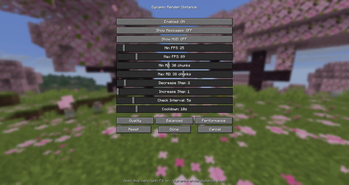
Press `F8` in-game (rebindable) or use the command `/drd open` to access the settings menu.
### Available Settings | Setting | Default | Description | | :--- | :--- | :--- | | Enabled | ON | Toggle the mod entirely. | | Show Messages | ON | Display a small action bar notification when render distance changes. | | Show HUD | OFF | Show a small top-left overlay with the current render distance and FPS. | | Min FPS | `45` | If average FPS drops below this, reduce render distance. | | Max FPS | `75` | If average FPS rises above this, increase render distance. | | Min RD | `6` | Minimum allowed render distance (in chunks). | | Max RD | `32` | Maximum allowed render distance (in chunks). | | Decrease Step | `2` | How many chunks to remove per lag spike. | | Increase Step | `1` | How many chunks to add when performance is good. | | Check Interval | `5. 0s` | How often to check the average FPS. | | Cooldown | `10. 0s` | How long to wait after a change before adjusting again. |
The config screen also has Quality / Balanced / Performance preset buttons that fill in all of the above at once.
### Keybinds All keybinds can be changed in Options → Controls (category Dynamic Render Distance): - Open config — default `F8`. - Toggle the mod on/off — unbound by default. - Toggle the HUD — unbound by default.
### Commands You can tweak settings directly from the chat using `/dynamicrenderdistance` (or `/drd` for short). Examples: - `/drd status` (shows current stats) - `/drd preset performance` (apply a preset) - `/drd minFps 60` - `/drd showHud true` - `/drd cooldown 15`
## For Modpack Creators
Dynamic Render Distance is highly optimized for inclusion in modpacks.
- Configuration File: All settings are saved locally to `config/dynamicrenderdistance.json`. You can easily pre-configure this JSON file and ship it with your modpack to provide players with a standardized "performance mode" out of the box.
- Localization: The mod ships translated into 10 languages (`en_us`, `ru_ru`, `es_es`, `de_de`, etc.). You can o
📊 Mod Details
- Game
- Minecraft Mods
- Author
- Nikrecs
- Version
- 1.2.0
- Downloads
- 4,951
- Endorsements
- 15
- Category
- fabric
- Created
- 4/19/2026
- Updated
- 6/18/2026
- Game Versions
- 26.2
- Tags
- game-mechanics, management, utility
🔧 How to Install Minecraft Mods Mods
Download from Modrinth. Use Prism Launcher or drop into your mods folder.
📖 Full step-by-step install guide for Minecraft Mods →
Visit the official mod page for specific installation instructions for this mod.
🎮 Need cheat codes or console commands? Check ur gaming wiki for Minecraft Mods commands, item IDs, and more.
❓ Frequently Asked Questions
Which Minecraft Mods versions does DynamicRenderDistance support?
The author lists 26.2. Other versions may work but are untested by the author.
What is the latest version of DynamicRenderDistance?
Version 1.2.0, published 2026-06-18 with 4,951 downloads recorded at the source.
Keep browsing — more Minecraft Mods mods await