DiscordRPC
🟡 Updated this year⚠️ Install Order · 2 steps
Install in this order, then this mod last — most mods fail to load without their framework and dependencies in place.
🖼️ Gallery (2 images)
🔍 Analysis
- 🏆 #317 of 367 forge mods in this game by downloads
📋 About This Mod
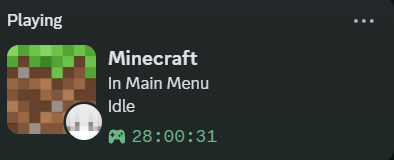
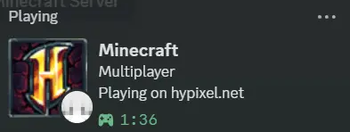
# 🎮 Custom Discord RPC **Custom Discord RPC** is a lightweight, fully customizable Rich Presence mod for Minecraft 1.8.9 Forge. It lets you show off exactly what you are doing in Minecraft directly on your Discord profile with style! Whether you're grinding on Hypixel, relaxing in a Singleplayer world, or playing on a private SMP, this mod will dynamically update your Discord status with real-time information—and let your friends join in on the fun! --- ## ✨ Key Features * 🖼️ **Fully Customizable:** Change the Discord RPC text, images, and tooltips to whatever you want. * ⚙️ **In-Game GUI Config:** No need to mess with confusing text files! Just press **`R`** (default keybind) in-game to open a clean, easy-to-use configuration menu. * 🌍 **Dynamic Server Stats:** Automatically displays the Server IP, Server Icon, and live Player Counts when playing on multiplayer servers. * 👤 **Player Details:** Shows off your Minecraft username and a dynamic 2D image of your player's head. * 🔗 **Interactive Buttons:** Add a clickable **"Join Server"** button to your profile! You can set it to the current server IP or any custom URL you want. * ⏱️ **Session Timers:** Track how long you've been playing with custom timers (Time Elapsed). --- ## 🛠️ How to Use 1. Drop the `.jar` file into your `/.minecraft/mods/` folder. 2. Launch Minecraft 1.8.9 with Forge. 3. Once in-game, press the **`R`** key on your keyboard to open the Custom Discord RPC settings menu. 4. Customize your text, images, and button links however you want. Your Discord status will update in real-time! --- ## 🔌 Compatibility * **Version:** Minecraft 1.8.9 * **Mod Loader:** Forge * **Side:** 💻 **Client-Side Only**. You can install this on your client to play on ANY vanilla or modded server. (Do not install this on a dedicated server). * **Dependencies:** None! It works perfectly completely on its own. ---
# 🎮 Custom Discord RPC
Custom Discord RPC is a lightweight, fully customizable Rich Presence mod for Minecraft 1. 8. 9 Forge. It lets you show off exactly what you are doing in Minecraft directly on your Discord profile with style!
Whether you're grinding on Hypixel, relaxing in a Singleplayer world, or playing on a private SMP, this mod will dynamically update your Discord status with real-time information—and let your friends join in on the fun!
## ✨ Key Features
🖼️ Fully Customizable: Change the Discord RPC text, images, and tooltips to whatever you want. ⚙️ In-Game GUI Config: No need to mess with confusing text files! Just press `R` (default keybind) in-game to open a clean, easy-to-use configuration menu. 🌍 Dynamic Server Stats: Automatically displays the Server IP, Server Icon, and live Player Counts when playing on multiplayer servers. 👤 Player Details: Shows off your Minecraft username and a dynamic 2D image of your player's head. 🔗 Interactive Buttons: Add a clickable "Join Server" button to your profile! You can set it to the current server IP or any custom URL you want. ⏱️ Session Timers: Track how long you've been playing with custom timers (Time Elapsed).
## 🛠️ How to Use
1. Drop the `.jar` file into your `/.minecraft/mods/` folder. 2. Launch Minecraft 1. 8. 9 with Forge. 3. Once in-game, press the `R` key on your keyboard to open the Custom Discord RPC settings menu. 4. Customize your text, images, and button links however you want. Your Discord status will update in real-time!
## 🔌 Compatibility
Version: Minecraft 1. 8. 9 Mod Loader: Forge Side: 💻 Client-Side Only. You can install this on your client to play on ANY vanilla or modded server. (Do not install this on a dedicated server). Dependencies: None! It works perfectly completely on its own.
📊 Mod Details
- Game
- Minecraft Mods
- Author
- rtx4400.
- Version
- 1.0
- Downloads
- 383
- Endorsements
- 1
- Category
- forge
- Created
- 4/4/2026
- Updated
- 3/22/2026
- Game Versions
- 1.8.9
- Tags
- social, utility
🔧 How to Install Minecraft Mods Mods
Download from Modrinth. Use Prism Launcher or drop into your mods folder.
📖 Full step-by-step install guide for Minecraft Mods →
Visit the official mod page for specific installation instructions for this mod.
🎮 Need cheat codes or console commands? Check ur gaming wiki for Minecraft Mods commands, item IDs, and more.
❓ Frequently Asked Questions
Which Minecraft Mods versions does DiscordRPC support?
The author lists 1.8.9. Other versions may work but are untested by the author.
What is the latest version of DiscordRPC?
Version 1.0, published 2026-03-22 with 383 downloads recorded at the source.
Keep browsing — more Minecraft Mods mods await