Discord: JustSync
🟡 Updated this year⚠️ Install Order · 2 steps
Install in this order, then this mod last — most mods fail to load without their framework and dependencies in place.
🖼️ Gallery (2 images)
🔍 Analysis
- 👍 0.6% endorsement rate
- 🏆 #420 of 896 fabric mods in this game by downloads
📋 About This Mod
# Discord: JustSync > If your bot can see a total of 10k members or more you will need to verify the bot through discord! Easily migrate from (https://modrinth.com/plugin/dcintegration) with Scripts on our Website tronka.de. ## Features - Send minecraft chat messages to discord - Send discord messages to the minecraft chat - Custom whitelisting through discord roles - Configure alt account usage - Webhook and Embed support with configurable message formats - Commands and command logging support ## Integrations The mod easily integrates with: - Floodgate/Geyser - Luckperms - Vanish More on our (https://wiki.tronka.de/Mod%20Integrations) ## Config The config file is located in `<minecraft-folder>/config/discord-js/discord-justsync.toml`, it will be created on first launch. To use the mod you must configure `botToken` with you discord bot token and `serverChatChannel` with the id of the channel you want to use for the minecraft chat channel. Without doing so minecraft will fail to start. ## The Discord Bot The bot will need following intents: SERVER_MEMBER, MESSAGE_CONTENT and following permissions: Send Messages, View Channels, Manage Webhooks, Manage Nicknames, Embed Links For a more detailed step-by-step tutorial refer to our (https://wiki.tronka.de/How%20to%20set%20up). ## Linking By enabling the `linking.enableLinking` option (default: true) players will be required to link their minecraft account to a discord account. You can control which players can join by configuring `linking.requiredRoles` with a role id required to join the server. By default, a player's discord account will be renamed to their ingame name whenever they join (`linking.renameOnJoin`). For this to work the `manage roles` permission is required. ## Commands ### Minecraft - `/discord reload` reload the configs - `/discord unlink` remove the link of your minecraft account - `/discord unlink <player>` remove a link from a discord user to a minecraft account (op required) ### Discord - `/link <code>` used to link to your minecraft account - `/justsync get` query link data for yourself - `/justsync get <player>` query link data for other players (moderate member permission required) - `/unlink` unlink yourself - `/justsync unlink <player>` unlink a player (moderate members permission required) - `/list` List the currently online players - `/reload` reload the config file (admin only) ## Problems, Suggestions and general Questions If you encounter any problems or bugs, have a suggestion or have a question for this mod feel free please join our (https://discord.com/invite/mvvwATzjsf).
# Discord: JustSync
> If your bot can see a total of 10k members or more you will need to verify the bot through discord!
Easily migrate from (https://modrinth.com/plugin/dcintegration) with Scripts on our Website tronka.de.
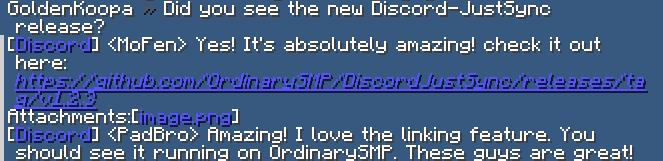
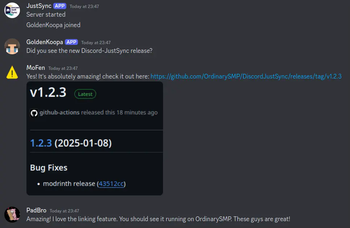
## Features - Send minecraft chat messages to discord - Send discord messages to the minecraft chat - Custom whitelisting through discord roles - Configure alt account usage - Webhook and Embed support with configurable message formats - Commands and command logging support
## Integrations The mod easily integrates with: - Floodgate/Geyser - Luckperms - Vanish
More on our (https://wiki.tronka.de/Mod%20Integrations)
## Config
The config file is located in `
## The Discord Bot The bot will need following intents: SERVER_MEMBER, MESSAGE_CONTENT and following permissions: Send Messages, View Channels, Manage Webhooks, Manage Nicknames, Embed Links
For a more detailed step-by-step tutorial refer to our (https://wiki.tronka.de/How%20to%20set%20up).
## Linking By enabling the `linking.enableLinking` option (default: true) players will be required to link their minecraft account to a discord account. You can control which players can join by configuring `linking.requiredRoles` with a role id required to join the server. By default, a player's discord account will be renamed to their ingame name whenever they join (`linking.renameOnJoin`). For this to work the `manage roles` permission is required.
## Commands
### Minecraft
- `/discord reload` reload the configs
- `/discord unlink` remove the link of your minecraft account
- `/discord unlink ` used to link to your minecraft account
- `/justsync get` query link data for yourself
- `/justsync get
## Problems, Suggestions and general Questions If you encounter any problems or bugs, have a suggestion or have a question for this mod feel free please join our (https://discord.com/invite/mvvwATzjsf).
📊 Mod Details
- Game
- Minecraft Mods
- Author
- PadBro
- Version
- 1.18.4
- Downloads
- 3,425
- Endorsements
- 22
- Category
- fabric
- Created
- 1/11/2025
- Updated
- 7/13/2026
- Game Versions
- 1.21.4, 1.21.5
- Tags
- management, social, utility
🔧 How to Install Minecraft Mods Mods
Download from Modrinth. Use Prism Launcher or drop into your mods folder.
📖 Full step-by-step install guide for Minecraft Mods →
Visit the official mod page for specific installation instructions for this mod.
🎮 Need cheat codes or console commands? Check ur gaming wiki for Minecraft Mods commands, item IDs, and more.
❓ Frequently Asked Questions
Which Minecraft Mods versions does Discord: JustSync support?
The author lists 1.21.4, 1.21.5. Other versions may work but are untested by the author.
What is the latest version of Discord: JustSync?
Version 1.18.4, published 2026-07-13 with 3,425 downloads recorded at the source.
Keep browsing — more Minecraft Mods mods await