Desolatum
🟡 Updated this year⚠️ Install Order · 2 steps
Install in this order, then this mod last — most mods fail to load without their framework and dependencies in place.
🖼️ Gallery (3 images)
🔍 Analysis
- 🏆 #214 of 258 decoration mods in this game by downloads
📋 About This Mod
<div class="box p-4 pb-2 project-detail__content" data-user-content> <p style="text-align:center"><img src="https://i.imgur.com/L9wNywS.png" alt="desolatum title" width="4096" height="666"></p> <p style="text-align:left"> </p> <p style="text-align:left"><img style="float:right" src="https://storage.ko-fi.com/cdn/useruploads/display/db181bc6-8b42-4b2f-8d87-503b2ba0335e_desolatum_black_smith_skin.png" alt="end dunes blacksmith has a message for you!" width="208" height="245"><strong>Blacksmith's Note: </strong>Desolatum aims to add more decorative content to the End dimension, while also revamping many of the dimension's already existing textures. With that being said, some content may change between the alpha/beta stage of development and the official non-beta release. Furthermore, there's more content planned to be added in the future, some in the pre-existing content of the mod and entirely new sections of features!</p> <p style="text-align:left"> </p> <p style="text-align:left"> </p> <p style="text-align:left"> </p> <h1 style="text-align:center"><strong>Biomes</strong></h1> <p style="text-align:center"><strong>(Screenshots taken with BSL Shaders + modified settings enabled)</strong></p> <hr> <p><img style="display:block;margin-left:auto;margin-right:auto" src="https://i.imgur.com/albkWL0.png" alt="end dunes description" width="750" height="423"></p> <p style="text-align:center"><img src="https://i.imgur.com/K3f6U8i.png" alt="obsidised end highlands description" width="750" height="422"></p> <p style="text-align:left"><img style="display:block;margin-left:auto;margin-right:auto" src="https://i.imgur.com/ojVoRyE.png" alt="viridian highlands description" width="750" height="422"></p> <p style="text-align:left"> </p> <h1 style="text-align:center"><strong>Built-in Resource Pack Differences</strong></h1> <p style="text-align:center"><strong>(These textures are optional/can be changed by disabling or enabling the resource pack(s))</strong></p> <hr> <p style="text-align:center"><strong>The end, as a whole, has been adjusted to not be as bright and a bit less saturated.</strong></p> <p style="text-align:center"><strong><img src="https://i.imgur.com/7QIPbqR.png" alt="resourcepack difference 0" width="750" height="391"></strong></p> <p style="text-align:center"><strong>Purpur has gotten a texture revamp + additional variants!</strong></p> <p style="text-align:center"><img src="https://i.imgur.com/oEIqjSf.png" alt="resourcepack difference 1" width="750" height="391"></p> <p style="text-align:center"><img src="https://i.imgur.com/3uYp2dQ.png" alt="resourcepack difference 2" width="750" height="391"></p> <p style="text-align:center"><strong>Obsidian has also gotten a texture revamp!</strong></p> <p style="text-align:left"><img style="display:block;margin-left:auto;margin-right:auto" src="https://i.imgur.com/oqkw70b.png" alt="resourcepack difference 3" width="750" height="391"></p> <h1 style="text-align:center"><strong>Compatibility</strong></h1> <hr> <p>Compatibility recipes are available for Create, Create: Sifting, Create: Dragon's Plus, and Oritech machines! Allowing automation for otherwise non-automatable blocks/items or completely new ways of obtaining certain blocks/items!</p> <p><img style="display:block;margin-left:auto;margin-right:auto" src="https://i.imgur.com/MIB37ZI.png" alt="compatibility recipes" width="750" height="338"></p> </div>

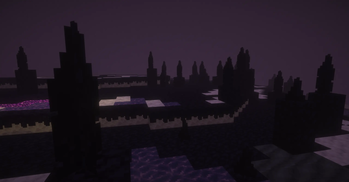
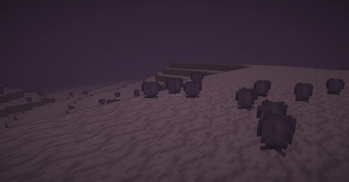
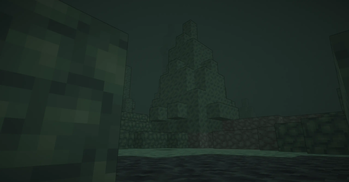
 Blacksmith's Note: Desolatum aims to add more decorative content to the End dimension, while also revamping many of the dimension's already existing textures. With that being said, some content may change between the alpha/beta stage of development and the official non-beta release. Furthermore, there's more content planned to be added in the future, some in the pre-existing content of the mod and entirely new sections of features!
Biomes
(Screenshots taken with BSL Shaders + modified settings enabled)


Built-in Resource Pack Differences
(These textures are optional/can be changed by disabling or enabling the resource pack(s))
The end, as a whole, has been adjusted to not be as bright and a bit less saturated.

Purpur has gotten a texture revamp + additional variants!


Obsidian has also gotten a texture revamp!

Compatibility
Compatibility recipes are available for Create, Create: Sifting, Create: Dragon's Plus, and Oritech machines! Allowing automation for otherwise non-automatable blocks/items or completely new ways of obtaining certain blocks/items!

📊 Mod Details
- Game
- Minecraft Mods
- Author
- DakotaPrideModding
- Version
- 0.1-1.21.1
- Downloads
- 392
- Endorsements
- 11
- Category
- decoration
- Created
- 10/23/2025
- Updated
- 10/22/2025
- Game Versions
- 1.21, 1.21.1
- Tags
- decoration, worldgen
🔧 How to Install Minecraft Mods Mods
Download from Modrinth. Use Prism Launcher or drop into your mods folder.
📖 Full step-by-step install guide for Minecraft Mods →
Visit the official mod page for specific installation instructions for this mod.
🎮 Need cheat codes or console commands? Check ur gaming wiki for Minecraft Mods commands, item IDs, and more.
❓ Frequently Asked Questions
Which Minecraft Mods versions does Desolatum support?
The author lists 1.21, 1.21.1. Other versions may work but are untested by the author.
What is the latest version of Desolatum?
Version 0.1-1.21.1, published 2025-10-22 with 392 downloads recorded at the source.
Keep browsing — more Minecraft Mods mods await