DECOBEACONS
⚪ Last updated 2024⚠️ Install Order · 2 steps
Install in this order, then this mod last — most mods fail to load without their framework and dependencies in place.
🖼️ Gallery (5 images)
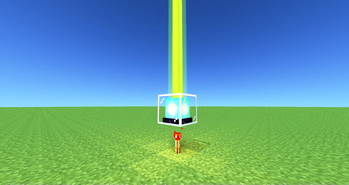
🔍 Analysis
- 👍 0.3% endorsement rate
- 🏆 #31 of 274 decoration mods in this game by downloads
📋 About This Mod
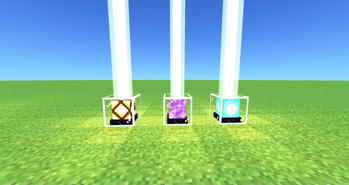
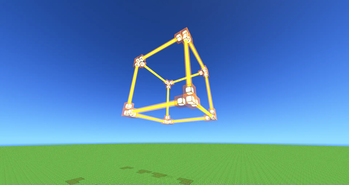
<center> <div align="center"> <h3>DECO BEACONS</h3> <p>Adds decorative beacons</p> </div> <img src="https://cdn.modrinth.com/data/cached_images/91b3989806ff2870cb6755cb468833e9a0de53cf.png" alt="divider2" height="500"> <img src="https://cdn.modrinth.com/data/cached_images/1dd8d4648419d58ed2fcd8df75e2bdc6563e07e4.png" alt="divider2 180" height="500"> <div align="center"> <h3>DECO BEACON</h3> <img src="https://cdn.modrinth.com/data/cached_images/0d0db5f58b9df0fa5d1e09ca339f96171870026b.png" alt="DECO BEACON" width="200"> </br> <span>Beam collides with block</span> </br> <img src="https://cdn.modrinth.com/data/cached_images/96d0794847b055bfa490e4f46e1bb0f00cc058fe.png" alt="DECO BEACON RECIPE" width="200"> </br> <img src="https://cdn.modrinth.com/data/cached_images/91b3989806ff2870cb6755cb468833e9a0de53cf.png" alt="divider2" height="500"> <img src="https://cdn.modrinth.com/data/cached_images/1dd8d4648419d58ed2fcd8df75e2bdc6563e07e4.png" alt="divider2 180" height="500"> <h3>GHOST DECO BEACON</h3> <img src="https://cdn.modrinth.com/data/cached_images/c63140c3060992fdee268b65b8328d744301d1ca.png" alt="GHOST DECO BEACON" width="200"> </br> <span>Beam passes thru blocks</span> </br> <span>Block has no collision itself</span> </br> <img src="https://cdn.modrinth.com/data/cached_images/d63427824db1e099a86c054e2b8f245e16c2edfb.png" alt="GHOST DECO BEACON RECIPE" width="200"> <img src="https://cdn.modrinth.com/data/cached_images/91b3989806ff2870cb6755cb468833e9a0de53cf.png" alt="divider2" height="500"> <img src="https://cdn.modrinth.com/data/cached_images/1dd8d4648419d58ed2fcd8df75e2bdc6563e07e4.png" alt="divider2 180" height="500"> <h3>OMNI BEACON</h3> <img src="https://cdn.modrinth.com/data/cached_images/8414fb7a59c74c186afbcaabcd259dacc54bb446.png" alt="OMNI BEACON" width="200"> </br> <span>Beam can be redirected</span> </br> <img src="https://cdn.modrinth.com/data/cached_images/9de28704f4e5b4e513e9c0f6e3e70b09aae18c0b.png" alt="OMNI BEACON RECIPE" width="200"> </br> <span>also has ghost variant</span> </br> <img src="https://cdn.modrinth.com/data/cached_images/427f47b322fe72d8774aea78df96041ef8ec7dd1.png" alt="GHOST OMNI BEACON RECIPE" width="200"> <img src="https://cdn.modrinth.com/data/cached_images/91b3989806ff2870cb6755cb468833e9a0de53cf.png" alt="divider2" height="500"> <img src="https://cdn.modrinth.com/data/cached_images/1dd8d4648419d58ed2fcd8df75e2bdc6563e07e4.png" alt="divider2 180" height="500"> <h3>FAKE BEACON</h3> <img src="https://cdn.modrinth.com/data/cached_images/28b157df288b5bf977001af2e4389352e31927c8.png" alt="FAKE BEACON" width="200"> </br> <span>Looks like an actual beacon...</span> </br> <img src="https://cdn.modrinth.com/data/cached_images/83121d299d64488cf3d51955721e346c39d51325.png" alt="FAKE BEACON RECIPE" width="200"> </br> <span>Also has ghost variant</span> </br> <img src="https://cdn.modrinth.com/data/cached_images/0ba268a6228b3545bb857611606fa829f7acc331.png" alt="GHOST FAKE BEACON RECIPE" width="200"> </div> </center> <img src="https://cdn.modrinth.com/data/cached_images/91b3989806ff2870cb6755cb468833e9a0de53cf.png" alt="divider2" height="500"> <img src="https://cdn.modrinth.com/data/cached_images/1dd8d4648419d58ed2fcd8df75e2bdc6563e07e4.png" alt="divider2 180" height="500"> <div align="justify"> <center><h3>HOW TO</h3></center> <h3>TURN ON/OFF</h3> <p> give it a redstone signal to activate the beacon. Toggle ActiveLow mode by R-Clicking it with a redstone torch </p> <h3>SET COLOR</h3> <p> Cycle thru the colors by R-Clicking the beacon with an empty hand. Shift R-Clicking it cycles thru the colors in reverse. R-Clicking it with a dye changes the color. It does not consume the dye. </p> <h3>SET BEACON TRANSPARENCY</h3> <p> DecoBeacon light beams can pass thru other decobeacons and change the beams color. R-clicking with a Sand block makes the surface abrasive and stops the light beam from passing thru. Applying sand to a ghost beacon doesn't stop any light beam from passing thru however it does stop the ghost beacon from affecting the light beam's color</p> <h3>USE GHOSTS</h3> <p> Each beacon has a ghost variant. They work the same way with a few exceptions. Light beams from Ghost beacons pass thru blocks (except opaque beacons). As "ghosts" these blocks don't have collision letting you walk thru them. </p> </div> ### USE BOOK SETTINGS We can write down beacon settings in a Book-&-Quill and apply it to a beacon by R-Clicking. Make sure to separate each setting with a comma "," and recheck what we type in. The beacon will "calmly" point out what we did wrong ### General Settings: - ### activeLow:true/false * if set to true, the beacon is "ACTIVE" when the redstone signal you give it is "LOW" - ### isTransparent:true/false * if set to false, decobeacon light beams cannot pass thru this decobeacon... except if this decobeacon is a ghost variant. * setting this to false o
DECO BEACONS
Adds decorative beacons


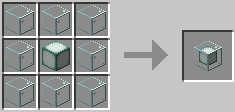
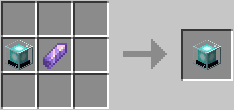
DECO BEACON
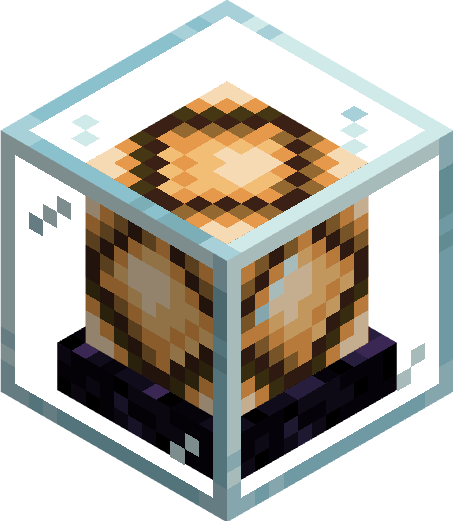 Beam collides with block
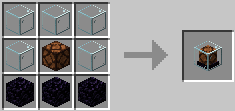
GHOST DECO BEACON
 Beam passes thru blocks
Block has no collision itself
Beam passes thru blocks
Block has no collision itself
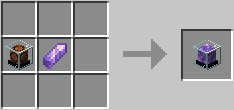
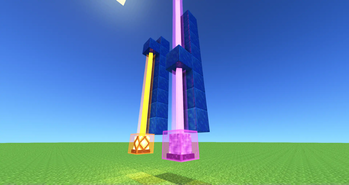
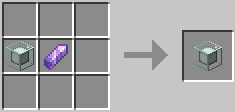
OMNI BEACON
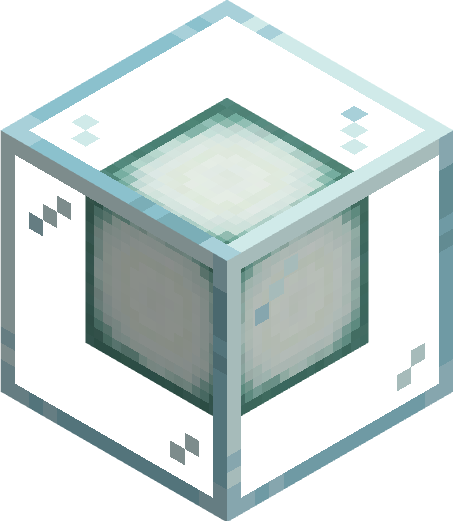 Beam can be redirected
 also has ghost variant
FAKE BEACON
 Looks like an actual beacon...
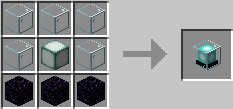 Also has ghost variant
HOW TO
TURN ON/OFF
give it a redstone signal to activate the beacon. Toggle ActiveLow mode by R-Clicking it with a redstone torch
SET COLOR
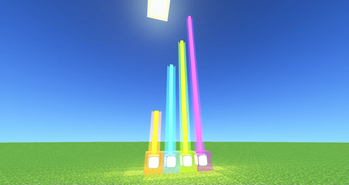
Cycle thru the colors by R-Clicking the beacon with an empty hand. Shift R-Clicking it cycles thru the colors in reverse. R-Clicking it with a dye changes the color. It does not consume the dye.
SET BEACON TRANSPARENCY
DecoBeacon light beams can pass thru other decobeacons and change the beams color. R-clicking with a Sand block makes the surface abrasive and stops the light beam from passing thru. Applying sand to a ghost beacon doesn't stop any light beam from passing thru however it does stop the ghost beacon from affecting the light beam's color
USE GHOSTS
Each beacon has a ghost variant. They work the same way with a few exceptions. Light beams from Ghost beacons pass thru blocks (except opaque beacons). As "ghosts" these blocks don't have collision letting you walk thru them.
### USE BOOK SETTINGS
We can write down beacon settings in a Book-&-Quill and apply it to a beacon by R-Clicking. Make sure to separate each setting with a comma "," and recheck what we type in. The beacon will "calmly" point out what we did wrong
### General Settings: - ### activeLow:true/false if set to true, the beacon is "ACTIVE" when the redstone signal you give it is "LOW" - ### isTransparent:true/false if set to false, decobeacon light beams cannot pass thru this decobeacon... except if this decobeacon is a ghost variant. * setting this to false o
📊 Mod Details
- Game
- Minecraft Mods
- Author
- 19phoboss98
- Version
- 0.0.1-1.18.2-Fabric
- Downloads
- 2,046
- Endorsements
- 7
- Category
- decoration
- Created
- 3/25/2024
- Updated
- 3/22/2024
- Game Versions
- 1.18.2
- Tags
- decoration, magic, technology
🔧 How to Install Minecraft Mods Mods
Download from Modrinth. Use Prism Launcher or drop into your mods folder.
📖 Full step-by-step install guide for Minecraft Mods →
Visit the official mod page for specific installation instructions for this mod.
🎮 Need cheat codes or console commands? Check ur gaming wiki for Minecraft Mods commands, item IDs, and more.
❓ Frequently Asked Questions
Which Minecraft Mods versions does DECOBEACONS support?
The author lists 1.18.2. Other versions may work but are untested by the author.
What is the latest version of DECOBEACONS?
Version 0.0.1-1.18.2-Fabric, published 2024-03-22 with 2,046 downloads recorded at the source.
Keep browsing — more Minecraft Mods mods await