Day/Night Progress Bar
🟡 Updated this year⚠️ Install Order · 2 steps
Install in this order, then this mod last — most mods fail to load without their framework and dependencies in place.
🖼️ Gallery (3 images)
🔍 Analysis
- 👍 0.6% endorsement rate
- 🏆 #199 of 289 decoration mods in this game by downloads
📋 About This Mod
!(https://cdn.modrinth.com/data/cached_images/533e43f106d693fed8f81b18e6030c886647e9d1_0.webp)
A sleek client-side HUD mod that displays the current day/night cycle progress with beautiful sun and moon indicators.
## ✨ Features
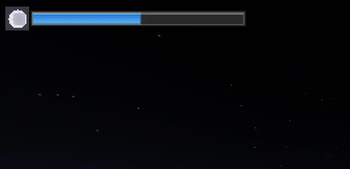
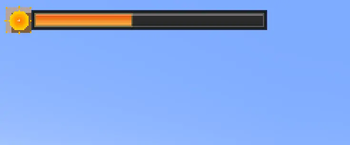
### 🎯 Core Functionality - Real-time progress bar showing day/night cycle advancement - Dynamic sun/moon icons that change based on time of day - Weather integration - different colors during rain and thunderstorms - Clean, modern design with gradient effects and shadows
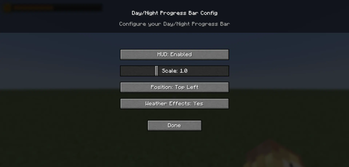
### ⚙️ Customization Options - 4 position presets: Top-left, Top-right, Bottom-left, Bottom-right - Size scaling: Adjust from 50% to 200% to fit your screen - Toggle on/off: Easily disable when not needed - Weather effects: Optional color changes during storms - Persistent settings: All preferences saved between sessions
### 🎮 Easy Configuration - Press F8 to open the config menu - Intuitive GUI with sliders and buttons - Real-time preview of changes - No restart required
## 🖼️ Visual Design
The progress bar features: - Detailed sun icon with animated rays and golden gradients - Realistic moon icon with craters and soft glow effects - Multi-layered shadows and borders for depth - Smooth color transitions between day/night themes - Weather-responsive colors (blue for rain, purple for storms)
## 🔧 Technical Details
- Client-side only - works on any server
- Lightweight - minimal performance impact
- No dependencies beyond Fabric API
- Clean code - well-optimized rendering
## 📋 Requirements
- Minecraft: 1. 21+
- Java: 21+
- Fabric Loader: 0. 17. 2+
- Fabric API: Any version
## 🚀 Installation
1. Install Fabric Loader 2. Download Fabric API 3. Drop this mod into your `mods` folder 4. Launch the game and press F8 to configure!
Perfect for players who want to keep track of time without opening menus or checking the sky! 🌙✨
📊 Mod Details
- Game
- Minecraft Mods
- Author
- dreamiiing
- Version
- 1.0.0
- Downloads
- 2,339
- Endorsements
- 14
- Category
- decoration
- Created
- 10/6/2025
- Updated
- 10/8/2025
- Game Versions
- 1.21.9, 1.21.10
- Tags
- decoration, game-mechanics, utility
🔧 How to Install Minecraft Mods Mods
Download from Modrinth. Use Prism Launcher or drop into your mods folder.
📖 Full step-by-step install guide for Minecraft Mods →
Visit the official mod page for specific installation instructions for this mod.
🎮 Need cheat codes or console commands? Check ur gaming wiki for Minecraft Mods commands, item IDs, and more.
❓ Frequently Asked Questions
Which Minecraft Mods versions does Day/Night Progress Bar support?
The author lists 1.21.9, 1.21.10. Other versions may work but are untested by the author.
What is the latest version of Day/Night Progress Bar?
Version 1.0.0, published 2025-10-08 with 2,339 downloads recorded at the source.
Keep browsing — more Minecraft Mods mods await