Data Config
🟡 Updated this year⚠️ Install Order · 2 steps
Install in this order, then this mod last — most mods fail to load without their framework and dependencies in place.
🖼️ Gallery (3 images)
🔍 Analysis
- 👍 0.1% endorsement rate
- 🏆 #159 of 346 forge mods in this game by downloads
📋 About This Mod
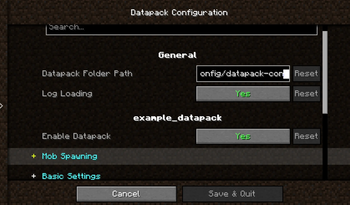
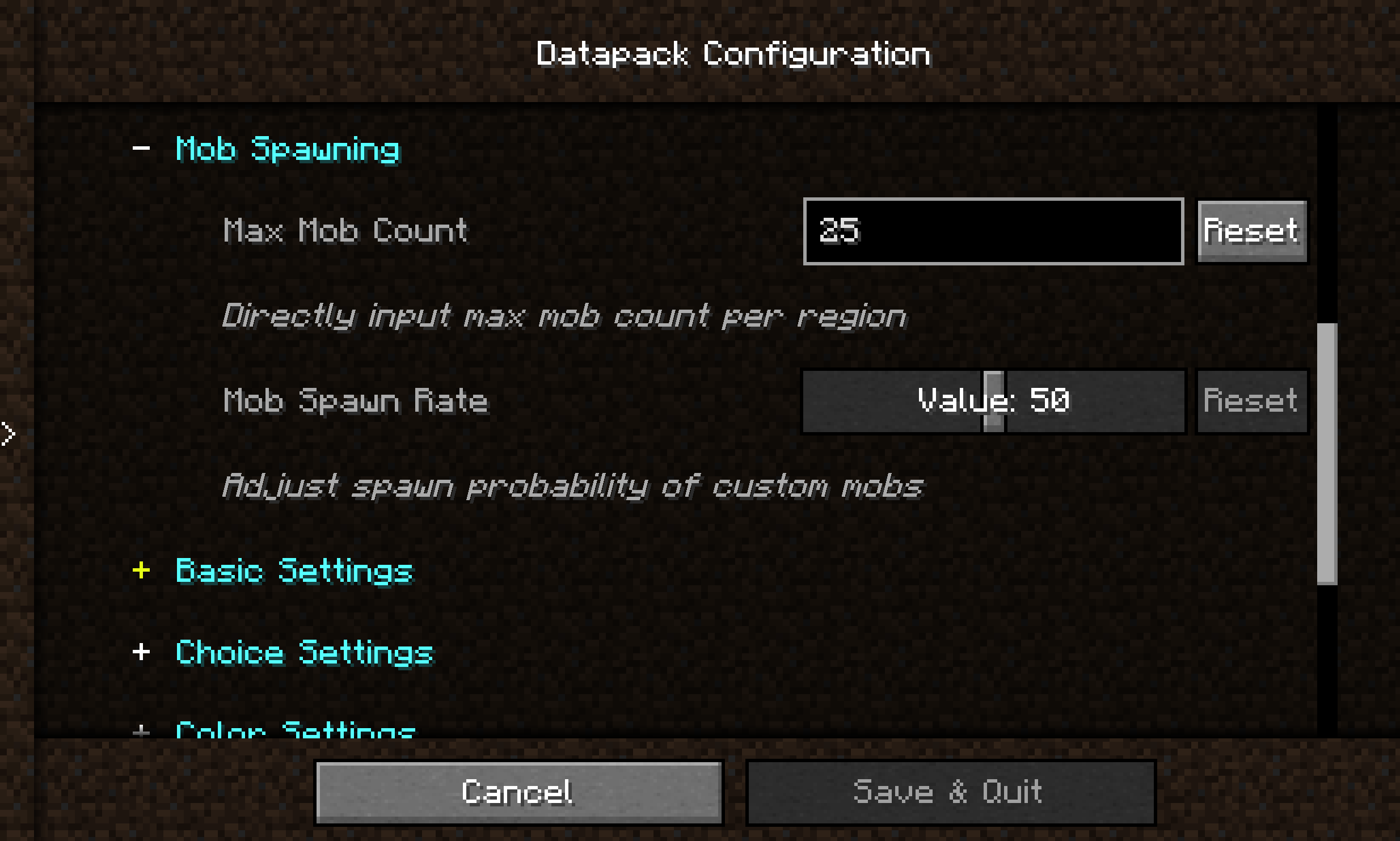
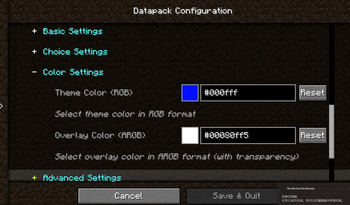
## Introduction **Datapack Config Mod** is a utility mod for Minecraft Forge 1.20.1 that provides datapack developers with a convenient graphical configuration interface. By integrating the Cloth Config API, the mod allows players to modify datapack parameters directly in-game without manually editing JSON files or restarting the game. --- ## Main Features ### 🎨 Graphical Configuration Interface - Uses Cloth Config to provide a user-friendly interface - Supports **10+ configuration types**: sliders, text boxes, dropdown menus, color pickers, etc. - Changes take effect immediately — no game restart required ### 🌍 Full Localization Support - Bilingual interface (Chinese and English) - Config option names, descriptions, and tooltips can be set per language ### 📦 Global Datapack Loading - Automatically loads `.zip` datapacks from `config/datapack-config-mod/` - Each datapack can be toggled on/off via the config interface - Datapacks are loaded with the highest priority ### 🔧 Main Menu Shortcut - A "Datapack Config" button is added to the top‑right corner of the main menu for one‑click access --- ## Supported Configuration Types | Type | Description | |------|-------------| | `boolean` | Boolean toggle | | `int` / `slider` | Integer input / slider | | `double` / `double_slider` | Floating‑point input / slider | | `string` | Text input | | `enum` / `enum_selector` | Dropdown menu / enum selector | | `color` | Color picker | --- ## Quick Start ### For Datapack Authors Create a `datapack_config.json` file in the root directory of your datapack: ```json { "config": { "spawn_rate": { "type": "slider", "default": "50", "min": 0, "max": 100, "name": { "zh_cn": "生物生成率", "en_us": "Mob Spawn Rate" }, "filePath": "data/mydatapack/config.json", "key": "spawn_rate" } } } ```
## Introduction
Datapack Config Mod is a utility mod for Minecraft Forge 1. 20. 1 that provides datapack developers with a convenient graphical configuration interface.
By integrating the Cloth Config API, the mod allows players to modify datapack parameters directly in-game without manually editing JSON files or restarting the game.
## Main Features
### 🎨 Graphical Configuration Interface - Uses Cloth Config to provide a user-friendly interface - Supports 10+ configuration types: sliders, text boxes, dropdown menus, color pickers, etc. - Changes take effect immediately — no game restart required
### 🌍 Full Localization Support - Bilingual interface (Chinese and English) - Config option names, descriptions, and tooltips can be set per language
### 📦 Global Datapack Loading - Automatically loads `.zip` datapacks from `config/datapack-config-mod/` - Each datapack can be toggled on/off via the config interface - Datapacks are loaded with the highest priority
### 🔧 Main Menu Shortcut - A "Datapack Config" button is added to the top‑right corner of the main menu for one‑click access
## Supported Configuration Types
| Type | Description | |------|-------------| | `boolean` | Boolean toggle | | `int` / `slider` | Integer input / slider | | `double` / `double_slider` | Floating‑point input / slider | | `string` | Text input | | `enum` / `enum_selector` | Dropdown menu / enum selector | | `color` | Color picker |
## Quick Start
### For Datapack Authors Create a `datapack_config.json` file in the root directory of your datapack:
```json { "config": { "spawn_rate": { "type": "slider", "default": "50", "min": 0, "max": 100, "name": { "zh_cn": "生物生成率", "en_us": "Mob Spawn Rate" }, "filePath": "data/mydatapack/config.json", "key": "spawn_rate" } } } ```
📊 Mod Details
- Game
- Minecraft Mods
- Author
- wonderful_Ai_Chen
- Version
- 0.0.2-1.21.10-neo
- Downloads
- 3,466
- Endorsements
- 2
- Category
- forge
- Created
- 5/25/2026
- Updated
- 7/5/2026
- Game Versions
- 1.21.10, 1.21.11
- Tags
- management
🔧 How to Install Minecraft Mods Mods
Download from Modrinth. Use Prism Launcher or drop into your mods folder.
📖 Full step-by-step install guide for Minecraft Mods →
Visit the official mod page for specific installation instructions for this mod.
🎮 Need cheat codes or console commands? Check ur gaming wiki for Minecraft Mods commands, item IDs, and more.
❓ Frequently Asked Questions
Which Minecraft Mods versions does Data Config support?
The author lists 1.21.10, 1.21.11. Other versions may work but are untested by the author.
What is the latest version of Data Config?
Version 0.0.2-1.21.10-neo, published 2026-07-05 with 3,466 downloads recorded at the source.
Keep browsing — more Minecraft Mods mods await