Custom Potions
🟠 Updated over a year ago⚠️ Install Order · 2 steps
Install in this order, then this mod last — most mods fail to load without their framework and dependencies in place.
🖼️ Gallery (3 images)
🔍 Analysis
- 👍 1.0% endorsement rate — high engagement, a strong quality signal
- 🏆 #69 of 874 fabric mods in this game by downloads
📋 About This Mod
# Custom Potions Provides a server side only way to add custom potions using datapacks. When installed on the client, it provides integration with REI and EMI. (Only up to 1.21.1. If you experience issues with it, you can disable it starting with 2.1.2+1.21.1 in config/custompotions.json) ## Adding a potion In a datapack, make a data/id/custom_potions/id.json file for your potion. The available parameters are "fallback" for the fallback name of the potion, if translations are unvailable (Potion of {fallback}, Arrow of {fallback}, Splash {fallback}, Lingering {fallback}), an array of effects following the vanilla format, and an optional color using the (https://minecraft.wiki/w/Calculators/Decimal_representation_of_color). For example: ```json { "fallback": "Bad Luck", "effects": , "color": 5841183 } ``` ## Adding a potion recipe In your datapack, make a data/id/potion_recipes/id.json file for your recipe. The available parameters are "reagent", which takes in an item id, and is the ingredient used in the top of the brewing stand to make the potion. There are also "base" and "result", which both use the same format, and define the input and output potions used in the recipe. They have the parameters "type", which takes in either "custompotions:vanilla" for vanilla (or modded) potions, and "custompotions:custom" for potions added by datapack using this mod. For example: ```json { "reagent": "minecraft:poisonous_potato", "base": { "type": "custompotions:vanilla", "potion": "minecraft:awkward" }, "result": { "type": "custompotions:custom", "potion": "potionstuffs:bad_luck" } } ``` ```json { "reagent": "minecraft:nautilus_shell", "base": { "type": "custompotions:vanilla", "potion": "minecraft:awkward" }, "result": { "type": "custompotions:vanilla", "potion": "minecraft:luck" } } ``` ## Translating The translation key follows the format of `custompotion.namespace.id.type`. For example, `custompotion.mypotions.bad_luck.normal`, `custompotion.mypotions.bad_luck.splash`, `custompotion.mypotions.bad_luck.lingering`, and `custompotion.mypotions.bad_luck.arrow`. You can use these in a language json file like so: ```json { "custompotion.mypotions.bad_luck.normal": "Unlucky Potion", "custompotion.mypotions.bad_luck.splash": "Throwable Unlucky Potion", "custompotion.mypotions.bad_luck.lingering": "Lingering Unlucky Potion", "custompotion.mypotions.bad_luck.arrow": "Unlucky Arrow" } ```
# Custom Potions Provides a server side only way to add custom potions using datapacks.
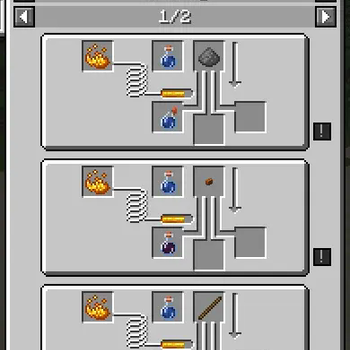
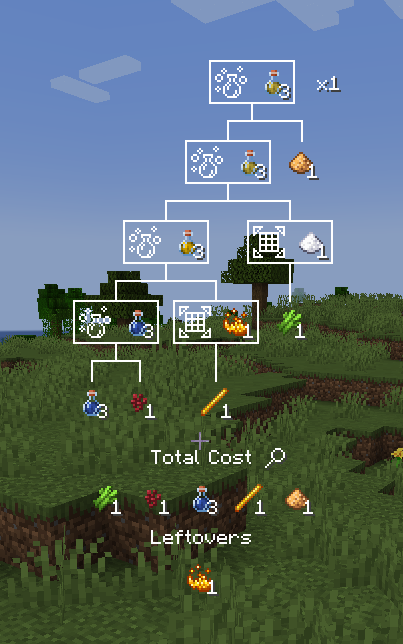
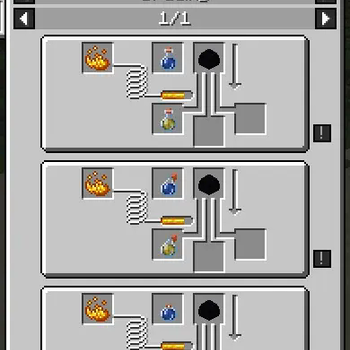
When installed on the client, it provides integration with REI and EMI. (Only up to 1. 21. 1. If you experience issues with it, you can disable it starting with 2. 1. 2+1. 21. 1 in config/custompotions.json)
## Adding a potion In a datapack, make a data/id/custom_potions/id.json file for your potion.
The available parameters are "fallback" for the fallback name of the potion, if translations are unvailable (Potion of {fallback}, Arrow of {fallback}, Splash {fallback}, Lingering {fallback}), an array of effects following the vanilla format, and an optional color using the (https://minecraft.wiki/w/Calculators/Decimal_representation_of_color).
For example: ```json { "fallback": "Bad Luck", "effects": [ { "id": "minecraft:unluck", "duration": 6000, "amplifier": 1 } ], "color": 5841183 } ```
## Adding a potion recipe In your datapack, make a data/id/potion_recipes/id.json file for your recipe. The available parameters are "reagent", which takes in an item id, and is the ingredient used in the top of the brewing stand to make the potion. There are also "base" and "result", which both use the same format, and define the input and output potions used in the recipe. They have the parameters "type", which takes in either "custompotions:vanilla" for vanilla (or modded) potions, and "custompotions:custom" for potions added by datapack using this mod.
For example: ```json { "reagent": "minecraft:poisonous_potato", "base": { "type": "custompotions:vanilla", "potion": "minecraft:awkward" }, "result": { "type": "custompotions:custom", "potion": "potionstuffs:bad_luck" } } ``` ```json { "reagent": "minecraft:nautilus_shell", "base": { "type": "custompotions:vanilla", "potion": "minecraft:awkward" }, "result": { "type": "custompotions:vanilla", "potion": "minecraft:luck" } } ``` ## Translating The translation key follows the format of `custompotion.namespace.id.type`. For example, `custompotion.mypotions.bad_luck.normal`, `custompotion.mypotions.bad_luck.splash`, `custompotion.mypotions.bad_luck.lingering`, and `custompotion.mypotions.bad_luck.arrow`.
You can use these in a language json file like so: ```json { "custompotion.mypotions.bad_luck.normal": "Unlucky Potion", "custompotion.mypotions.bad_luck.splash": "Throwable Unlucky Potion", "custompotion.mypotions.bad_luck.lingering": "Lingering Unlucky Potion", "custompotion.mypotions.bad_luck.arrow": "Unlucky Arrow" } ```
📊 Mod Details
- Game
- Minecraft Mods
- Author
- AshyBoxy
- Version
- 2.1.2+1.21.1
- Downloads
- 2,061
- Endorsements
- 21
- Category
- fabric
- Created
- 5/25/2024
- Updated
- 2/25/2025
- Game Versions
- 1.21, 1.21.1
- Tags
- magic, utility
🔧 How to Install Minecraft Mods Mods
Download from Modrinth. Use Prism Launcher or drop into your mods folder.
📖 Full step-by-step install guide for Minecraft Mods →
Visit the official mod page for specific installation instructions for this mod.
🎮 Need cheat codes or console commands? Check ur gaming wiki for Minecraft Mods commands, item IDs, and more.
❓ Frequently Asked Questions
Which Minecraft Mods versions does Custom Potions support?
The author lists 1.21, 1.21.1. Other versions may work but are untested by the author.
What is the latest version of Custom Potions?
Version 2.1.2+1.21.1, published 2025-02-25 with 2,061 downloads recorded at the source.
Keep browsing — more Minecraft Mods mods await