Custom Capes
🟡 Updated this year⚠️ Install Order · 2 steps
Install in this order, then this mod last — most mods fail to load without their framework and dependencies in place.
🖼️ Gallery (1 images)
🔍 Analysis
- 👍 0.1% endorsement rate
- 🏆 #54 of 983 fabric mods in this game by downloads
📋 About This Mod
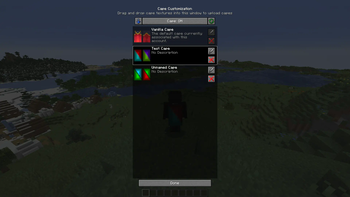
# Custom Capes This mod lets you use and upload custom cape textures and see them in-game, without going out to the browser. ## Usage To open the Cape Customization menu, go to settings, then open Skin Customization, and then click Cape Settings. ### Syncing Capes from other cape services To get capes from other cape services, click the blue arrow which will add capes that you have. Currently this will only get capes from Optifine and add them to your capes. ### Adding Capes Open the Cape Customization menu, and drag-and-drop a cape texture, which you can make yourself or download an already made one. ### Editing Capes You can edit the name and description of the cape you uploaded by clicking the Edit button next to the cape, after you edited the input fields, press Done. That will update the cape name and description. ### Deleting Capes To delete a cape you have to press the X button on the cape which you uploaded. ### Displaying Capes To show a cape, simply click a cape you uploaded in the Cape Customization menu, this will show the cape. To go back to the default cape, click the Vanilla Cape. ### Hiding/Showing other players capes (available before version 1.0.4) To hide or show a player's cape, open the Social Interactions menu, and click the red or green button on the player, this will hide or show the player's cape, click it again to reverse the action. ## Other Info All players using this mod will be able to see capes you are currently using through this mod. This mod does not support non-premium accounts, and it is not going to. You can use this mod in modpacks.
# Custom Capes
This mod lets you use and upload custom cape textures and see them in-game, without going out to the browser.
To open the Cape Customization menu, go to settings, then open Skin Customization, and then click Cape Settings.
### Syncing Capes from other cape services
To get capes from other cape services, click the blue arrow which will add capes that you have. Currently this will only get capes from Optifine and add them to your capes.
### Adding Capes
Open the Cape Customization menu, and drag-and-drop a cape texture, which you can make yourself or download an already made one.
### Editing Capes
You can edit the name and description of the cape you uploaded by clicking the Edit button next to the cape, after you edited the input fields, press Done. That will update the cape name and description.
### Deleting Capes
To delete a cape you have to press the X button on the cape which you uploaded.
### Displaying Capes
To show a cape, simply click a cape you uploaded in the Cape Customization menu, this will show the cape. To go back to the default cape, click the Vanilla Cape.
### Hiding/Showing other players capes (available before version 1. 0. 4)
To hide or show a player's cape, open the Social Interactions menu, and click the red or green button on the player, this will hide or show the player's cape, click it again to reverse the action.
## Other Info
All players using this mod will be able to see capes you are currently using through this mod.
This mod does not support non-premium accounts, and it is not going to.
You can use this mod in modpacks.
📊 Mod Details
- Game
- Minecraft Mods
- Author
- EpicPix
- Version
- 1.0.5+26.2
- Downloads
- 84,829
- Endorsements
- 94
- Category
- fabric
- Created
- 7/8/2023
- Updated
- 7/25/2026
- Game Versions
- 26.2
- Tags
- utility
🔧 How to Install Minecraft Mods Mods
Download from Modrinth. Use Prism Launcher or drop into your mods folder.
📖 Full step-by-step install guide for Minecraft Mods →
Visit the official mod page for specific installation instructions for this mod.
🎮 Need cheat codes or console commands? Check ur gaming wiki for Minecraft Mods commands, item IDs, and more.
❓ Frequently Asked Questions
Which Minecraft Mods versions does Custom Capes support?
The author lists 26.2. Other versions may work but are untested by the author.
What is the latest version of Custom Capes?
Version 1.0.5+26.2, published 2026-07-25 with 84,829 downloads recorded at the source.
Keep browsing — more Minecraft Mods mods await