Cubes Without Borders
🟡 Updated this year⚠️ Install Order · 2 steps
Install in this order, then this mod last — most mods fail to load without their framework and dependencies in place.
🖼️ Gallery (5 images)



🔍 Analysis
- 👍 0.0% endorsement rate
- 🏆 #67 of 1284 fabric mods in this game by downloads
📋 About This Mod
# Cubes Without Borders (https://img.shields.io/github/actions/workflow/status/Kira-NT/cubes-without-borders/build.yml?logo=github)](https://github.com/Kira-NT/cubes-without-borders/actions/workflows/build.yml) (https://img.shields.io/github/v/release/Kira-NT/cubes-without-borders?sort=date&label=version)](https://github.com/Kira-NT/cubes-without-borders/releases/latest) (https://img.shields.io/modrinth/dt/cubes-without-borders?color=00AF5C&logo=modrinth)](https://modrinth.com/mod/cubes-without-borders) (https://img.shields.io/curseforge/dt/975120?color=F16436&logo=curseforge)](https://www.curseforge.com/minecraft/mc-mods/cubes-without-borders) (https://img.shields.io/github/license/Kira-NT/cubes-without-borders?cacheSeconds=36000)](LICENSE.md) <img alt="Cubes Without Borders Icon" src="https://cdn.modrinth.com/data/ETlrkaYF/images/b359ea368791493eb62786ac91a59cee3a5bd7f7.webp" width="128"> A mod that allows you to play Minecraft in a borderless fullscreen window. This means you can keep the game open while interacting with other applications on a different monitor, or even directly on top of Minecraft itself, without the game being minimized. Unlike other "borderless fullscreen" mods, **Cubes Without Borders** is highly configurable, does not hinder your input latency, and explicitly supports all major platforms - Linux, macOS, and even Windows - instead of providing a passable experience for only one group of players while making it seem as though others do not exist. ---- ## Usage To enable borderless fullscreen, go to the `Video Settings` tab, where you would typically find the `Fullscreen` setting, and switch it to the newly added third option: `Borderless`. Depending on whether you have Sodium installed, you may find this option in one of the following locations: | !(https://cdn.modrinth.com/data/ETlrkaYF/images/ec7266be71352f61f4e3d7dd030660a905d8a11d.webp) | !(https://cdn.modrinth.com/data/ETlrkaYF/images/8a1468a6098574cecf3904b5e8a7224a871b58c9.webp) | | - | - | Additionally, the mod introduces a `--borderless` startup flag that forces the game to launch in the borderless fullscreen mode, regardless of your current settings. ---- ## FAQ <details> <summary>I'm a Windows user and...</summary> That is a problem indeed, my friend! In all seriousness, though, if you are having issues with the default borderless fullscreen mode used by CWB, you can switch to a different one in the mod's settings. Check whether `minecraft:windowed` *(the default, low-latency borderless fullscreen mode)* or `windows:windowed` *(the true windowed fullscreen mode)* works better for you. Additionally, it's generally recommended to use CWB alongside (https://modrinth.com/mod/sodium), as it fixes many hardware- and driver-specific issues that might otherwise hinder your experience. </details> <details> <summary>On Windows, my cursor becomes invisible in inventories when fullscreen is enabled.</summary> Once again, you can switch to `windows:windowed` in the mod's settings to force the game to run in windowed mode, as proper fullscreen mode does not seem to work correctly on your system. It's worth noting, however, that what you are experiencing is not a problem with the mod, but rather an issue with your system that you might be able to fix. People commonly report their cursor becoming invisible in games on Windows in the following scenarios: - When using (https://support.medal.tv/support/solutions/articles/48001258678-troubleshooting-missing-mouse-cursors-in-medal-tv) - When using OBS on Windows 11 with the (https://github.com/obsproject/obs-studio/issues/10782) enabled for the source - When the (https://learn.microsoft.com/en-us/answers/questions/2617725/invisible-mouse-cursor-in-full-screen-games) option is enabled in the Control Panel - Due to your usual causes, such as broken and/or outdated drivers </details> <details> <summary>When I open Video Settings, the Fullscreen setting doesn't include a Borderless option - it's just a toggle!</summary> You are probably using a rebranded fork of Sodium, or a version of Sodium that CWB doesn't support yet/already. Don't worry, though! You can access vanilla Video Settings from Sodium's custom screen by pressing <kbd>Ctrl</kbd> + <kbd>Shift</kbd> + <kbd>P</kbd> - there you'll be able to find the modified Fullscreen setting. In fact, if you simply toggle fullscreen by pressing <kbd>F11</kbd>, for example, you should immediately jump straight into the borderless mode, as it's set as your preferred fullscreen mode by default. </details> <details> <summary>When I set Fullscreen Mode to Borderless in Video Settings, nothing really changes compared to when it is set to Exclusive - the game window continues to be automatically minimized whenever it loses focus.</summary> This mod does no
# Cubes Without Borders
[!(https://img.shields.io/github/actions/workflow/status/Kira-NT/cubes-without-borders/build.yml?logo=github)](https://github.com/Kira-NT/cubes-without-borders/actions/workflows/build.yml) [!(https://img.shields.io/github/v/release/Kira-NT/cubes-without-borders?sort=date&label=version)](https://github.com/Kira-NT/cubes-without-borders/releases/latest) [!(https://img.shields.io/modrinth/dt/cubes-without-borders?color=00AF5C&logo=modrinth)](https://modrinth.com/mod/cubes-without-borders) [!(https://img.shields.io/curseforge/dt/975120?color=F16436&logo=curseforge)](https://www.curseforge.com/minecraft/mc-mods/cubes-without-borders) [!(https://img.shields.io/github/license/Kira-NT/cubes-without-borders?cacheSeconds=36000)](LICENSE.md)
A mod that allows you to play Minecraft in a borderless fullscreen window. This means you can keep the game open while interacting with other applications on a different monitor, or even directly on top of Minecraft itself, without the game being minimized.
Unlike other "borderless fullscreen" mods, Cubes Without Borders is highly configurable, does not hinder your input latency, and explicitly supports all major platforms - Linux, macOS, and even Windows - instead of providing a passable experience for only one group of players while making it seem as though others do not exist.
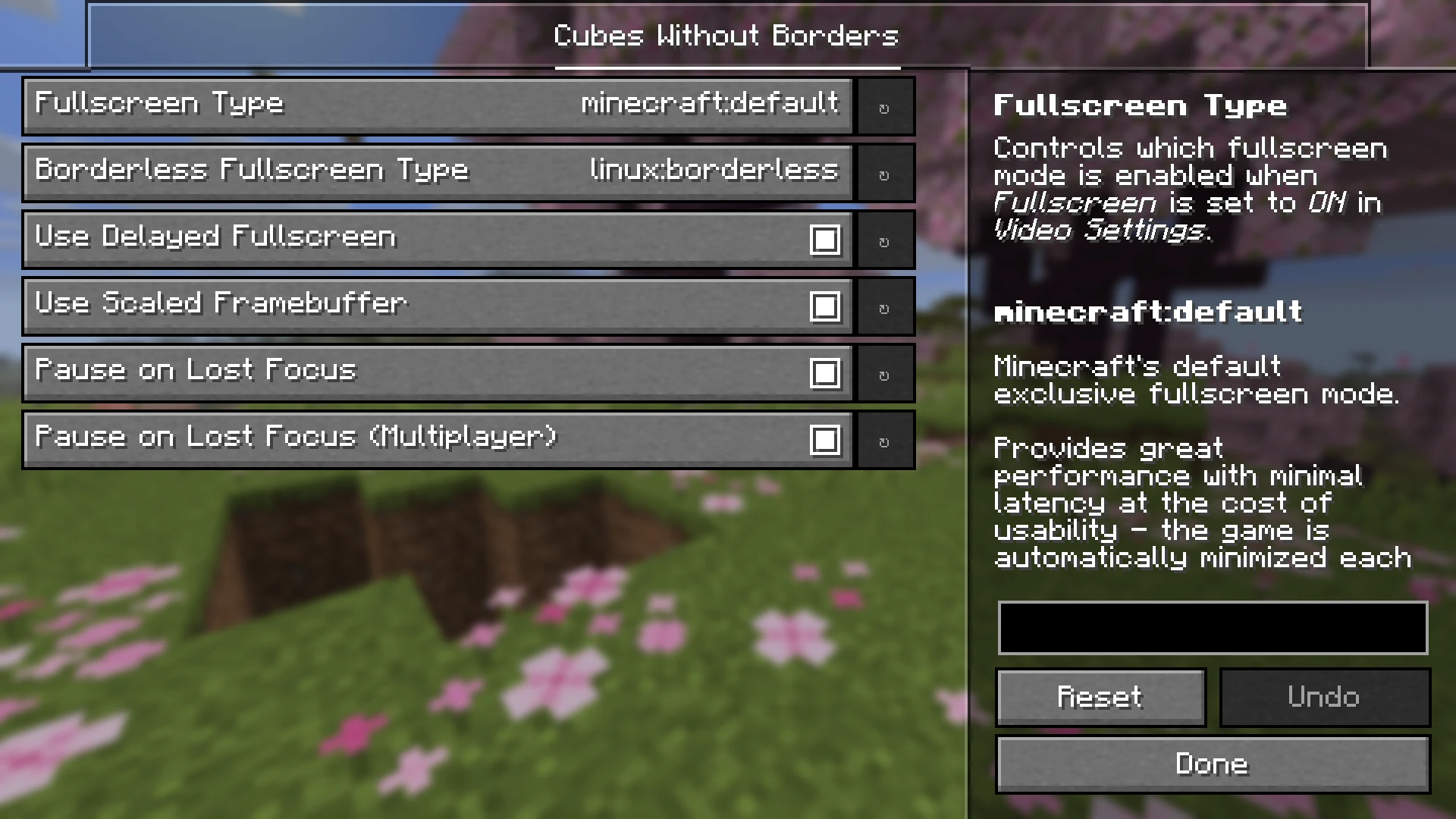
To enable borderless fullscreen, go to the `Video Settings` tab, where you would typically find the `Fullscreen` setting, and switch it to the newly added third option: `Borderless`.
Depending on whether you have Sodium installed, you may find this option in one of the following locations:
| !(https://cdn.modrinth.com/data/ETlrkaYF/images/ec7266be71352f61f4e3d7dd030660a905d8a11d.webp) | !(https://cdn.modrinth.com/data/ETlrkaYF/images/8a1468a6098574cecf3904b5e8a7224a871b58c9.webp) | | - | - |
Additionally, the mod introduces a `--borderless` startup flag that forces the game to launch in the borderless fullscreen mode, regardless of your current settings.
I'm a Windows user and...
That is a problem indeed, my friend! In all seriousness, though, if you are having issues with the default borderless fullscreen mode used by CWB, you can switch to a different one in the mod's settings.
Check whether `minecraft:windowed` (the default, low-latency borderless fullscreen mode) or `windows:windowed` (the true windowed fullscreen mode) works better for you.
Additionally, it's generally recommended to use CWB alongside (https://modrinth.com/mod/sodium), as it fixes many hardware- and driver-specific issues that might otherwise hinder your experience.
On Windows, my cursor becomes invisible in inventories when fullscreen is enabled.
Once again, you can switch to `windows:windowed` in the mod's settings to force the game to run in windowed mode, as proper fullscreen mode does not seem to work correctly on your system.
It's worth noting, however, that what you are experiencing is not a problem with the mod, but rather an issue with your system that you might be able to fix. People commonly report their cursor becoming invisible in games on Windows in the following scenarios:
- When using (https://support.medal.tv/support/solutions/articles/48001258678-troubleshooting-missing-mouse-cursors-in-medal-tv)
- When using OBS on Windows 11 with the ["Windows 10+ Capturing Method"](https://github.com/obsproject/obs-studio/issues/10782) enabled for the source
- When the ["Display pointer trails"](https://learn.microsoft.com/en-us/answers/questions/2617725/invisible-mouse-cursor-in-full-screen-games) option is enabled in the Control Panel
- Due to your usual causes, such as broken and/or outdated drivers
When I open Video Settings, the Fullscreen setting doesn't include a Borderless option - it's just a toggle!
You are probably using a rebranded fork of Sodium, or a version of Sodium that CWB doesn't support yet/already. Don't worry, though! You can access vanilla Video Settings from Sodium's custom screen by pressing Ctrl + Shift + P - there you'll be able to find the modified Fullscreen setting.
In fact, if you simply toggle fullscreen by pressing F11, for example, you should immediately jump straight into the borderless mode, as it's set as your preferred fullscreen mode by default.
When I set Fullscreen Mode to Borderless in Video Settings, nothing really changes compared to when it is set to Exclusive - the game window continues to be automatically minimized whenever it loses focus.
This mod does no
📊 Mod Details
- Game
- Minecraft Mods
- Author
- Kira-NT
- Version
- 4.1.0+26.2
- Downloads
- 26,050,539
- Endorsements
- 2,262
- Category
- fabric
- Created
- 2/22/2024
- Updated
- 6/21/2026
- Game Versions
- 26.2
- Tags
- utility
🔧 How to Install Minecraft Mods Mods
Download from Modrinth. Use Prism Launcher or drop into your mods folder.
📖 Full step-by-step install guide for Minecraft Mods →
Visit the official mod page for specific installation instructions for this mod.
🎮 Need cheat codes or console commands? Check ur gaming wiki for Minecraft Mods commands, item IDs, and more.
❓ Frequently Asked Questions
Which Minecraft Mods versions does Cubes Without Borders support?
The author lists 26.2. Other versions may work but are untested by the author.
What is the latest version of Cubes Without Borders?
Version 4.1.0+26.2, published 2026-06-21 with 26.1M downloads recorded at the source.
Keep browsing — more Minecraft Mods mods await