Client-Side Color Codes (CSCC)
🟡 Updated this year⚠️ Install Order · 2 steps
Install in this order, then this mod last — most mods fail to load without their framework and dependencies in place.
🖼️ Gallery (6 images)

🔍 Analysis
- 🏆 #70 of 211 decoration mods in this game by downloads
📋 About This Mod
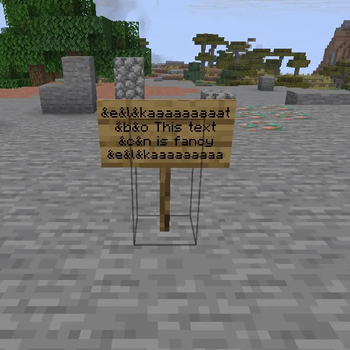
# 🎨 Client-Side Color Codes (CSCC) **CSCC** allows you to create and see colored texts on every server fully client-side. Make fancy texts by using color codes in front of the text, e.g. `&a&lHello` — the "Hello" will be fat and in green. (standard format used on most servers with colored text support) > ⚠️ **Important Note:** Players who don't have the mod installed will **NOT** see the formatted text, they will see `&a&lHello` in the normal formatting. --- ### Why? Because many servers lock colored texts behind a paywall and I want aesthetic tool names. --- ### Supported Features **Live Preview:** Instantly see how your formatted text will look like while typing. **Color Code List:** Use the command /cscc to get a list of all working color codes. **Colorable texts include:** * Chat messages * Item names (renamed in anvil) * Items in item frames * Entities (renamed with a nametag) * Signs & Hanging signs Does **NOT** support text in books (I have to decide which way I want to implement it, might not come in future) *Other missing texts will probably be added (if there are any).*
# 🎨 Client-Side Color Codes (CSCC)
CSCC allows you to create and see colored texts on every server fully client-side.
Make fancy texts by using color codes in front of the text, e.g. `&a&lHello` — the "Hello" will be fat and in green. (standard format used on most servers with colored text support)
> ⚠️ Important Note: Players who don't have the mod installed will NOT see the formatted text, they will see `&a&lHello` in the normal formatting.
### Why? Because many servers lock colored texts behind a paywall and I want aesthetic tool names.
### Supported Features Live Preview: Instantly see how your formatted text will look like while typing.
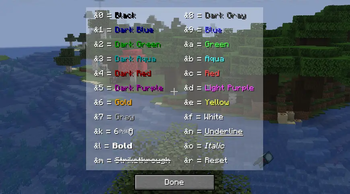
Color Code List: Use the command /cscc to get a list of all working color codes.
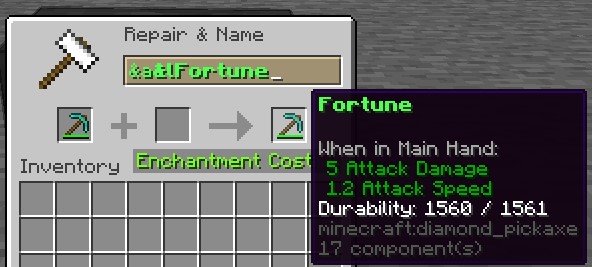
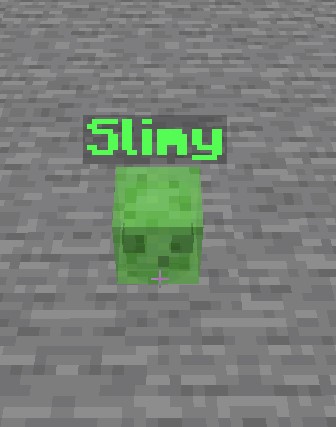
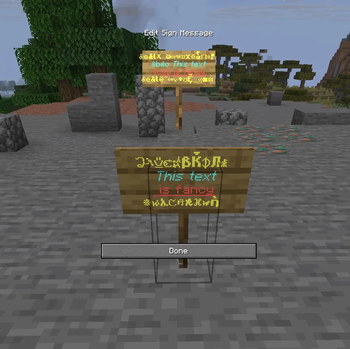
Colorable texts include: Chat messages Item names (renamed in anvil) Items in item frames Entities (renamed with a nametag) Signs & Hanging signs
Does NOT support text in books (I have to decide which way I want to implement it, might not come in future)
Other missing texts will probably be added (if there are any).*
📊 Mod Details
- Game
- Minecraft Mods
- Author
- ancosa
- Version
- 26.2-1.2.1
- Downloads
- 279
- Endorsements
- 2
- Category
- decoration
- Created
- 7/8/2026
- Updated
- 7/21/2026
- Game Versions
- 26.2
- Tags
- decoration, social, utility
🔧 How to Install Minecraft Mods Mods
Download from Modrinth. Use Prism Launcher or drop into your mods folder.
📖 Full step-by-step install guide for Minecraft Mods →
Visit the official mod page for specific installation instructions for this mod.
🎮 Need cheat codes or console commands? Check ur gaming wiki for Minecraft Mods commands, item IDs, and more.
❓ Frequently Asked Questions
Which Minecraft Mods versions does Client-Side Color Codes (CSCC) support?
The author lists 26.2. Other versions may work but are untested by the author.
What is the latest version of Client-Side Color Codes (CSCC)?
Version 26.2-1.2.1, published 2026-07-21 with 279 downloads recorded at the source.
Keep browsing — more Minecraft Mods mods await