Create: Storage Terminal
🟡 Updated this year⚠️ Install Order · 2 steps
Install in this order, then this mod last — most mods fail to load without their framework and dependencies in place.
🖼️ Gallery (3 images)

🔍 Analysis
- 👍 0.8% endorsement rate
- 🏆 #84 of 241 decoration mods in this game by downloads
📋 About This Mod
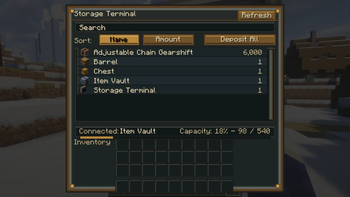
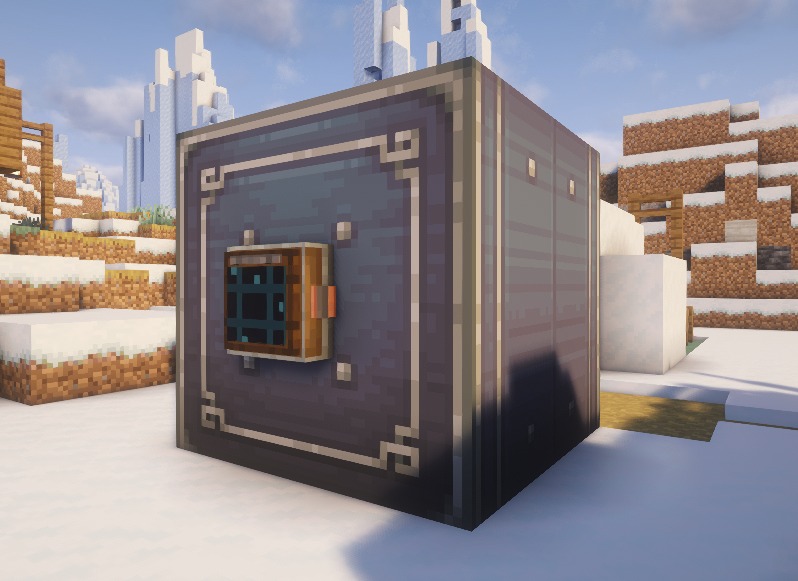
**📦 Create: Storage Terminal** **Create: Storage Terminal** adds a convenient, Create-inspired storage interface to Minecraft. Place a **Storage Terminal** next to compatible storage—especially **Create Item Vaults**—to browse, search, deposit, and retrieve items through a single terminal. --- ## ✨ Features - 🔍 Search stored items instantly - 📋 Sort items by **Name** or **Amount** - 📤 Retrieve items directly from connected storage - 📥 Deposit items from your inventory - 📦 **Deposit All** button to quickly store your inventory - 🔄 Refresh the storage contents at any time - 📊 View connected storage and capacity information - 🎨 Designed to match the Create mod aesthetic --- ## 🖱️ Controls | Action | Result | |--------|--------| | **Left Click** | Extract one stack | | **Right Click** | Extract half a stack | | **Shift + Click** | Extract as many items as possible | | **Double Click** | Extract a full stack | | **Shift + Click (Inventory)** | Deposit the selected stack | | **Deposit All** | Deposit all compatible items | --- ## 📖 How to Use 1. Craft a **Storage Terminal** 2. Place it against or next to compatible storage 3. Open the terminal 4. Search, sort, deposit, and retrieve your items The terminal is designed primarily for **Create Item Vaults**, but also supports compatible inventories that expose an item handler. --- ## 🎨 Designed for Create The Storage Terminal has been designed to blend naturally with the **Create** mod, using a mechanical style inspired by Create's industrial aesthetic. --- ## 📌 Requirements - Create - The correct Minecraft version and mod loader --- ## 🚧 Planned Features Future updates may include: - 📡 Support for larger connected storage networks - 📦 More supported storage blocks - 🔍 Additional sorting and filtering options - ⚙️ More terminal customization --- ### 💡 Simple. Fast. Mechanical. **Create: Storage Terminal** makes managing large Create storage systems easier without opening every container individually. **⚠️ This is an unofficial create addon. Do not report addon bugs to the original create developers.** !(https://cdn.modrinth.com/data/cached_images/2f981cdb0f9bd8d718bf44ee4eb86d402e673891.png) This mod have been created with IntelliJ ⚠️ This is an unofficial create addon. Do not report addon bugs to the original create developers. Disclaimer about product: NOT AN OFFICIAL MINECRAFT PRODUCT. NOT APPROVED BY OR ASSOCIATED WITH MOJANG OR MICROSOFT
📦 Create: Storage Terminal
Create: Storage Terminal adds a convenient, Create-inspired storage interface to Minecraft.
Place a Storage Terminal next to compatible storage—especially Create Item Vaults—to browse, search, deposit, and retrieve items through a single terminal.
## ✨ Features
- 🔍 Search stored items instantly
- 📋 Sort items by Name or Amount
- 📤 Retrieve items directly from connected storage
- 📥 Deposit items from your inventory
- 📦 Deposit All button to quickly store your inventory
- 🔄 Refresh the storage contents at any time
- 📊 View connected storage and capacity information
- 🎨 Designed to match the Create mod aesthetic
## 🖱️ Controls
| Action | Result | |--------|--------| | Left Click | Extract one stack | | Right Click | Extract half a stack | | Shift + Click | Extract as many items as possible | | Double Click | Extract a full stack | | Shift + Click (Inventory) | Deposit the selected stack | | Deposit All | Deposit all compatible items |
## 📖 How to Use
1. Craft a Storage Terminal 2. Place it against or next to compatible storage 3. Open the terminal 4. Search, sort, deposit, and retrieve your items
The terminal is designed primarily for Create Item Vaults, but also supports compatible inventories that expose an item handler.
## 🎨 Designed for Create
The Storage Terminal has been designed to blend naturally with the Create mod, using a mechanical style inspired by Create's industrial aesthetic.
## 📌 Requirements
- Create
- The correct Minecraft version and mod loader
## 🚧 Planned Features
Future updates may include:
- 📡 Support for larger connected storage networks
- 📦 More supported storage blocks
- 🔍 Additional sorting and filtering options
- ⚙️ More terminal customization
### 💡 Simple. Fast. Mechanical.
Create: Storage Terminal makes managing large Create storage systems easier without opening every container individually.
⚠️ This is an unofficial create addon. Do not report addon bugs to the original create developers.
!(https://cdn.modrinth.com/data/cached_images/2f981cdb0f9bd8d718bf44ee4eb86d402e673891.png)
This mod have been created with IntelliJ
Disclaimer about product: NOT AN OFFICIAL MINECRAFT PRODUCT. NOT APPROVED BY OR ASSOCIATED WITH MOJANG OR MICROSOFT
📊 Mod Details
- Game
- Minecraft Mods
- Author
- SmartStreamLabs
- Version
- 0.1.3-hotfix
- Downloads
- 873
- Endorsements
- 7
- Category
- decoration
- Created
- 7/16/2026
- Updated
- 8/19/2026
- Game Versions
- 1.20.1
- Tags
- decoration, storage, utility
🔧 How to Install Minecraft Mods Mods
Download from Modrinth. Use Prism Launcher or drop into your mods folder.
📖 Full step-by-step install guide for Minecraft Mods →
Visit the official mod page for specific installation instructions for this mod.
🎮 Need cheat codes or console commands? Check ur gaming wiki for Minecraft Mods commands, item IDs, and more.
❓ Frequently Asked Questions
Which Minecraft Mods versions does Create: Storage Terminal support?
The author lists 1.20.1. Other versions may work but are untested by the author.
What is the latest version of Create: Storage Terminal?
Version 0.1.3-hotfix, published 2026-08-19 with 873 downloads recorded at the source.
Keep browsing — more Minecraft Mods mods await