Create: Dynamic Lights
🟡 Updated this year⚠️ Install Order · 2 steps
Install in this order, then this mod last — most mods fail to load without their framework and dependencies in place.
🖼️ Gallery (3 images)
🔍 Analysis
- 👍 0.0% endorsement rate
- 🏆 #490 of 618 adventure mods in this game by downloads
📋 About This Mod
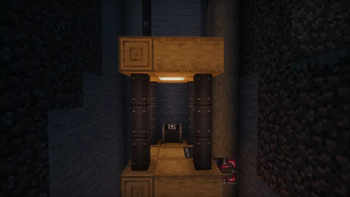
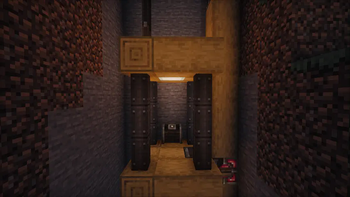
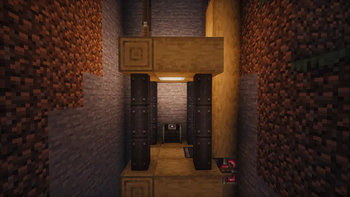
# Create-Dynamic-Lights Add dynamic lights to the Create mod. ## Features 1. Dynamic Lighting for Contraptions: - Automatically create light blocks when Contraptions move. 2. Support LambDynamicLights: - Add and update light sources for LambDynamicLights mod as Contraptions move, allowing for smoother lighting effects. ## Dependencies ### Fabric 1. Create-Fabric (Required) 2. LambDynamicLights (Recommended) ### Forge 1. Create (Required) 2. Embeddium/Rubidium Dynamic Lights (Recommended) ## Server and Client Support | Feature | Server Only | Client Only | Both Side | |----------------|:-----------:|:-----------:|:-----------:| | Light Block | Yes | No | Yes | | Dynamic Lights | No | Yes | Yes | - Only installed on the server. - You can use the Light Block to create light sources even if the client doesn't have the mod installed. The client will see the light sources, and the performance impact may be heavy. - Only installed on the client. - The client can see the light sources created by the LimbDynamicLights mod but the light sources only has visual effects and no actual light source is created. ## Known Issues 1. On Fabric, if the mod is installed only on the client side, the client will crash when you modify and save the server configuration. - For servers, I recommend installing the mod even if you don't want to use the Light Block effect. This can prevent client crashes and exception logs on the server side. ## Preview !(https://raw.githubusercontent.com/leon-o/Create-Dynamic-Lights/main/misc/docs/images/no-light.png) No dynamic light !(https://raw.githubusercontent.com/leon-o/Create-Dynamic-Lights/main/misc/docs/images/default-light.png) Default dynamic light !(https://raw.githubusercontent.com/leon-o/Create-Dynamic-Lights/main/misc/docs/images/brighter-light.png) Brighter dynamic light (set the luminance multiplier to 1.2) ### Some gifs - !(https://raw.githubusercontent.com/leon-o/Create-Dynamic-Lights/main/misc/docs/images/elevator-no-block-light.gif) - As the elevator moves, the light illuminates the surrounding area. - !(https://raw.githubusercontent.com/leon-o/Create-Dynamic-Lights/main/misc/docs/images/bearing-block-light.gif) - Enable the light block. As the bearing moves, the light block is created and removed. You can see the light is a little flicker. - !(https://raw.githubusercontent.com/leon-o/Create-Dynamic-Lights/main/misc/docs/images/bearing-no-block-light.gif) - Disable the light block and enable the LimbDynamicLight. There is no flicker, and the light is smoother. ## Q&A 1. Q: Why and when to use the light block? - A: The Light Block is a block that emits light. It's invisible and intangible, making it ideal for creating light sources in the game world. It can affect the environment by melting ice or snow and preventing mob spawning. However, the Light Block can impact performance, and the light source isn’t smooth when the contraption moves. Therefore, I recommend using the LambDynamicLights mod for smoother lighting effects. There might be two reasons for using the Light Block: 1. The client doesn't have the LambDynamicLights mod installed or this mod installed. 2. You want to create a light source that can affect the environment, such as melting ice or snow.
# Create-Dynamic-Lights Add dynamic lights to the Create mod.
## Features 1. Dynamic Lighting for Contraptions: - Automatically create light blocks when Contraptions move. 2. Support LambDynamicLights: - Add and update light sources for LambDynamicLights mod as Contraptions move, allowing for smoother lighting effects.
## Dependencies
### Fabric 1. Create-Fabric (Required) 2. LambDynamicLights (Recommended)
### Forge 1. Create (Required) 2. Embeddium/Rubidium Dynamic Lights (Recommended)
## Server and Client Support | Feature | Server Only | Client Only | Both Side | |----------------|:-----------:|:-----------:|:-----------:| | Light Block | Yes | No | Yes | | Dynamic Lights | No | Yes | Yes |
- Only installed on the server.
- - You can use the Light Block to create light sources even if the client doesn't have the mod installed. The client will see the light sources, and the performance impact may be heavy.
- Only installed on the client.
- - The client can see the light sources created by the LimbDynamicLights mod but the light sources only has visual effects and no actual light source is created.
## Known Issues 1. On Fabric, if the mod is installed only on the client side, the client will crash when you modify and save the server configuration. - For servers, I recommend installing the mod even if you don't want to use the Light Block effect. This can prevent client crashes and exception logs on the server side.
## Preview !(https://raw.githubusercontent.com/leon-o/Create-Dynamic-Lights/main/misc/docs/images/no-light.png) No dynamic light
!(https://raw.githubusercontent.com/leon-o/Create-Dynamic-Lights/main/misc/docs/images/default-light.png) Default dynamic light
!(https://raw.githubusercontent.com/leon-o/Create-Dynamic-Lights/main/misc/docs/images/brighter-light.png) Brighter dynamic light (set the luminance multiplier to 1. 2)
### Some gifs - !(https://raw.githubusercontent.com/leon-o/Create-Dynamic-Lights/main/misc/docs/images/elevator-no-block-light.gif) - As the elevator moves, the light illuminates the surrounding area.
- !(https://raw.githubusercontent.com/leon-o/Create-Dynamic-Lights/main/misc/docs/images/bearing-block-light.gif)
- - Enable the light block. As the bearing moves, the light block is created and removed. You can see the light is a little flicker.
- !(https://raw.githubusercontent.com/leon-o/Create-Dynamic-Lights/main/misc/docs/images/bearing-no-block-light.gif)
- - Disable the light block and enable the LimbDynamicLight. There is no flicker, and the light is smoother.
## Q&A 1. Q: Why and when to use the light block? - A: The Light Block is a block that emits light. It's invisible and intangible, making it ideal for creating light sources in the game world. It can affect the environment by melting ice or snow and preventing mob spawning. However, the Light Block can impact performance, and the light source isn’t smooth when the contraption moves. Therefore, I recommend using the LambDynamicLights mod for smoother lighting effects. There might be two reasons for using the Light Block: 1. The client doesn't have the LambDynamicLights mod installed or this mod installed. 2. You want to create a light source that can affect the environment, such as melting ice or snow.
📊 Mod Details
- Game
- Minecraft Mods
- Author
- leon-o
- Version
- neoforge-2.0.1
- Downloads
- 653,990
- Endorsements
- 268
- Category
- adventure
- Created
- 8/4/2024
- Updated
- 10/8/2025
- Game Versions
- 1.21.1
- Tags
- adventure
🔧 How to Install Minecraft Mods Mods
Download from Modrinth. Use Prism Launcher or drop into your mods folder.
📖 Full step-by-step install guide for Minecraft Mods →
Visit the official mod page for specific installation instructions for this mod.
🎮 Need cheat codes or console commands? Check ur gaming wiki for Minecraft Mods commands, item IDs, and more.
❓ Frequently Asked Questions
Which Minecraft Mods versions does Create: Dynamic Lights support?
The author lists 1.21.1. Other versions may work but are untested by the author.
What is the latest version of Create: Dynamic Lights?
Version neoforge-2.0.1, published 2025-10-08 with 653,990 downloads recorded at the source.
Keep browsing — more Minecraft Mods mods await