Create: Droneworks Simulated
🟡 Updated this year⚠️ Install Order · 2 steps
Install in this order, then this mod last — most mods fail to load without their framework and dependencies in place.
🖼️ Gallery (3 images)
🔍 Analysis
- 👍 0.2% endorsement rate
- 🏆 #30 of 53 neoforge mods in this game by downloads
📋 About This Mod
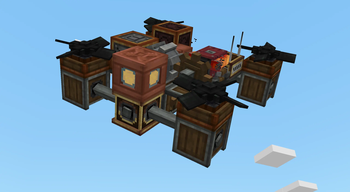
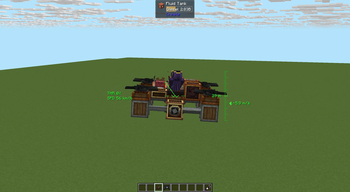
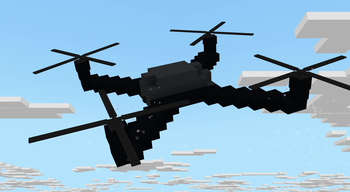
# Create: Droneworks Simulated Build and fly your own drones in Create. Droneworks is an add-on for Aeronautics that lets you build aircraft from redstone-controlled parts and control it remotely !(https://cdn.modrinth.com/data/cached_images/78a91951c865257b698a7cd646e0152cec501e99.png) ## Realism Propellers actually push, torque has to be balanced ## Pilot it your way - **Commander Seat** — hop in for a locked third-person view with a full flight HUD. - **Drone Camera** — mount a tiny FPV camera and get a first-person feed that banks and tumbles with the craft, complete with analog glitch visuals. - **Drone Remote Controller** — link to a seat or camera and watch your drone from anywhere in range(1500 blocks is a default), wirelessly. ## The parts - **Drone Core** — the brain: set your heading, feed it thrust with an analog redstone signal, and switch between stabilised and high-sensitivity modes. - **Drone Controls** — maps each side to an axis (yaw, pitch, roll) for full steering. - **Drone Propeller** & **Tilting Propeller Bearing** — your lift and thrust, with per-blade torque direction so you can tune yaw and keep the craft balanced. - **Drone Blade** & **Drone Hub** — decorative rotor pieces to make your build look the part. - **Flap Bearing** — combines clutch gearshift torsion spring and mechanical bearing to control flaps with analog redstone with setting max angle. What before was achieved by 4 blocks now compacted in one. Neat feature is analog redstone, if max degree is 30, then at 5 redstone signal angle would be 10, at 10 redstone signal it would be 20 and at 15 it would be max angle - 30. <iframe width="560" height="315" src="https://www.youtube-nocookie.com/embed/DK8TuKbse2E" title="YouTube video player" frameborder="0" allow="accelerometer; autoplay; clipboard-write; encrypted-media; gyroscope; picture-in-picture; web-share" allowfullscreen></iframe>
# Create: Droneworks Simulated
Build and fly your own drones in Create.
Droneworks is an add-on for Aeronautics that lets you build aircraft from redstone-controlled parts and control it remotely
!(https://cdn.modrinth.com/data/cached_images/78a91951c865257b698a7cd646e0152cec501e99.png)
## Realism Propellers actually push, torque has to be balanced
## Pilot it your way - Commander Seat — hop in for a locked third-person view with a full flight HUD. - Drone Camera — mount a tiny FPV camera and get a first-person feed that banks and tumbles with the craft, complete with analog glitch visuals. - Drone Remote Controller — link to a seat or camera and watch your drone from anywhere in range(1500 blocks is a default), wirelessly.
## The parts - Drone Core — the brain: set your heading, feed it thrust with an analog redstone signal, and switch between stabilised and high-sensitivity modes. - Drone Controls — maps each side to an axis (yaw, pitch, roll) for full steering. - Drone Propeller & Tilting Propeller Bearing — your lift and thrust, with per-blade torque direction so you can tune yaw and keep the craft balanced. - Drone Blade & Drone Hub — decorative rotor pieces to make your build look the part. - Flap Bearing — combines clutch gearshift torsion spring and mechanical bearing to control flaps with analog redstone with setting max angle. What before was achieved by 4 blocks now compacted in one. Neat feature is analog redstone, if max degree is 30, then at 5 redstone signal angle would be 10, at 10 redstone signal it would be 20 and at 15 it would be max angle - 30.
📊 Mod Details
- Game
- Minecraft Mods
- Author
- LowTierChud
- Version
- 0.1.1
- Downloads
- 7,568
- Endorsements
- 13
- Category
- neoforge
- Created
- 7/19/2026
- Updated
- 7/9/2026
- Game Versions
- 1.21.1
- Tags
- technology, transportation
🔧 How to Install Minecraft Mods Mods
Download from Modrinth. Use Prism Launcher or drop into your mods folder.
📖 Full step-by-step install guide for Minecraft Mods →
Visit the official mod page for specific installation instructions for this mod.
🎮 Need cheat codes or console commands? Check ur gaming wiki for Minecraft Mods commands, item IDs, and more.
❓ Frequently Asked Questions
Which Minecraft Mods versions does Create: Droneworks Simulated support?
The author lists 1.21.1. Other versions may work but are untested by the author.
What is the latest version of Create: Droneworks Simulated?
Version 0.1.1, published 2026-07-09 with 7,568 downloads recorded at the source.
Keep browsing — more Minecraft Mods mods await