Create: Blueprinted
🟡 Updated this year⚠️ Install Order · 2 steps
Install in this order, then this mod last — most mods fail to load without their framework and dependencies in place.
🖼️ Gallery (4 images)


🔍 Analysis
- 👍 0.4% endorsement rate
- 🏆 #176 of 359 forge mods in this game by downloads
📋 About This Mod
# Create: Blueprinted Originally made for the (https://brassworks.opnsoc.org/), this mod is free and open for anyone to use! Create: Blueprinted allows you to render your Create mod schematics into high-resolution PNG images straight from the game. (https://modrinth.com/project/7ljLUpZn) *(licensed under (https://github.com/titlo10/Create-Schematic-Preview/blob/main/LICENSE))* is included as a embedded dependency for the purpose of previewing schematics and setting their rotation before rendering. ## Add-on mods These add-on mods allow players to share schematics online from a schematic table. You can use multiple add-on mods and switch between them in-game. - (https://modrinth.com/mod/create-schematic-upload) - Upload schematics to CreateMod.com and make it easier to download them! ## Features * **High-Resolution Renders:** Render your `.nbt` schematics to crisp PNGs directly from the Schematic Table UI or a command. * **Adjust Orientation:** Use the schematic preview to pick a unique orientation for your image or enter precise angles from a command. * **Adjustable Resolution:** Choose your output width, from a quick preview, all the way up to 8192px posters. * **Anti-Aliasing:** Built-in supersampling smooths out jagged edges. It's on by default, and you can tune or disable it. * **Fluids Included:** Water, lava, and waterlogged blocks are drawn in the render instead of being skipped. * **Background Processing:** Most operations happen in the background and wont interrupt your game. Live progress is displayed in the action bar. * **Schematic Table Bug Fix:** Prevents long schematic names overflowing the scroll input box bounds. ## Usage ### In-Game UI You can render schematics directly from the Schematic Table. Just select your schematic and click the new render button! Hold **Shift** while clicking to render at 2048px (instead of the default 1024px). Rotate the schematic preview to select a unique orientation for your image. !(https://github.com/salem-5/Create-Blueprinted/blob/main/showcase/ui.png?raw=true) !(https://github.com/salem-5/Create-Blueprinted/blob/main/showcase/render.png?raw=true) - *Rendered Build by (https://liukrast.net/)* ### Commands If you need more control over the output, you can use the built-in command: ```bash /schematic <export/share> <filename> ``` * **export** - Save image to a PNG file within the `./schematics` folder. * **share** - Share a schematic to a remote server (Blueprinted doesn't implement this by default, it must be provided by add-on mods). * **width** — Total output width in pixels (64–8192). * **orientation** — The yaw & pitch of the image. See: (https://minecraft.wiki/w/Argument_types#rotation) for more info. The value `~ ~` will use your current viewing angle. * **antialiasing** — Supersampling factor: `1` = off, `2`–`4` = progressively smoother edges (defaults to `2`). ## Developers The mod includes an API which includes events fired before and after a schematic is rendered, alongside `ShareProviders` which allow you to implement custom share functionality for sending image or schematic file data to another location such as a remote server. (e.g. sending a schematic image to a Discord server). Blueprinted does not add this functionality by default, it must be provided by an addon mod. More information is available on the (https://github.com/salem-5/Create-Blueprinted). *(Make sure to carefully read the documentation provided if you want to implement a `ShareProvider`. You will need to implement some form of server image sanitization and comply with Modrinths (https://modrinth.com/legal/rules) for remote server uploads).* ## License This project is licensed under MIT. The mod includes (https://modrinth.com/project/7ljLUpZn) as a bundled dependency. This mod is (https://github.com/titlo10/Create-Schematic-Preview/blob/main/LICENSE).
# Create: Blueprinted
Originally made for the (https://brassworks.opnsoc.org/), this mod is free and open for anyone to use!
Create: Blueprinted allows you to render your Create mod schematics into high-resolution PNG images straight from the game.
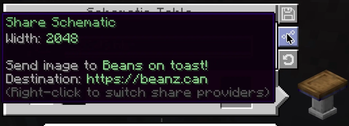
(https://modrinth.com/project/7ljLUpZn) (licensed under (https://github.com/titlo10/Create-Schematic-Preview/blob/main/LICENSE))* is included as a embedded dependency for the purpose of previewing schematics and setting their rotation before rendering. ## Add-on mods These add-on mods allow players to share schematics online from a schematic table. You can use multiple add-on mods and switch between them in-game. - (https://modrinth.com/mod/create-schematic-upload) - Upload schematics to CreateMod.com and make it easier to download them!
## Features High-Resolution Renders: Render your `.nbt` schematics to crisp PNGs directly from the Schematic Table UI or a command. Adjust Orientation: Use the schematic preview to pick a unique orientation for your image or enter precise angles from a command. Adjustable Resolution: Choose your output width, from a quick preview, all the way up to 8192px posters. Anti-Aliasing: Built-in supersampling smooths out jagged edges. It's on by default, and you can tune or disable it. Fluids Included: Water, lava, and waterlogged blocks are drawn in the render instead of being skipped. Background Processing: Most operations happen in the background and wont interrupt your game. Live progress is displayed in the action bar. Schematic Table Bug Fix: Prevents long schematic names overflowing the scroll input box bounds.
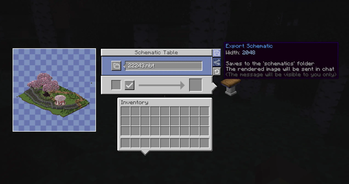
## Usage ### In-Game UI You can render schematics directly from the Schematic Table. Just select your schematic and click the new render button!
Hold Shift while clicking to render at 2048px (instead of the default 1024px). Rotate the schematic preview to select a unique orientation for your image.
!(https://github.com/salem-5/Create-Blueprinted/blob/main/showcase/ui.png?raw=true) !(https://github.com/salem-5/Create-Blueprinted/blob/main/showcase/render.png?raw=true) - Rendered Build by (https://liukrast.net/)*
### Commands
If you need more control over the output, you can use the built-in command:
```bash
/schematic
## Developers The mod includes an API which includes events fired before and after a schematic is rendered, alongside `ShareProviders` which allow you to implement custom share functionality for sending image or schematic file data to another location such as a remote server. (e.g. sending a schematic image to a Discord server). Blueprinted does not add this functionality by default, it must be provided by an addon mod.
More information is available on the (https://github.com/salem-5/Create-Blueprinted).
(Make sure to carefully read the documentation provided if you want to implement a `ShareProvider`. You will need to implement some form of server image sanitization and comply with Modrinths (https://modrinth.com/legal/rules) for remote server uploads).
## License This project is licensed under MIT.
The mod includes (https://modrinth.com/project/7ljLUpZn) as a bundled dependency. This mod is (https://github.com/titlo10/Create-Schematic-Preview/blob/main/LICENSE).
📊 Mod Details
- Game
- Minecraft Mods
- Author
- swzo
- Version
- 2.2.3+mc1.21.1-neoforge
- Downloads
- 13,340
- Endorsements
- 51
- Category
- forge
- Created
- 3/25/2026
- Updated
- 8/25/2026
- Game Versions
- 1.21.1
- Tags
- management, technology, utility
🔧 How to Install Minecraft Mods Mods
Download from Modrinth. Use Prism Launcher or drop into your mods folder.
📖 Full step-by-step install guide for Minecraft Mods →
Visit the official mod page for specific installation instructions for this mod.
🎮 Need cheat codes or console commands? Check ur gaming wiki for Minecraft Mods commands, item IDs, and more.
❓ Frequently Asked Questions
Which Minecraft Mods versions does Create: Blueprinted support?
The author lists 1.21.1. Other versions may work but are untested by the author.
What is the latest version of Create: Blueprinted?
Version 2.2.3+mc1.21.1-neoforge, published 2026-08-25 with 13,340 downloads recorded at the source.
Keep browsing — more Minecraft Mods mods await