Create: Advanced Optimization
🟡 Updated this year⚠️ Install Order · 2 steps
Install in this order, then this mod last — most mods fail to load without their framework and dependencies in place.
🖼️ Gallery (4 images)
🔍 Analysis
- 👍 0.3% endorsement rate
- 🏆 #14 of 57 neoforge mods in this game by downloads
📋 About This Mod
<div> <a href="https://bisecthosting.com/OurStory" target="_blank" rel="nofollow noopener"> <img src="https://img.shields.io/badge/Partner-BisectHosting-0078FF?logo=bisecthosting&logoColor=white&style=for-the-badge" alt="BisectHosting Partner"> </a> <a href="https://discord.gg/kb8NSTF45n" target="_blank" rel="nofollow noopener"> <img src="https://img.shields.io/discord/272468475287437312?label=Discord&logo=discord&color=5865F2&style=for-the-badge" alt="Join our Discord"> </a> <a href="https://www.curseforge.com/members/levelsfr/projects" target="_blank" rel="nofollow noopener"> <img src="https://img.shields.io/badge/CurseForge-My Projects-F16436?logo=curseforge&logoColor=white&style=for-the-badge" alt="View our CurseForge projects"> </a> <a href="https://modrinth.com/user/LevelsFR" target="_blank" rel="nofollow noopener"> <img src="https://img.shields.io/badge/Modrinth-My Projects-00AF5C?logo=modrinth&logoColor=white&style=for-the-badge" alt="View our Modrinth projects"> </a> <a href="https://www.patreon.com/c/OurStoryCollection" target="_blank" rel="nofollow noopener"> <img src="https://img.shields.io/badge/Support Us-Patreon-ff424d?logo=patreon&logoColor=white&style=for-the-badge" alt="Support us on Patreon"> </a> </div> <div> <h1><strong>Create: Advanced Optimization</strong></h1> <p> <strong>A lightweight server-side optimization and diagnostics mod for Create on NeoForge.</strong> </p> <p> Optimize key Create systems and diagnose large factories, logistics networks, packages, trains, and processing chains with built-in profiling reports. </p> </div> <hr> <h2>⚙️ <strong>Performance Improvements</strong></h2> <p> Create factories can become enormous, interconnected, automated, and slightly terrifying. </p> <p> Create: Advanced Optimization reduces avoidable background work in selected Create systems while preserving normal mechanics, recipes, progression, and machine behavior. </p> <h3><strong>Active Optimizations</strong></h3> <ul> <li> <strong>Spout recipe caching</strong> reduces repeated filling recipe lookups. </li> <li> <strong>Basin memoization</strong> avoids unnecessary repeated processing recipe calculations. </li> <li> <strong>Mechanical Crafter memoization</strong> reduces repeated crafting checks when nothing relevant has changed. </li> <li> <strong>Belt Funnel fast rejection</strong> skips operations that cannot produce a valid result. </li> <li> <strong>Deployer fast rejection</strong> avoids unnecessary processing for invalid operations. </li> <li> <strong>Optimized Diving Boots checks</strong> remove small but frequently repeated calculations. </li> </ul> <p> These optimizations target specific operations. Systems such as trains, railway graphs, logistics networks, pipes, and Redstone Links are monitored by the profiler but are not directly modified unless explicitly listed above. </p> <p> <strong>No recipes are changed. No machines are nerfed. No Create gameplay is altered.</strong> </p> <hr> <h2>📦 <strong>Package Entity Monitoring</strong></h2> <p> Large package networks can create significant background activity on busy servers. </p> <p>The integrated package monitor tracks:</p> <ul> <li>Current active Package Entities</li> <li>Peak Package Entity count</li> <li>Package-heavy chunks</li> <li>Configurable warning thresholds</li> <li>Package statistics included in profiler reports</li> </ul> <p> Use <code>/cao packages top</code> to quickly identify areas containing unusually large numbers of active packages. </p> <hr> <h2>📊 <strong>Built-In Create Profiler</strong></h2> <p> <img src="https://media.forgecdn.net/attachments/description/1598059/description_2c2eaa29-4c0d-4aeb-bb8f-dbbb7ac301d8.png" alt="Create Advanced Optimization HTML profiler report preview"> </p> <p> Profile your Create setup directly in-game and identify which systems consume the most server time. </p> <p>The profiler can measure activity from:</p> <ul> <li>Factories and Smart Block Entities</li> <li>Fluid transport and pipes</li> <li>Funnels and inventory extraction</li> <li>Spout processing and filling</li> <li>Package Entities and global logistics</li> <li>Chain Conveyors</li> <li>Railway managers and trains</li> <li>Train map synchronization</li> <li>Track graph synchronization</li> <li>Redstone Links</li> <li>Diving Boots</li> </ul> <p> Profiler coverage means that these systems are measured. It does not necessarily mean that their internal behavior is modified. </p> <p>Each session exports:</p> <ul> <li>A readable TXT report</li> <li>A detailed visual HTML report</li> <li>Server health and MSPT information</li> <li>Top Create-related hotspots</li> <li>Package statistics</li> <li>Detected alerts</li> <li>Recommended systems and locations to inspect</li> </ul> <p> Open the





Create: Advanced Optimization
A lightweight server-side optimization and diagnostics mod for Create on NeoForge.
Optimize key Create systems and diagnose large factories, logistics networks, packages, trains, and processing chains with built-in profiling reports.
⚙️ Performance Improvements
Create factories can become enormous, interconnected, automated, and slightly terrifying.
Create: Advanced Optimization reduces avoidable background work in selected Create systems while preserving normal mechanics, recipes, progression, and machine behavior.
Active Optimizations
- Spout recipe caching reduces repeated filling recipe lookups.
- Basin memoization avoids unnecessary repeated processing recipe calculations.
- Mechanical Crafter memoization reduces repeated crafting checks when nothing relevant has changed.
- Belt Funnel fast rejection skips operations that cannot produce a valid result.
- Deployer fast rejection avoids unnecessary processing for invalid operations.
- Optimized Diving Boots checks remove small but frequently repeated calculations.
These optimizations target specific operations. Systems such as trains, railway graphs, logistics networks, pipes, and Redstone Links are monitored by the profiler but are not directly modified unless explicitly listed above.
No recipes are changed. No machines are nerfed. No Create gameplay is altered.
📦 Package Entity Monitoring
Large package networks can create significant background activity on busy servers.
The integrated package monitor tracks:
- Current active Package Entities
- Peak Package Entity count
- Package-heavy chunks
- Configurable warning thresholds
- Package statistics included in profiler reports
Use /cao packages top to quickly identify areas containing unusually large numbers of active packages.
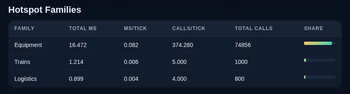
📊 Built-In Create Profiler
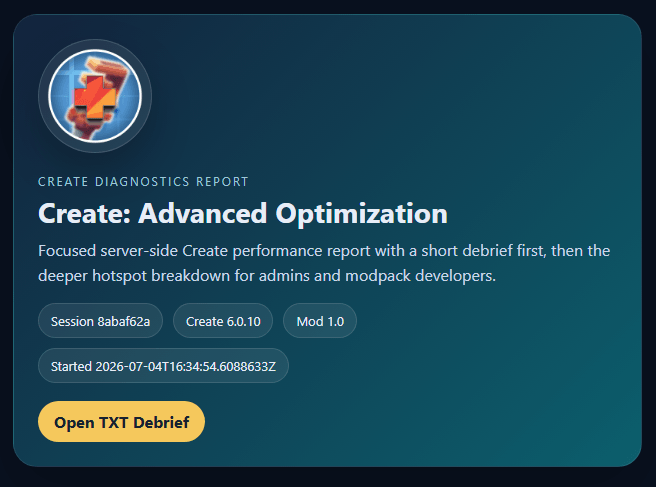
Profile your Create setup directly in-game and identify which systems consume the most server time.
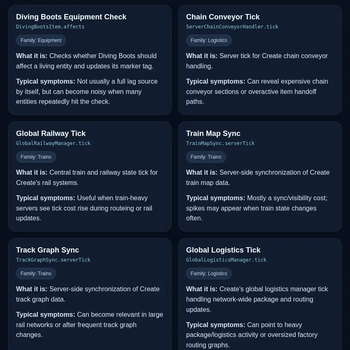
The profiler can measure activity from:
- Factories and Smart Block Entities
- Fluid transport and pipes
- Funnels and inventory extraction
- Spout processing and filling
- Package Entities and global logistics
- Chain Conveyors
- Railway managers and trains
- Train map synchronization
- Track graph synchronization
- Redstone Links
- Diving Boots
Profiler coverage means that these systems are measured. It does not necessarily mean that their internal behavior is modified.
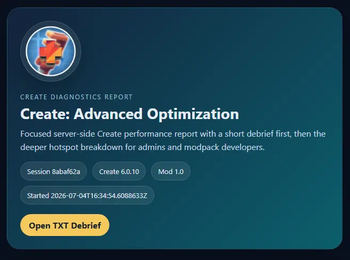
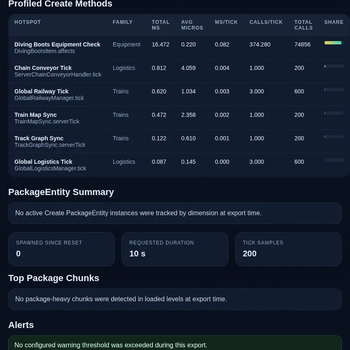
Each session exports:
- A readable TXT report
- A detailed visual HTML report
- Server health and MSPT information
- Top Create-related hotspots
- Package statistics
- Detected alerts
- Recommended systems and locations to inspect
Open the
📊 Mod Details
- Game
- Minecraft Mods
- Author
- LevelsFR
- Version
- 1.4
- Downloads
- 3,777
- Endorsements
- 13
- Category
- neoforge
- Created
- 7/8/2026
- Updated
- 8/24/2026
- Game Versions
- 1.21.1
- Tags
- optimization, technology, utility
🔧 How to Install Minecraft Mods Mods
Download from Modrinth. Use Prism Launcher or drop into your mods folder.
📖 Full step-by-step install guide for Minecraft Mods →
Visit the official mod page for specific installation instructions for this mod.
🎮 Need cheat codes or console commands? Check ur gaming wiki for Minecraft Mods commands, item IDs, and more.
❓ Frequently Asked Questions
Which Minecraft Mods versions does Create: Advanced Optimization support?
The author lists 1.21.1. Other versions may work but are untested by the author.
What is the latest version of Create: Advanced Optimization?
Version 1.4, published 2026-08-24 with 3,777 downloads recorded at the source.
Keep browsing — more Minecraft Mods mods await