Counter
🟡 Updated this year⚠️ Install Order · 2 steps
Install in this order, then this mod last — most mods fail to load without their framework and dependencies in place.
🖼️ Gallery (3 images)
🔍 Analysis
- 👍 0.1% endorsement rate
- 🏆 #2 of 33 game-mechanics mods in this game by downloads
📋 About This Mod
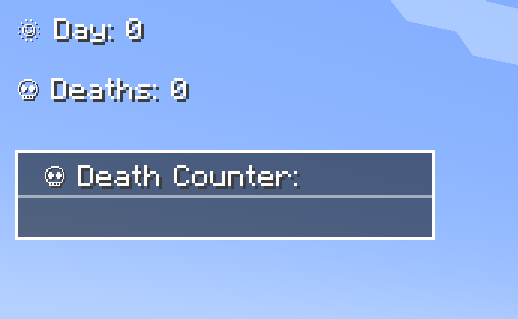
### **Track Days, Deaths, Survival Time, Time, Coordinates & Ping – Fully Customizable!** The **Counter Mod** enhances Minecraft by adding **Day Counters**, **Death Counters**, a **Survival Time Tracker**, a **Time Overlay**, a **Coordinates Overlay** and a **Numeric Ping Display**. Whether in singleplayer or multiplayer, this mod provides an easy way to track world progression, player statistics, and network latency – especially useful in **hardcore modpacks**. --- ### **🌟 Features** - ✅ **Day Counter** – Displays the current Minecraft day as an overlay or in chat. - ✅ **Death Counter** – Tracks player deaths with an overlay leaderboard & chat display. - ✅ **Survival Time Tracker** – Tracks how long a player has survived since their last death. Shows best time, global best, and history. - ✅ **Time Overlay** – Shows the current in-game time directly on screen. - ✅ **Coords Overlay** – Shows the current coordinates directly on screen and share locations with others. - ✅ **Numeric Ping Display** – Replaces vanilla ping bars with color-coded numeric values. - ✅ **Highly Configurable** – Customize positions, colors, display modes, and styles. --- ### **⚙️ Configuration** - Configure everything via **server-config.toml** and **client-config.toml**. - Customize **text color, overlay positions, scaling, and display styles**. - Supports **multiple display modes**: Chat, Overlay, or both. - **Enable or disable** specific features (Day, Death, Survival, etc.) independently. - 📜 **For a full list of config options, visit:** (https://github.com/BigBull-H3RO/Counter) --- ## **📝 Commands** Below is an overview of the main commands the mod provides: | Command | Permission | Description | |----------------------------------------|------------|------------------------------------------------------------------------------------| | **`/day get`** | `all` | Shows the current day counter value. | | **`/day set <days>`** | `admin` | Sets the Day Counter to the specified value. | | **`/death get `** | `all` | Shows your own total deaths, another player's deaths, or the leaderboard (`list`). | | **`/death set <player> <amount>`** | `admin` | Sets the death count for the specified player(s). | | **`/death reset`** | `admin` | Resets the death count of all players to `0`. | | **`/time get`** | `all` | Shows the current in-game time. | | **`/coords get`** | `all` | Shows your current coordinates. | | **`/coords send `** | `all` | Shares your coordinates with another player or all players. | | **`/survival history `** | `all` | Shows the survival time history for you or another player. | | **`/survival best `** | `all` | Displays the best survival time for you, another player, or the global best. | | **`/survival current `** | `all` | Displays the current survival time since the last death. | --- ### **🎨 Overlay Edit Mode** - Easily adjust the position and visibility of overlays via an in-game UI. - Supports dragging elements, hiding overlays, and saving changes dynamically. - Resize overlays with buttons. - Change alignment (left, center, right) using arrow icons. --- ### **🔗 Links** 🐛 Please report issues to the (https://github.com/BigBull-H3RO/Counter/issues) on GitHub
### Track Days, Deaths, Survival Time, Time, Coordinates & Ping – Fully Customizable!
The Counter Mod enhances Minecraft by adding Day Counters, Death Counters, a Survival Time Tracker, a Time Overlay, a Coordinates Overlay and a Numeric Ping Display. Whether in singleplayer or multiplayer, this mod provides an easy way to track world progression, player statistics, and network latency – especially useful in hardcore modpacks.
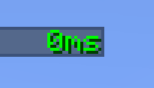
### 🌟 Features - ✅ Day Counter – Displays the current Minecraft day as an overlay or in chat. - ✅ Death Counter – Tracks player deaths with an overlay leaderboard & chat display. - ✅ Survival Time Tracker – Tracks how long a player has survived since their last death. Shows best time, global best, and history. - ✅ Time Overlay – Shows the current in-game time directly on screen. - ✅ Coords Overlay – Shows the current coordinates directly on screen and share locations with others. - ✅ Numeric Ping Display – Replaces vanilla ping bars with color-coded numeric values. - ✅ Highly Configurable – Customize positions, colors, display modes, and styles.
### ⚙️ Configuration - Configure everything via server-config.toml and client-config.toml. - Customize text color, overlay positions, scaling, and display styles. - Supports multiple display modes: Chat, Overlay, or both. - Enable or disable specific features (Day, Death, Survival, etc.) independently. - 📜 For a full list of config options, visit: (https://github.com/BigBull-H3RO/Counter)
## 📝 Commands Below is an overview of the main commands the mod provides:
| Command | Permission | Description |
|----------------------------------------|------------|------------------------------------------------------------------------------------|
| `/day get` | `all` | Shows the current day counter value. |
| `/day set
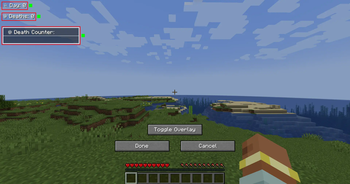
### 🎨 Overlay Edit Mode - Easily adjust the position and visibility of overlays via an in-game UI. - Supports dragging elements, hiding overlays, and saving changes dynamically. - Resize overlays with buttons. - Change alignment (left, center, right) using arrow icons.
### 🔗 Links
🐛 Please report issues to the (https://github.com/BigBull-H3RO/Counter/issues) on GitHub
📊 Mod Details
- Game
- Minecraft Mods
- Author
- bigbull333
- Version
- 0.4.2-26.2
- Downloads
- 2,079
- Endorsements
- 2
- Category
- game-mechanics
- Created
- 3/11/2025
- Updated
- 8/3/2026
- Game Versions
- 26.2
- Tags
- game-mechanics, utility
🔧 How to Install Minecraft Mods Mods
Download from Modrinth. Use Prism Launcher or drop into your mods folder.
📖 Full step-by-step install guide for Minecraft Mods →
Visit the official mod page for specific installation instructions for this mod.
🎮 Need cheat codes or console commands? Check ur gaming wiki for Minecraft Mods commands, item IDs, and more.
❓ Frequently Asked Questions
Which Minecraft Mods versions does Counter support?
The author lists 26.2. Other versions may work but are untested by the author.
What is the latest version of Counter?
Version 0.4.2-26.2, published 2026-08-03 with 2,079 downloads recorded at the source.
Keep browsing — more Minecraft Mods mods await