Core Companion
🟡 Updated this year⚠️ Install Order · 2 steps
Install in this order, then this mod last — most mods fail to load without their framework and dependencies in place.
🖼️ Gallery (4 images)
🔍 Analysis
- 👍 0.5% endorsement rate
- 🏆 #747 of 892 fabric mods in this game by downloads
📋 About This Mod
# Core Companion Core Companion adds an owner-bound AI companion to Minecraft. The companion can chat with the player, remember context, react to the world, use an inventory, perform survival tasks, show expressions, use optional voice/TTS/vision features, and perform Baritone-powered world actions. The goal is to make the companion feel like a persistent character in your world instead of a simple pet or command bot. It can follow you, stay nearby, help with tasks, respond to events, manage items, run planner goals, build a relationship over time, and be customized through in-game settings. On first join it sets itself up automatically — picking and downloading a local AI model that fits your hardware — so you can go from install to a talking companion without editing a single config file. ## Development Status Core Companion is an early release. Some features are experimental and may change as the mod is improved. ## Local AI Hardware Warning CoreCompanion runs an Ollama language model alongside Minecraft, so both programs must share your graphics card’s memory. **12 GB of dedicated VRAM is the minimum recommended for the normal experience, and 16 GB is preferred.** Examples include the RTX 3060 12 GB, RTX 4070, RTX 5070, RX 7700 XT, RTX 4060 Ti 16 GB, RTX 5060 Ti 16 GB, and RX 7800 XT. Graphics cards with 6–8 GB of VRAM are limited to the lightweight AI model and may struggle when using shaders, high-resolution texture packs, vision features, or demanding Minecraft settings. Please check the exact VRAM capacity before downloading. This requirement applies only when running the AI locally. Players using a compatible cloud AI provider do not need a local AI-capable graphics card. ## Main Features - Spawn, remove, recall, locate, and auto-spawn your companion on login - Persistent owner-bound companion identity - Female and male companion setup options - Choose a start mode per world: bond with a partner immediately, or meet unbonded **village companions** and earn their trust through chat and food - Companion can be targeted by vanilla commands through its configured name or alias - Backpack and equipment inventory, with a companion inventory screen and a **rotatable 3D companion preview** - Item holding, equipment use, item transfer, dropping, depositing, and sorting behavior - **Recovers your dropped items after death** — she paths to your death spot, grabs your stuff (full NBT intact), and brings it back - Orb of Binding and bonded/unbonded spawn-egg support - Shoulder carry, dismount, hand-holding, player lead attach/release/pull, and paired emote state cleanup ## Setup & First Run The first time you join, Core Companion sets itself up automatically — no config files to edit. - **Hardware-aware model pick:** it checks the memory your machine can actually give an AI model — dedicated GPU VRAM, Apple-Silicon unified memory, or system RAM — reserves a few GB for Minecraft itself so nothing offloads and stutters, and downloads the best-fitting local model: lightweight (`dolphin-phi`), balanced (`dolphin3`), or largest (`dolphin-mixtral`). It tells you which one it chose for your specs, since responses get sharper on bigger models. - **Live download, then arrival:** a progress bar above your hotbar tracks the one-time download, and your companion only appears once her model is downloaded **and** warmed up — she never spawns unable to talk. - **Clean-machine friendly:** if the local AI service (Ollama) isn't installed yet, a clear in-game setup guide appears instead of a raw error — and following, mining, and building all keep working without it. - **Always adjustable:** the chosen model, provider, personality, and everything else stay editable later in the in-game config screen, and a model you set yourself is always respected. ## AI And Chat Core Companion supports normal chat responses and AI-assisted actions through the `/corecompanion` command. - `/corecompanion ask` — chat with your companion - **Local-first and provider-flexible:** runs on a local Ollama model by default, or connect any OpenAI-compatible endpoint (OpenAI, xAI/Grok, Gemini's OpenAI-compatible endpoint, LM Studio, llama.cpp server, and more) - **Zero-config local start:** on first join it auto-selects and downloads a local model sized to your hardware, then warms it up before your companion arrives (see *Setup & First Run*) - Provider, endpoint, API key, and model are set in the in-game config screen - Configurable personality, history, temperature, token length, and response settings - Internal AI action directives for Baritone actions, planner goals, and social actions - Deterministic handlers for location, looked-at block questions/actions, hunger/eating, nearest village, sleep, "take me to base/farm," and social requests - Multiple AI action lines can be queued and processed ## Direct Action Verbs The companion supports many direct action commands and AI-triggered actions. - **Control & status:** `stop`, `stay`,
# Core Companion
Core Companion adds an owner-bound AI companion to Minecraft. The companion can chat with the player, remember context, react to the world, use an inventory, perform survival tasks, show expressions, use optional voice/TTS/vision features, and perform Baritone-powered world actions.
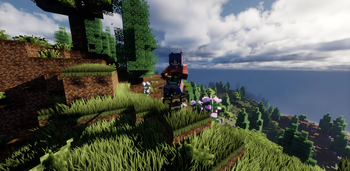
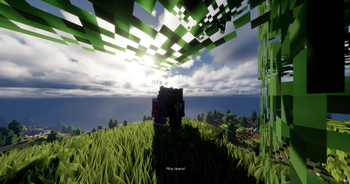
The goal is to make the companion feel like a persistent character in your world instead of a simple pet or command bot. It can follow you, stay nearby, help with tasks, respond to events, manage items, run planner goals, build a relationship over time, and be customized through in-game settings. On first join it sets itself up automatically — picking and downloading a local AI model that fits your hardware — so you can go from install to a talking companion without editing a single config file.
## Development Status
Core Companion is an early release. Some features are experimental and may change as the mod is improved.
## Local AI Hardware Warning
CoreCompanion runs an Ollama language model alongside Minecraft, so both programs must share your graphics card’s memory.
12 GB of dedicated VRAM is the minimum recommended for the normal experience, and 16 GB is preferred. Examples include the RTX 3060 12 GB, RTX 4070, RTX 5070, RX 7700 XT, RTX 4060 Ti 16 GB, RTX 5060 Ti 16 GB, and RX 7800 XT.
Graphics cards with 6–8 GB of VRAM are limited to the lightweight AI model and may struggle when using shaders, high-resolution texture packs, vision features, or demanding Minecraft settings.
Please check the exact VRAM capacity before downloading.
This requirement applies only when running the AI locally. Players using a compatible cloud AI provider do not need a local AI-capable graphics card.
## Main Features
- Spawn, remove, recall, locate, and auto-spawn your companion on login
- Persistent owner-bound companion identity
- Female and male companion setup options
- Choose a start mode per world: bond with a partner immediately, or meet unbonded village companions and earn their trust through chat and food
- Companion can be targeted by vanilla commands through its configured name or alias
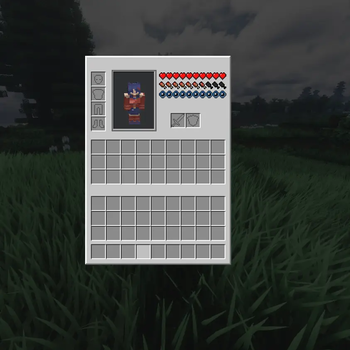
- Backpack and equipment inventory, with a companion inventory screen and a rotatable 3D companion preview
- Item holding, equipment use, item transfer, dropping, depositing, and sorting behavior
- Recovers your dropped items after death — she paths to your death spot, grabs your stuff (full NBT intact), and brings it back
- Orb of Binding and bonded/unbonded spawn-egg support
- Shoulder carry, dismount, hand-holding, player lead attach/release/pull, and paired emote state cleanup
## Setup & First Run
The first time you join, Core Companion sets itself up automatically — no config files to edit.
- Hardware-aware model pick: it checks the memory your machine can actually give an AI model — dedicated GPU VRAM, Apple-Silicon unified memory, or system RAM — reserves a few GB for Minecraft itself so nothing offloads and stutters, and downloads the best-fitting local model: lightweight (`dolphin-phi`), balanced (`dolphin3`), or largest (`dolphin-mixtral`). It tells you which one it chose for your specs, since responses get sharper on bigger models.
- Live download, then arrival: a progress bar above your hotbar tracks the one-time download, and your companion only appears once her model is downloaded and warmed up — she never spawns unable to talk.
- Clean-machine friendly: if the local AI service (Ollama) isn't installed yet, a clear in-game setup guide appears instead of a raw error — and following, mining, and building all keep working without it.
- Always adjustable: the chosen model, provider, personality, and everything else stay editable later in the in-game config screen, and a model you set yourself is always respected.
## AI And Chat
Core Companion supports normal chat responses and AI-assisted actions through the `/corecompanion` command.
- `/corecompanion ask` — chat with your companion
- Local-first and provider-flexible: runs on a local Ollama model by default, or connect any OpenAI-compatible endpoint (OpenAI, xAI/Grok, Gemini's OpenAI-compatible endpoint, LM Studio, llama.cpp server, and more)
- Zero-config local start: on first join it auto-selects and downloads a local model sized to your hardware, then warms it up before your companion arrives (see Setup & First Run)
- Provider, endpoint, API key, and model are set in the in-game config screen
- Configurable personality, history, temperature, token length, and response settings
- Internal AI action directives for Baritone actions, planner goals, and social actions
- Deterministic handlers for location, looked-at block questions/actions, hunger/eating, nearest village, sleep, "take me to base/farm," and social requests
- Multiple AI action lines can be queued and processed
## Direct Action Verbs
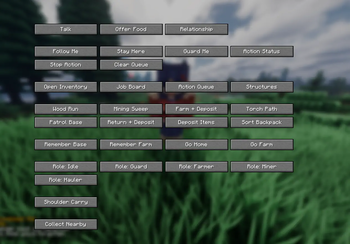
The companion supports many direct action commands and AI-triggered actions.
- Control & status: `stop`, `stay`,
📊 Mod Details
- Game
- Minecraft Mods
- Author
- capital_coin
- Version
- 2.3
- Downloads
- 1,278
- Endorsements
- 7
- Category
- fabric
- Created
- 5/31/2026
- Updated
- 8/7/2026
- Game Versions
- 1.21.11
- Tags
- mobs, social, utility
🔧 How to Install Minecraft Mods Mods
Download from Modrinth. Use Prism Launcher or drop into your mods folder.
📖 Full step-by-step install guide for Minecraft Mods →
Visit the official mod page for specific installation instructions for this mod.
🎮 Need cheat codes or console commands? Check ur gaming wiki for Minecraft Mods commands, item IDs, and more.
❓ Frequently Asked Questions
Which Minecraft Mods versions does Core Companion support?
The author lists 1.21.11. Other versions may work but are untested by the author.
What is the latest version of Core Companion?
Version 2.3, published 2026-08-07 with 1,278 downloads recorded at the source.
Keep browsing — more Minecraft Mods mods await