Copy-Item
🟡 Updated this year⚠️ Install Order · 2 steps
Install in this order, then this mod last — most mods fail to load without their framework and dependencies in place.
🖼️ Gallery (1 images)
🔍 Analysis
- 🏆 #8 of 10 management mods in this game by downloads
📋 About This Mod
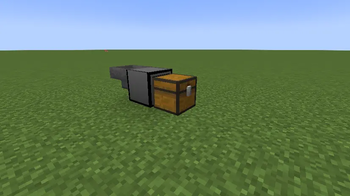
你在创造模式下,你打开背包时,多了一个物品项,名字就是:复制物品,里面包含的1个方块 它可以被合成,配方如下: !(https://cdn.modrinth.com/data/cached_images/ef2ef463c23ab70779f0f4f1c6c5940cd5d0bee4.png)! 当然,这个mod可以和沉浸式工程的材料合成,配方如下: !(https://cdn.modrinth.com/data/cached_images/736c0095d83c9ae7341a6f644edc6dd17fb64309.png) 使用方式: 这方块你只要使用漏斗让里边输入1个物品,再用红石信号激活,如果这个方块的前面有一个箱子的话,就复制输入物品的64倍(可以配置),但是输入的物品会消耗掉,如果你不想让他消耗,那么你往上面放一个铁块,这样输入的物品没消耗或已存在的情况下,只要你给他红石信号,他会一直复制,直到箱子被填满,不输入红石信号时,它就绝不会复制的。 如果你想拿出方块里已输入的物品,就可以用漏斗吸走就可以进行下一次复制。 mod配置: 这个模组可以配置复制倍数 你只要在游戏里的mod菜单里,找到配置就能改复制倍数,最大64倍,最小1倍。 不想进游戏里的mod菜单里,你确保游戏装着这个mod启动过,那么可以在"config\copyitem-common.toml"找到配置文件,里面的内容如下: ``` #The amount of items to copy when the machine is activated # Default: 64 # Range: 1 ~ 64 copyAmount = 32 ``` 你可以修改“copyAmount”来达到你的目的。 When you are in the creative mode, when you open your backpack, there is an additional item, the name is: copy the item, which contains a square. It can be synthesized with the following formula: ! (https://cdn.modrinth.com/data/cached_images/ef2ef463c23ab70779f0f4f1c6c5940cd5d0bee4.png)! (https://cdn.modrinth.com/data/cached_images/ef2ef463c23ab70779f0f4f1c6c5940cd50bee4.png) Of course, this mod can be synthesized with immersion engineering materials, and the formula is as follows: ! (https://cdn.modrinth.com/data/cached_images/736c0095d83c9ae7341a6f6444edc6dd17fb64309.png) How to use: You only need to use the funnel to input an item in this box, and then use the red stone signal to activate it. If there is a box in front of this box, it will copy 64 times of the input item (configurable), but the input item will be consumed. If you don't want him to consume it, then you put an iron block on it. If the input item is not consumed or already exists, as long as you give him the red stone signal, he will copy it until the box is filled. If you want to take out the items entered in the box, you can suck them away with a funnel and make the next copy. Mod configuration: This module can be configured with replication multiples. You just need to find the configuration in the mod menu in the game to change the copy multiple, the maximum is 64 times, and the minimum is 1 time. Don't want to enter the mod menu in the game. Make sure that the game is started with this mod, then you can find the configuration file in "config\copyitem-common.toml". The contents are as follows: ``` #The amount of items to copy when the machine is activated # Default: 64 # Range: 1 ~ 64 copyAmount = 32 ``` You can modify "copyAmount" to achieve your goal.
你在创造模式下,你打开背包时,多了一个物品项,名字就是:复制物品,里面包含的1个方块 它可以被合成,配方如下: !(https://cdn.modrinth.com/data/cached_images/ef2ef463c23ab70779f0f4f1c6c5940cd5d0bee4.png)![合成表]
当然,这个mod可以和沉浸式工程的材料合成,配方如下:

使用方式: 这方块你只要使用漏斗让里边输入1个物品,再用红石信号激活,如果这个方块的前面有一个箱子的话,就复制输入物品的64倍(可以配置),但是输入的物品会消耗掉,如果你不想让他消耗,那么你往上面放一个铁块,这样输入的物品没消耗或已存在的情况下,只要你给他红石信号,他会一直复制,直到箱子被填满,不输入红石信号时,它就绝不会复制的。 如果你想拿出方块里已输入的物品,就可以用漏斗吸走就可以进行下一次复制。
mod配置: 这个模组可以配置复制倍数 你只要在游戏里的mod菜单里,找到配置就能改复制倍数,最大64倍,最小1倍。 不想进游戏里的mod菜单里,你确保游戏装着这个mod启动过,那么可以在"config\copyitem-common.toml"找到配置文件,里面的内容如下: ``` #The amount of items to copy when the machine is activated # Default: 64 # Range: 1 ~ 64 copyAmount = 32 ``` 你可以修改“copyAmount”来达到你的目的。
When you are in the creative mode, when you open your backpack, there is an additional item, the name is: copy the item, which contains a square. It can be synthesized with the following formula: ! (https://cdn.modrinth.com/data/cached_images/ef2ef463c23ab70779f0f4f1c6c5940cd5d0bee4.png)! (https://cdn.modrinth.com/data/cached_images/ef2ef463c23ab70779f0f4f1c6c5940cd50bee4.png)
Of course, this mod can be synthesized with immersion engineering materials, and the formula is as follows: ! (https://cdn.modrinth.com/data/cached_images/736c0095d83c9ae7341a6f6444edc6dd17fb64309.png)
How to use: You only need to use the funnel to input an item in this box, and then use the red stone signal to activate it. If there is a box in front of this box, it will copy 64 times of the input item (configurable), but the input item will be consumed. If you don't want him to consume it, then you put an iron block on it. If the input item is not consumed or already exists, as long as you give him the red stone signal, he will copy it until the box is filled. If you want to take out the items entered in the box, you can suck them away with a funnel and make the next copy.
Mod configuration: This module can be configured with replication multiples. You just need to find the configuration in the mod menu in the game to change the copy multiple, the maximum is 64 times, and the minimum is 1 time. Don't want to enter the mod menu in the game. Make sure that the game is started with this mod, then you can find the configuration file in "config\copyitem-common.toml". The contents are as follows: ``` #The amount of items to copy when the machine is activated # Default: 64 # Range: 1 ~ 64 copyAmount = 32 ``` You can modify "copyAmount" to achieve your goal.
📊 Mod Details
- Game
- Minecraft Mods
- Author
- mcjava20
- Version
- 1.0.0
- Downloads
- 397
- Endorsements
- 0
- Category
- management
- Created
- 2/5/2026
- Updated
- 2/3/2026
- Game Versions
- 1.21.1
- Tags
- management, storage, utility
🔧 How to Install Minecraft Mods Mods
Download from Modrinth. Use Prism Launcher or drop into your mods folder.
📖 Full step-by-step install guide for Minecraft Mods →
Visit the official mod page for specific installation instructions for this mod.
🎮 Need cheat codes or console commands? Check ur gaming wiki for Minecraft Mods commands, item IDs, and more.
❓ Frequently Asked Questions
Which Minecraft Mods versions does Copy-Item support?
The author lists 1.21.1. Other versions may work but are untested by the author.
What is the latest version of Copy-Item?
Version 1.0.0, published 2026-02-03 with 397 downloads recorded at the source.
Keep browsing — more Minecraft Mods mods await