CopperHopper (Regulator Fork)
🟡 Updated this year⚠️ Install Order · 2 steps
Install in this order, then this mod last — most mods fail to load without their framework and dependencies in place.
🖼️ Gallery (2 images)
🔍 Analysis
- 🏆 #511 of 876 fabric mods in this game by downloads
📋 About This Mod
*** # 🟠 Copper Hopper (Regulator Fork) **A fork of (https://modrinth.com/mod/copper-hopper) that adds "Keep Last Item" functionality!** 📦 **Original Mod:** (https://modrinth.com/mod/copper-hopper) 🔧 **Fork Maintainer:** @AlpineOpponent --- ## 🧐 Why this fork? The original Copper Hopper is amazing for filtering items, but it has one flaw for automation: **It drains the chest above completely.** If you are using **Copper Golems**, **Item Frames**, or **Visual Sorting Systems**, you often need to keep at least **one "bait" item** in the source chest so your system remembers what belongs there. This fork solves that problem by turning the Copper Hopper into a smart **Regulator**. 🧠 --- ## ✨ New Features ### 🛑 The "Stock Keeper" Buttons Inside the Copper Hopper GUI, you will now see small toggle buttons next to each of the 5 filter slots. These buttons control how the hopper pulls items from the **container directly above it** (Chest, Barrel, etc.). | Icon | Mode | Description | | :---: | :--- | :--- | | ⬇️ | **Drain All (Default)** | Standard behavior. The hopper will pull *every* matching item from the chest above until it is empty. | | 🛑 | **Keep Last Item** | The hopper will pull matching items but **STOP** when there is exactly **1 item left** in the chest above. | --- ## 🛠️ How to Use 1. Place a **Copper Hopper** underneath a Chest or Barrel. 2. Open the Hopper GUI. 3. Place your filter item (e.g., Raw Iron) in a slot. 4. **Click the small button** next to that slot to toggle it to **🛑 (Keep Last)**. 5. Watch as the hopper drains your excess iron but leaves the last one behind for your Golems! 🤖 --- ## 💡 Perfect For... * 🤖 **Copper Golem Sorting:** Keep one item in the chest so the Golem always knows the chest is "assigned." * 🔥 **Furnace Arrays:** Prevent your input buffers from running completely dry. * 🖼️ **Item Frame Systems:** Keep your storage organized without manual refilling. --- ## ⚖️ License & Credits * Original code and concept by **pcal43**. * Forked and modified by **AlpineOpponent**. (and Google Antigravity hehe) * Licensed under the (LICENSE) . Check out the original project to support the creator! 👇 https://modrinth.com/mod/copper-hopper
# 🟠 Copper Hopper (Regulator Fork)
A fork of (https://modrinth.com/mod/copper-hopper) that adds "Keep Last Item" functionality!
📦 Original Mod: (https://modrinth.com/mod/copper-hopper) 🔧 Fork Maintainer: @AlpineOpponent
## 🧐 Why this fork?
The original Copper Hopper is amazing for filtering items, but it has one flaw for automation: It drains the chest above completely.
If you are using Copper Golems, Item Frames, or Visual Sorting Systems, you often need to keep at least one "bait" item in the source chest so your system remembers what belongs there.
This fork solves that problem by turning the Copper Hopper into a smart Regulator. 🧠
## ✨ New Features
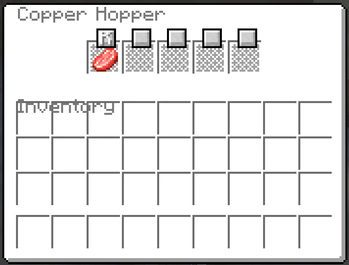
### 🛑 The "Stock Keeper" Buttons Inside the Copper Hopper GUI, you will now see small toggle buttons next to each of the 5 filter slots.
These buttons control how the hopper pulls items from the container directly above it (Chest, Barrel, etc.).
| Icon | Mode | Description | | :---: | :--- | :--- | | ⬇️ | Drain All (Default) | Standard behavior. The hopper will pull every matching item from the chest above until it is empty. | | 🛑 | Keep Last Item | The hopper will pull matching items but STOP when there is exactly 1 item left in the chest above. |
## 🛠️ How to Use
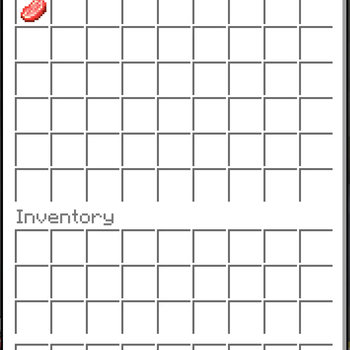
1. Place a Copper Hopper underneath a Chest or Barrel. 2. Open the Hopper GUI. 3. Place your filter item (e.g., Raw Iron) in a slot. 4. Click the small button next to that slot to toggle it to 🛑 (Keep Last). 5. Watch as the hopper drains your excess iron but leaves the last one behind for your Golems! 🤖
## 💡 Perfect For...
🤖 Copper Golem Sorting: Keep one item in the chest so the Golem always knows the chest is "assigned." 🔥 Furnace Arrays: Prevent your input buffers from running completely dry. 🖼️ Item Frame Systems: Keep your storage organized without manual refilling.
## ⚖️ License & Credits
Original code and concept by pcal43. Forked and modified by AlpineOpponent. (and Google Antigravity hehe) * Licensed under the (LICENSE) .
Check out the original project to support the creator! 👇 https://modrinth.com/mod/copper-hopper
📊 Mod Details
- Game
- Minecraft Mods
- Author
- AlpineOpponent
- Version
- 0.19.1+1.21.10-prerelease
- Downloads
- 331
- Endorsements
- 2
- Category
- fabric
- Created
- 1/6/2026
- Updated
- 12/22/2025
- Game Versions
- 1.21.2, 1.21.3, 1.21.4, 1.21.5, 1.21.6
- Tags
- storage, transportation
🔧 How to Install Minecraft Mods Mods
Download from Modrinth. Use Prism Launcher or drop into your mods folder.
📖 Full step-by-step install guide for Minecraft Mods →
Visit the official mod page for specific installation instructions for this mod.
🎮 Need cheat codes or console commands? Check ur gaming wiki for Minecraft Mods commands, item IDs, and more.
❓ Frequently Asked Questions
Which Minecraft Mods versions does CopperHopper (Regulator Fork) support?
The author lists 1.21.2, 1.21.3, 1.21.4, 1.21.5, 1.21.6, 1.21.7. Other versions may work but are untested by the author.
What is the latest version of CopperHopper (Regulator Fork)?
Version 0.19.1+1.21.10-prerelease, published 2025-12-22 with 331 downloads recorded at the source.
Keep browsing — more Minecraft Mods mods await